
CSL Plasma review
 Analysis by Appsdrops
When I’m planning a plasma donation, the useful part of a phone app is not simply having information on a screen; it’s being able to check the details I need while I’m organizing the visit. CSL Plasma Donor App is built around that practical role. It is a free medical app from CSL PLASMA INC., intended for people using CSL Plasma’s donation service. I see it as a companion to the donation process, rather than a general health tracker or a replacement for speaking with the donation center.
That distinction matters when considering its connectivity. Mobile access can make planning easier, but an app used alongside real-world appointments and visits is only helpful when its information is available at the moment you need it. My overall impression is that this app makes most sense for donors who are comfortable using their phone as part of their routine and who can check important details before they leave home.
Planning around a connection
The app’s central appeal is convenience: it aims to help donors manage time, rewards, and the practical steps around giving plasma. Those tasks often happen in short bursts—checking something before heading out, reviewing the app while making plans, or looking at it after a visit. A reliable internet connection is therefore part of the experience whenever the app needs to retrieve current account or service information.
I would avoid treating the app as a substitute for preparation. If I were arranging a donation around work, errands, or a ride from someone else, I’d check the relevant information before setting off rather than wait until I was already at the center. That simple habit reduces the chance of relying on a screen that may be slow to load when mobile coverage is weak. It is especially useful when a visit is time-sensitive or when I have a tight schedule afterward.
Connectivity also affects how much confidence I place in a screen I opened earlier. Information tied to an account or a current service can change, so I would refresh it when I have a good signal instead of assuming an old view will always be current. This is a sensible approach for any service app, but it matters more when the next step involves travel or an in-person visit.
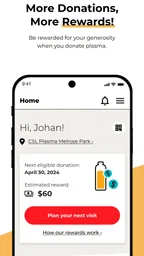
The app’s store summary centers on saving time and receiving rewards while supporting plasma donation. I read that as a useful combination of personal convenience and a broader purpose, not as a guarantee that every part of a visit can be handled from a phone. The donation itself remains an in-person process. The app is most valuable in the surrounding coordination: keeping the service in reach and making it easier to fit into everyday life.
Making the phone useful before and after a visit
A realistic routine might look like this: I check the app the evening before a planned visit, make sure I understand what I need to do next, and then revisit it before leaving if the plan has changed. Afterward, I can use the app as a reference point for the service-related details available to me. The practical insight is to separate planning from last-minute dependence. A few minutes of checking at home, on a stable connection, can be more useful than trying to solve every question from a parking lot.
That workflow is also helpful for people who donate around shift work or family responsibilities. A person fitting a visit between school pickup and an evening shift has less room for delays than someone with an open day. In that situation, the app’s value comes from reducing uncertainty before the trip, not from assuming the phone will rescue a plan after something goes wrong. I’d still leave enough flexibility for the in-person process.
For a new donor, I’d use the app as a starting point for getting familiar with CSL Plasma’s service, then confirm any important personal or visit-specific questions directly with the center. A service app can help keep information organized, but it should not be mistaken for individual medical guidance. If I had a concern about whether I could donate, I would ask the appropriate staff rather than rely on a general screen or an outdated note.
What it feels like in different mobile settings
The app is aimed at people who may use it in several settings: at home while planning, on the way to a center, or while handling the practical details of a visit. Those situations do not offer the same network quality. At home, a connection is usually easier to rely on; in transit or inside a building, signal strength can vary. I’d therefore open anything important before travelling and allow time for pages or account details to load.
For someone who routinely has poor mobile coverage, the app may be less dependable as a just-in-time tool. That doesn’t make it useless, but it does change how I’d use it: prepare while connected, avoid depending on an untested screen during a visit, and keep essential plans somewhere accessible in another way if needed. The trade-off is convenience in exchange for a degree of reliance on a working connection.
On a shared or borrowed phone, I would be cautious about leaving a personal service app open. I’d finish checking what I need, close the app, and avoid letting someone else handle account-related screens. That is a practical privacy habit rather than a claim about any particular security feature. It matters because donation-related services can involve personal information, and a phone is often used in public or around other people.
There is also a useful distinction between using the app as a planning aid and using it as the only record of a plan. If I have a set time to leave or a ride arranged, I would keep those arrangements in my usual calendar or messages too. That way, a temporary connection problem in one app does not erase the broader plan. This is not duplicating everything; it is protecting the parts of the day that matter independently of the app.
When a screen stalls or a plan changes
Connection trouble is frustrating when it arrives at the point of action. If a page does not load, I would first check whether the phone has a usable connection, then try again somewhere with better reception. If it still does not work, I would avoid repeatedly tapping through screens without knowing whether the information has updated. For a visit-critical question, contacting the donation center through a method I already have is more sensible than guessing.
That is the main recovery advice I can give without overstating what the app does: keep a backup route for important questions. Before heading out, save or note the details you need in a way that does not depend on reopening the app at the last minute. If plans change while travelling, pause and confirm the next step rather than assuming that a previously viewed screen reflects the new situation.
Users should also distinguish an app problem from a service or account issue. A slow connection, a temporary loading failure, or a sign-in difficulty can look similar from the user’s side, but the right next step may differ. I would try once more on a stable connection, then seek help through CSL Plasma’s usual support channels if access remains a problem. It is better to do that before a planned visit than to arrive with an unresolved question.
This approach may sound cautious, but it fits the app’s purpose. A donor app helps organize a real-world service; it does not remove the need to adapt when a phone or network misbehaves. People who expect every task to work instantly in every location may find that limitation irritating. People who use it as one part of a broader routine are less likely to be caught out.
Using it thoughtfully with personal information
Because this is a medical-category app connected to plasma donation, I would use it with the same care I bring to other personal service accounts. I would unlock my phone before opening it, avoid displaying account screens unnecessarily in public, and sign out or secure the device if someone else might use it. These are ordinary precautions, but they make particular sense when an app is tied to a health-related activity.
For data-conscious users, the practical question is not only what the app can do but when it needs to communicate. I would open it when I have a clear purpose—checking a visit-related detail or handling an app task—rather than leave it running as a constant background habit. I would also review the phone’s privacy and app settings in the usual way. That gives me control over the broader device experience without assuming anything about the app’s specific data practices.
Someone using a limited mobile plan may prefer to do their checks on Wi-Fi before leaving. That is a simple way to avoid depending on mobile data for routine planning. If the app needs a connection at a particular moment, the user should account for that instead of assuming it will work without one. For people with plenty of data and steady coverage, this consideration is less significant; for people with a tight plan, it is worth building into the routine.
Who will get the most from it
I think the app is best suited to existing or prospective CSL Plasma donors who want a phone-based way to stay engaged with the service and who already manage everyday plans digitally. It may be especially handy for someone who visits regularly and wants to make the surrounding logistics feel less scattered. The app is free, has an Everyone age rating, and its audience is broad, though the actual purpose is clearly most relevant to people considering or making plasma donations.
Its standing suggests that many people have tried it: it has an average rating of 4.0 from around 11,000 ratings, with roughly 3,600 written reviews and over one million installs. I treat those figures as context, not proof that the app will suit every donor. A rating can’t tell me whether its particular workflow fits my habits, whether my connection is dependable, or whether I need more direct assistance than an app can provide.
The release date is July 22, 2020, and the current version is 4.5.1, with Android 7.0 as the minimum operating system. That makes it relevant to people checking compatibility on an older Android phone, although I’d still confirm the app is available for my device in the app store before planning around it. The developer is CSL PLASMA INC., which makes the app a service-specific choice rather than a universal donation organizer.
If you donate through a different provider, this is not a general-purpose alternative for managing that relationship. A provider’s own app or direct contact with its center is more appropriate. Likewise, someone seeking a comprehensive medical record, diagnostic advice, or a way to avoid in-person donation steps should look elsewhere. The app’s strength is its connection to CSL Plasma’s donor experience, and that focus is also its boundary.
My connectivity verdict
Compared with paper notes, calendar reminders, or calling a center for every routine check, CSL Plasma Donor App offers a more direct mobile companion for people already using CSL Plasma. The usual alternatives still have a place: a calendar is better for general scheduling, a phone call is better for a specific question that needs a human answer, and a paper note can be useful when a device is unavailable. I would not force one tool to replace all the others.
The app is most convincing when I can use it deliberately: check what I need on a dependable connection, plan the visit, and keep a backup for anything time-sensitive. Its connectivity dependence is a real consideration, especially for people who travel through weak-signal areas or prefer to do everything at the last moment. It is not the right choice for someone who wants a provider-neutral donation tool or expects the app alone to resolve medical and service questions.
Overall, I’d recommend it to CSL Plasma donors who are comfortable handling some of their donation routine on a phone. It can make the service easier to keep in mind and may reduce small planning hassles, provided I don’t assume every screen will be available wherever I happen to be. Used with sensible preparation and a backup plan for important questions, it feels like a practical companion—not a replacement for the center, a personal medical conversation, or good judgment.
What we like
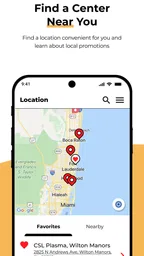
- The app helps locate nearby CSL Plasma donation centers.
- Appointment scheduling is available through the app.
- Donors can review payment card balances and transaction history.
- Donation-related alerts can help keep users informed.
- The interface gives donors convenient access to account details.
What could be better
- Some features may require a CSL Plasma donor account.
- Center hours and appointment availability can vary by location.
- Payment card details may take time to reflect recent activity.
- App features may differ depending on your region.
- Technical issues could make account information temporarily unavailable.





