Compass360: Smart Compass tool review
 Analysis by Appsdrops
I look at a compass app differently from a full weather service: it needs to answer a simple question quickly, then stay out of the way. Compass360: Smart Compass tool pairs a magnetic compass with weather information and alerts, which makes it most appealing when I want orientation and a quick sense of conditions in one place. The combination is convenient, but it also means the app is not automatically a substitute for a dedicated navigation tool or a detailed forecast service.
Quick orientation, with weather close at hand
As a weather app with compass functionality, Compass360 has a focused idea: help me check direction and weather without moving between separate tools. That can be useful before a walk, when choosing which way to head through an unfamiliar area, or when I am about to leave and want to consider conditions as well as orientation. Its concise identity is reflected in the name Compass360, but the practical appeal is the pairing rather than the label.
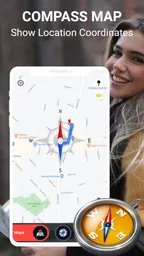
I would treat the compass as a quick reference, not as a replacement for a map. A compass can tell me which direction I am facing; it does not, by itself, explain where a road goes, how to reach an address, or whether a route is safe. The weather side adds useful context to that glance, while a map or specialist forecast app remains the better choice for planning a journey in detail.
Speed matters for this kind of tool because people usually open it for a quick check. I would expect the basic interaction to feel most useful when I can orient myself and review weather information without working through a complicated planning process. Still, perceived speed depends on the phone, signal and conditions around the compass sensor. I would not assume that every reading or weather update appears instantly in every situation.
Where the combined approach helps
A realistic use is a short outing in a place I do not know well. I can check which way I am facing, consider the weather before setting off, and then use a map if I need turn-by-turn guidance. Keeping those checks together can save a little friction, especially when I only need a quick decision rather than a full forecast breakdown.
There is a useful distinction between convenience and completeness here. Compass360’s combination may be enough for deciding whether to take a brief walk or which direction to explore, but a dedicated weather service is usually a stronger option when I need detailed hourly planning or a broader set of forecast tools. Likewise, hikers or travelers who depend on route recording and map navigation should keep a dedicated navigation app in their toolkit.
When a quick check becomes a heavier session
The app’s appeal is clearest in brief visits. If I keep returning to it while planning a longer outing, I would want to judge whether the weather information answers the questions I actually have, rather than assume that a compass-and-weather pairing covers every planning need. For a longer walk, I would check the forecast first, use a map to understand the route, and use the compass as a supporting orientation cue.
One practical tip is to avoid making a route decision from a single compass glance. I would first orient myself, then compare that direction with visible landmarks or a map. If the reading seems inconsistent, pausing and checking again is more sensible than continuing on the strength of one uncertain indication. That habit is valuable with any magnetic compass app, since nearby metal objects or electronic equipment can affect magnetic readings.
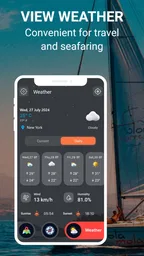
Weather alerts are useful as prompts to pay attention, not as a guarantee that conditions will remain predictable. Before an activity where weather could create a safety concern, I would check the latest forecast and use my judgment on the ground. An alert can help draw attention to changing conditions, while a dedicated forecast source may be preferable when timing and detail matter.
Reliability means checking the reading in context
My view of a compass app’s reliability is tied to how carefully I use it. Phone compasses rely on device sensors, so a reading that looks unusual deserves a second look. I would move away from objects that could interfere, hold the phone steadily, and compare the direction with a known landmark or map. That is not a special workaround for this app; it is a sensible check for any phone-based magnetic compass.
For weather information, reliability also depends on having a useful connection and on checking the information at the right time. I would not treat a previously viewed screen as proof that conditions have not changed. If I am making a decision about leaving, I would refresh or revisit the current information rather than rely on memory from an earlier check.
The app’s average rating is 3.6 from around 1,100 ratings, with 44 written reviews. I read that as a mixed reception rather than a reason to dismiss it outright: the concept may suit people who want a simple combined tool, while expectations for polished forecasting or navigation may be harder to meet. It has passed over one million installs, so it has attracted a substantial audience, but popularity alone does not tell me whether it fits my own needs.
Device fit and practical constraints
Compass360 is free, developed by Avn Global Application, and its current version is 1.2.5. It is rated for Everyone and requires Android 7.0 or later. Those details make it accessible to a broad range of Android users, though a compatible operating system does not guarantee that every phone has the same sensor behavior or delivers the same experience.
I would pay particular attention to the phone itself if compass accuracy is important. A device with a compass sensor can provide magnetic direction, but how steady the result feels can vary with the handset and its surroundings. If the app is intended only for casual orientation, that may be a reasonable trade-off. If I need dependable navigation in unfamiliar terrain, I would choose a purpose-built navigation setup and treat the phone compass as a backup or quick reference.
On performance, I would keep expectations modest and practical. Compass360 is designed around quick checks, so I would not judge it by how many tools it offers during a prolonged session. I also would not infer battery use or memory demands from its feature description alone. For anyone concerned about resource use, the sensible test is to try it during ordinary use on their own phone and notice whether it behaves comfortably alongside the apps they already rely on.
Who should choose it—and who should look elsewhere
I would recommend Compass360 to someone who wants a handy compass and weather information together, especially for casual outdoor plans, short walks, or quick orientation checks. It may also suit a person who prefers opening one focused app rather than switching between a compass utility and a weather app for simple decisions.
I would skip it as my main tool if I needed detailed weather planning, comprehensive maps, or navigation features designed for long trips. In those cases, a dedicated forecast app and a trusted mapping or navigation app are better fits. Compass360’s strength is the convenience of combining two kinds of quick reference, not replacing every specialist tool.
Released on May 1, 2024, it has a straightforward proposition, but the right way to judge it is through the tasks I expect it to handle. I would test whether its compass readings make sense on my device and whether the weather information is useful for my routine before relying on it more heavily. That small trial gives a clearer answer than expecting the app to serve as a complete outdoor planning system.
My performance verdict
Compass360 is best understood as a lightweight, convenient companion for quick direction and weather checks, not a complete navigation or forecasting suite. I like the practicality of bringing those checks together, and I can see it fitting naturally into a short outing or an everyday decision about heading outside. The trade-off is that sensor readings need sensible context, and people with more demanding route or forecast needs will still benefit from specialist apps.
For casual use, I would give it a try if I wanted a compass and weather information in the same place. For trips where getting the forecast or route right is important, I would use it alongside dedicated tools rather than depend on it alone. That is the clearest way to get value from its focused design while keeping expectations realistic.
What we like
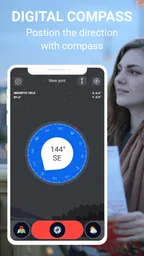
- Shows heading in degrees for precise navigation.
- Offers a clean interface that is easy to read outdoors.
- Can help identify magnetic north without mobile data.
- Useful for checking direction during hikes or city walks.
- Small app size makes it a light addition to your phone.
What could be better
- Compass accuracy depends on your phone's magnetic sensor.
- Nearby metal objects can interfere with direction readings.
- May require calibration before giving reliable results.
- Phone cases with magnets can affect the compass.
- Some features may vary across devices and app versions.





