
City Weather: Weather Forecast review
 Analysis by Appsdrops
Weather apps are most useful when they help me make a small decision quickly: whether to take a jacket, shift a walk, or check the forecast before leaving town. City Weather: Weather Forecast is a straightforward weather app from SUNCAP COMPAGNY, aimed at those everyday checks and at planning around a destination. I would approach it as a practical companion, not as a specialist forecasting tool that replaces every other source.
A simple baseline for daily checks
The best way to use a city-focused weather app is to make one location the starting point for the day. I check the weather before getting dressed, then return to it if the plan changes. That rhythm is more useful than opening an app repeatedly without a question in mind: “Do I need another layer?” and “Is this a good time to go out?” are decisions a forecast can help frame.
The app’s short store description is “City Weather,” and its broader purpose is clear from the way it is presented: checking conditions for daily life and travel planning. That city-first angle suits people whose routines revolve around a home city, workplace, campus, or a place they visit regularly. It is less compelling for someone who wants a deep meteorological workspace or highly specialized outdoor guidance.
For a realistic weekday use case, I would check the forecast before commuting, then look again before an evening walk if the timing has changed. The important habit is to connect a forecast check to a decision rather than treating it as a promise. Weather can shift, and a general city view may not reflect every street or neighborhood equally.
When planning a trip, I would check the destination before packing and revisit it nearer to departure. A forecast several days ahead is best treated as a planning signal, not a fixed itinerary. If conditions appear uncertain, I would pack for a range of possibilities rather than making a tight plan around one forecast snapshot.
Build a repeatable routine around places
One useful way to get more from any city weather app is to keep a short mental sequence: check the place, check the relevant part of the day, then decide what to bring or when to leave. This avoids the common trap of seeing a single condition and assuming it describes the whole day. For a trip, the same sequence works with the destination instead of home.
I would also avoid comparing readings from several locations as if they were interchangeable. A city-level forecast is a broad guide. If your plans depend on a precise local condition—such as a long outdoor event or a difficult drive—use a source designed for that level of decision-making as well. City Weather can be the quick first check, while a more detailed forecast can provide a second opinion when the stakes are higher.
Check the setup before relying on it
Settings matter because a weather app is only useful when the place and display suit the way you make decisions. I would first confirm that the city being checked is the one I actually care about. This sounds basic, but it is easy to glance at a forecast for home while mentally planning for a different destination.
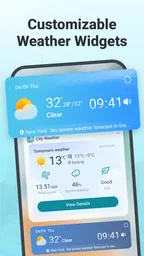
Next, I would look through the available settings and choose a display that is easy to scan. I would not assume that a particular unit, alert, widget, or customization exists; instead, I would use only the options the installed version actually presents. The practical goal is to make the information readable at a glance, not to spend time tuning every control.
There is also a useful trade-off between convenience and attention. If the app offers notifications, I would enable only the ones that genuinely change what I do. Too many weather prompts can become background noise, while a carefully chosen alert can help when conditions are likely to affect a planned outing. If alerts are not part of the available setup, a deliberate check before leaving is a simple substitute.
For travel, I would make destination checks part of packing rather than relying on a last-minute glance at the door. That gives me time to add a layer or reconsider footwear. I would still check again near departure, because forecasts are more useful when refreshed closer to the activity they are meant to guide.
Faster habits that keep checks useful
A shortcut does not have to be a special feature. I get speed from asking the same small set of questions each time: where am I checking, when will I be outside, and what decision depends on the answer? That method prevents a quick forecast check from turning into aimless scrolling, and it works whether I am at home or preparing for a trip.
Another helpful pattern is to separate planning from immediate action. For packing, I look ahead and think in terms of flexibility. For leaving now, I care about what is happening around the time I go. Treating those as different tasks helps avoid overreacting to a forecast that is relevant later but not yet.
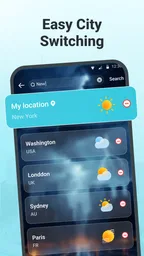
If I have several places to consider, I would check them in a consistent order: home first, then the destination, then any other location that affects the plan. This is a small workflow improvement, but it reduces the chance of mixing up which forecast belongs to which decision. It also makes it easier to notice when the trip location calls for a different plan than home does.
City Weather is free, has an Everyone content rating, and has reached more than fifty thousand installs. Its average rating is 3.9 from roughly 250 ratings. Those figures suggest that it has found an audience, but they do not tell me whether its particular presentation will suit your habits. I would judge that after a few days of checking the same city and seeing whether the app makes routine decisions easier.
Where a city forecast reaches its limits
The city focus is both the app’s practical strength and the boundary to keep in mind. A broad forecast is convenient for everyday planning, but it should not be mistaken for a precise reading of conditions at a specific address. If a small local change could affect safety or timing, I would compare with a more specialized source rather than trusting one city-level view alone.
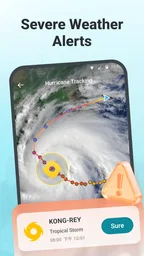
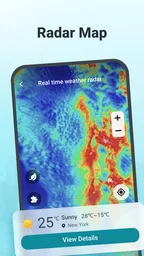
I would also skip this app if my main need were advanced analysis. People who plan around detailed radar, severe-weather tracking, or niche activities may prefer a service built explicitly around those tools. That is not a criticism of a simple city weather app; it is a mismatch between the job and the tool. For choosing clothes or checking a destination before a casual weekend away, a lighter approach can be more pleasant.
Version 1.8.0.0 is the current release, and the app requires Android 9 or later. Before installing, I would check that the device meets that requirement. The version number is useful context, but I would not treat it as proof that every feature or forecast will behave identically on every device. If something feels confusing, I would first check the app’s current settings and confirm the selected city.
Its average rating is respectable rather than overwhelming, so I would approach it with measured expectations. A rating can help set context, but weather usefulness depends heavily on location, personal habits, and how much detail someone wants. The best test is whether the app answers your everyday questions without making you work harder than necessary.
Who will enjoy it, and who should look elsewhere
I can see this app working well for someone who wants a simple weather check attached to a city and occasionally needs to think ahead for a journey. It may also suit a person who prefers a light routine: check before leaving, check again when plans change, and use a broader forecasting service only for decisions that need more detail.
On the other hand, I would choose another option if I needed highly localized information, extensive technical charts, or a dedicated severe-weather workflow. I would also look elsewhere if I wanted the weather app itself to provide a full travel-planning system. A forecast can inform a trip, but it is not a substitute for checking transport, opening times, or other practical details.
My main recommendation is to use City Weather as a quick decision aid, not as an unquestioned authority. Keep the right city in view, check at the moment that matters, and use a second source when the plan is sensitive to local conditions. That approach gets more value from a city weather app while respecting what a broad forecast can and cannot tell you.
City Weather: Weather Forecast was released on April 28, 2026, by SUNCAP COMPAGNY. For a free weather app with a general-audience rating, that makes it an accessible option to try if its city-centered approach matches your routine. I would keep it if it helps me make ordinary plans faster; if I find myself needing to verify every detail elsewhere, I would move to a more specialized forecast service.
What we like
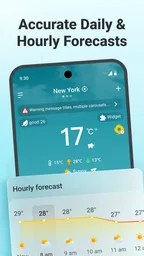
- Provides a clear overview of current conditions and upcoming forecasts.
- Useful for checking weather before planning outdoor activities.
- Weather information is organized for quick browsing.
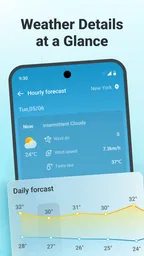
- Forecast details can help with day-to-day planning.
- A focused weather app is easy to understand for new users.
What could be better
- Forecast accuracy can vary by location and provider.
- Some areas may have less detailed weather information.
- Weather updates depend on a reliable internet connection.
- Frequent forecast changes may make planning less certain.
- The app may request location access for local forecasts.





