


Buddy.ai: Kids Learning Games review
 Analysis by Appsdrops
When I’m choosing an early-learning app for a young child, I care less about how many activities it advertises and more about whether a child can start without turning the session into a parent-led lesson. Buddy.ai: Kids Learning Games is aimed at children from preschool through the early school years, with learning activities spanning speech, STEM, letters, and art. That broad mix makes it worth considering for families who want one playful starting point, though it is not a substitute for every kind of teaching or practice.
What to consider before handing it to a child
Buddy.ai is an education app from AI Buddy Inc. Its intended audience is children aged 3 to 8, and its content rating is Everyone. The app is free to download, while in-app purchases range from $3.99 to $119.99 per item. That wide range is a reason to check the purchase options with an adult before a child explores independently; “free” does not mean every part of the experience is necessarily included at no cost.
The age range matters when setting expectations. A preschooler may need short, low-pressure encounters with letters and spoken language, while a child approaching first grade may be ready for more deliberate practice. One app spanning those stages can be convenient, but children develop at different rates. I would judge whether an activity suits a particular child by watching their response, not by assuming the age range guarantees a perfect fit.
There is a useful distinction between learning with an app and learning through conversation with a person. Buddy.ai can make it easier to begin a brief activity when a parent is busy, but I would treat it as a supplement rather than a replacement for reading together, answering a child’s questions, or practicing new ideas in everyday life. The strongest use is often a small, focused session followed by a real-world connection.
Its reception suggests many families have tried it: it has a 4.6 average from around 713,000 ratings, with roughly 2,200 written reviews and over 50 million installs. Those figures are reassuring as signs of broad use, not proof that every child will enjoy it or that its teaching style matches every household. I would still start with a supervised trial and see whether the child stays engaged without becoming frustrated.
Why its mix of subjects is useful
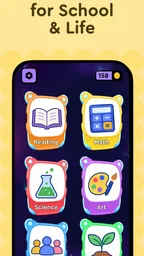
The app’s range is its clearest practical advantage. Speech, STEM, ABC learning, and art can appeal to children who do not respond to the same kind of activity every day. If a child is tired of tracing letters, a different subject may offer a change of pace without requiring a parent to find another app. That variety is most helpful when it supports curiosity rather than encouraging a child to jump from one activity to another without finishing anything.
For families, this can simplify the choice between separate early-learning apps. A dedicated alphabet app may offer a narrower experience, while a drawing app may be better for open-ended creative play. Buddy.ai’s broader educational focus is a reasonable middle ground if the goal is to introduce several kinds of learning in one place. It is less compelling if a child already has a favorite, well-suited tool for each subject and uses those tools consistently.
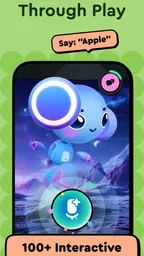
Speech-oriented learning can be particularly useful when a child is willing to participate but reluctant to repeat words for an adult. A playful prompt may make practice feel less like correction. I would keep the mood light: if a child is shy, tired, or not in the mood to speak, forcing a response can turn a useful activity into a struggle. In that moment, shared reading or a quiet art activity may be a better choice.
A realistic routine that makes the app more useful
One practical scenario is the stretch before dinner, when a parent needs a few minutes to prepare food and a child wants something more engaging than passive video. I would open the app with a clear plan: choose one activity together, let the child try it, then ask them to show or explain one thing afterward. That small follow-up turns screen time into a conversation and helps a parent notice whether the child understood, guessed, or simply tapped through.
Another useful approach is to tie a short session to something happening offline. If the activity involves letters, a parent can look for that letter on a cereal box or in a picture book afterward. If the child explores art, they can make a drawing with household materials. These connections are not special app functions; they are simple ways I would help a child carry an idea beyond the screen.
I also recommend keeping the child’s first sessions supervised, especially around purchases and navigation. A young learner may not understand the difference between an activity and an offer to buy something. An adult can make sure the app is being used as intended and help choose an activity that is neither too easy nor too difficult. Once a child understands the routine, a parent can decide how much independent use feels appropriate for their family.
Where alternatives may be a better fit
If your priority is deep practice in one subject, a focused alternative may be easier to evaluate. A dedicated phonics or handwriting tool, for example, can suit a family seeking repeated work on a specific skill. A physical workbook offers a different kind of practice, with pencil control and a clear paper trail of what a child has done. Neither option is automatically better; the right choice depends on whether the child needs variety, focused repetition, or a break from screens.
For creative play, a blank sketchpad and art supplies may be preferable to any guided digital activity. They give a child room to make their own choices without prompts. Likewise, a parent-led game with blocks, household objects, or picture books can be a better match when the goal is movement, tactile exploration, or conversation. Buddy.ai is best considered one tool in a broader routine, not the default answer to every learning moment.
It may also be the wrong choice for a child who becomes overstimulated by digital activities, resists speaking to an app, or needs close support with every instruction. In those cases, a calm activity with an adult may produce less friction. I would not keep pushing the app simply because it covers several subjects; a child’s willingness to return and engage matters more than the breadth of its menu.
What switching in or out really involves
Trying Buddy.ai does not require replacing a family’s existing learning routine. I would introduce it as an optional activity, then notice whether it complements what the child already enjoys. If the child is drawn to one subject, use that interest to guide a short follow-up away from the screen. If they repeatedly avoid the app, there is little reason to make it a daily habit.
Switching from a single-purpose learning app may mean giving up a narrower, more predictable routine in exchange for a wider selection of subjects. The reverse switch can make sense if a child wants more repetition in one area or finds multiple choices distracting. There is no need to treat either decision as permanent: families can adjust based on attention, confidence, and how much adult involvement the child needs.
Before relying on it as a regular activity, I would also check that the device meets the minimum operating-system requirement: version 8.0. The current version is 6.33.0. Those details are useful when deciding whether an older device is suitable, but the more important test is still practical: can the child use the app comfortably, and can the adult keep the experience within the family’s budget and screen-time expectations?
My recommendation for the right family
Buddy.ai is a sensible option for parents who want a child-friendly introduction to several early-learning areas in one app and are prepared to guide the first sessions. Its broad subject mix, age focus, and large user base make it easy to understand why families consider it. I especially like the idea of using it in short bursts, with an adult nearby and a real-world activity afterward.
I would be more cautious if you need a fully focused curriculum, a screen-free activity, or a tool that a child can use without any adult attention. The free download makes it accessible to try, but the in-app purchase range means a parent should review spending choices rather than assume every feature is included. My advice is to test whether your child enjoys the interaction, set clear limits, and keep other forms of play and learning in the mix.
Overall, I’d recommend Buddy.ai as a flexible starting point for curious young learners, not as a complete teaching plan. It is most likely to suit families who value variety and can turn digital activities into conversation and practice offline. If your child thrives on one subject, prefers hands-on learning, or finds app-based prompts frustrating, a more focused or screen-free alternative may be the better fit.
What we like
- Speech recognition lets children answer aloud instead of relying only on taps.
- Short activities make it easy to fit practice into a busy day.
- Friendly characters help make English lessons feel like play.
- The app gives immediate feedback after spoken answers.
- Lessons are designed for young beginners with no prior English required.
What could be better
- Speech recognition may struggle with accents or background noise.
- A stable internet connection may be needed for some features.
- Some content may require a paid subscription.
- Repeated activities can feel predictable after extended use.
- Children may need adult help with setup and subscription choices.





