

brightwheel: Childcare App review
 Analysis by Appsdrops
The first thing I notice about brightwheel is that its value depends less on novelty than on whether it becomes part of a childcare center’s daily rhythm. It is an education app from brightwheel, built around the practical exchanges that happen between families and childcare providers: attendance, day-to-day updates, billing, and learning information. That makes it a different proposition from a general family calendar or a messaging app. It is most useful when the people on both sides actually use it consistently.
For a parent, the appeal is easy to understand: fewer scattered notes and fewer moments of wondering how the day went. For a provider, the promise is a more organized way to handle routine communication and administration. I would consider it when a childcare program already uses the platform, rather than downloading it in isolation and expecting it to replace every tool a family or educator relies on.
Why it feels useful in the first week
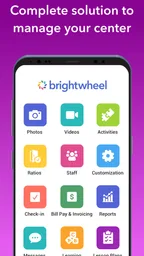
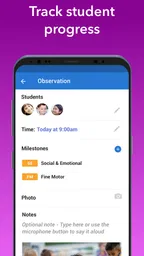
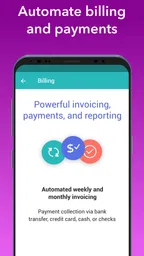
The early appeal comes from putting several childcare-related tasks in one place. Instead of treating sign-in and sign-out, family updates, billing, and learning tools as unrelated chores, brightwheel brings them into one service. That can make the daily handoff feel more orderly, especially for a family that has previously depended on paper sheets, brief doorway conversations, or messages spread across different channels.
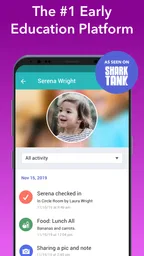
A realistic example is a parent who drops off a child before work and cannot stay to ask how the morning is going. A digital record of the day can make it easier to follow the center’s updates later, while sign-in and sign-out information gives the routine a clear administrative anchor. The benefit is not that an app can replace a conversation with a caregiver; it is that the conversation does not have to carry every small logistical detail.
Providers may appreciate the same consolidation for a different reason. When staff are juggling arrivals, classroom routines, and parent communication, it helps to have childcare tasks associated with the service the center uses rather than relying entirely on individual notebooks or informal reminders. I see this as most promising for teams that want a shared routine, not as a magic shortcut that removes the work of keeping records accurate.
There is also a useful distinction between visibility and reassurance. A stream of updates can help a parent stay connected, but its value depends on what the childcare program chooses to record and share. I would treat the app as a communication channel, not as a guarantee that every moment will be documented or that every question will receive an immediate response.
Getting the routine right matters more than exploring every tool
My practical advice for a new family is to start with the essentials the center actually uses: learn where attendance information appears, where to look for daily communication, and how billing is handled. That creates a useful habit before the app becomes another place to check compulsively. Families do not need to turn every feature into a daily task for the platform to earn its keep.
For a childcare team, the first week is a chance to agree on who handles which updates and when. If staff members have different expectations about recording information, the app may feel inconsistent even when the underlying tools are sound. A short, shared routine—such as deciding which details belong in a daily update and who checks administrative items—can do more for clarity than asking everyone to post more often.
That is one of the less obvious trade-offs: a centralized system can make information easier to find, but centralization raises the importance of consistent habits. If a center keeps using paper for one part of the day and the app for another without a clear reason, families may still need to chase details. The platform works best when it complements real communication while reducing avoidable fragmentation.
What keeps it useful month after month
Childcare is repetitive by nature, so a tool in this category has to deliver recurring value rather than a burst of excitement. Brightwheel’s strongest long-term case is that the same essentials return every week: attendance, communication with families, billing, and learning-related information. If the center uses those functions as part of its ordinary process, the app can remain relevant without demanding that parents invent new reasons to open it.
That recurring role is especially helpful for households coordinating more than one adult. A parent who handles morning drop-off may not be the person who picks up or keeps track of a payment. A shared place for childcare-related information can reduce the need to relay every detail by memory. I would still encourage families to agree on who checks what; simply having an app does not prevent a missed message if nobody takes responsibility for seeing it.
Its education focus also gives it a more specific purpose than a generic chat tool. Families are not only using it to send messages; it is tied to the relationship between a childcare provider and the people responsible for a child’s care. That context matters. A general messaging app can be convenient for quick notes, but it may leave attendance, billing, and learning communication scattered across separate systems.
The comparison is not automatically in brightwheel’s favor for every household. A small arrangement that already runs smoothly with direct conversation and a simple paper process may not gain enough from adding another app. Likewise, a family looking for a broad organizer for school, medical appointments, activities, and household plans should not assume this childcare-centered service will cover all of those needs. Its value is strongest within the provider-family relationship it is designed to support.
For a center, month-to-month value depends on whether families and staff maintain the shared process. If the platform becomes the expected place for routine updates and administrative tasks, it can prevent information from being divided among too many informal channels. If only some participants use it, the center may end up maintaining parallel habits, which weakens the convenience for everyone.
The upkeep that comes with a shared system
Brightwheel is not a set-and-forget solution. Parents need to check it often enough to notice information relevant to their child, and providers need to keep routine records and communications current. That is ordinary maintenance for a childcare management app, but it is still maintenance. I would not recommend adopting it on the assumption that digitizing a process makes the process effortless.
A useful workflow is to connect app-checking to an existing moment: after drop-off, during a break, or when reviewing family logistics in the evening. The point is not to monitor the app constantly. It is to make sure important childcare information has a predictable place in the day, so it does not become one more notification stream competing with work and family messages.
Providers have a different upkeep challenge. A digital record is only helpful if the team agrees how to use it and keeps the routine manageable. If staff are expected to enter every detail without a clear purpose, administration can crowd out direct care. A center should decide which updates help families and which information is better handled in a conversation, rather than treating more entries as proof of better communication.
That balance is central to my assessment. The app can support a clearer handoff, but the childcare team still supplies the judgment, attention, and human context. A parent reading an update may need to ask a follow-up question; a staff member may need to explain something that does not fit neatly into a routine record. The best use of brightwheel leaves room for those exchanges rather than trying to turn every interaction into a form.
Another practical consideration is onboarding. If a center changes its process, families need to know which information should now be found in the app and which requests still belong in person. Without that explanation, parents may check multiple channels out of caution, defeating some of the benefit of consolidation. Before relying on it for everyday coordination, I would ask the provider to clarify its own communication habits.
Where app fatigue can creep in
The main source of fatigue is not a complicated feature set so much as the possibility of adding another routine to an already busy day. Parents may already be managing school communications, work messages, and family logistics. If brightwheel is used only occasionally or updates are not relevant to a particular family, opening it can start to feel like another obligation rather than a convenience.
There is also a difference between useful visibility and too much checking. Families who expect a live, minute-by-minute account of a child’s day may be disappointed if the center uses the platform primarily for essential records and selected updates. I would set expectations with the provider instead of interpreting a quiet app as a problem. The app is a tool for communication, not a substitute for knowing how a specific childcare program handles the day.
Providers can experience fatigue too. Staff may be caring for children while also keeping information organized for families. If the team finds that updates interrupt classroom attention, it should streamline what it records and choose a workable cadence. The better question is not “How much can we post?” but “Which information helps a family understand the day or take action?”
Privacy-minded families may also want to understand the center’s own practices before making the app a routine part of childcare. I would ask who in the program is expected to use it and how the center communicates important matters, rather than assume that installing an app answers every question about information handling. That is a sensible conversation with any provider using a digital childcare system.
Brightwheel is free to download, has an Everyone age rating, and has been available since August 25, 2014. Its track record in the app store is substantial, with an average rating of 4.8 from around 11,000 ratings; the app has also passed 1 million installs. Those figures suggest that many people have found a reason to use it, but they do not tell an individual family whether its own childcare center will use the app well. Local habits matter more than popularity when deciding whether it will be useful in your day.
Who should make room for it
I would recommend brightwheel to families whose childcare provider already uses it for more than occasional announcements. In that situation, it can help keep attendance, practical updates, billing, and learning-related communication together. It is also a reasonable fit for providers trying to establish a consistent digital routine with families, provided staff have the time and agreement needed to maintain it.
I would be less enthusiastic for a family whose center relies on a different system, or for a provider that cannot commit to using the app consistently. Installing it without participation from the people who handle the child’s care offers little benefit. A simple direct conversation or the provider’s established channel may be better than maintaining a second, mostly empty communication space.
The app is also not the right answer for someone seeking a full household organizer or a replacement for personal conversations with educators. Its focus is childcare, and that focus is a strength when the need matches. It becomes a limitation when a family expects one tool to coordinate every part of life or to provide a level of real-time detail the center has not promised.
After the novelty fades, brightwheel earns its place through repetition: the next arrival, the next update, the next billing task, and the next useful exchange between a family and its childcare provider. I like that its purpose is grounded in real routines rather than in constant engagement. Its lasting value, though, rests on a simple condition: the center and family must agree to make it the dependable place for the childcare information they want to share. When that habit is already taking shape, it can reduce friction. When it is not, another app is unlikely to fix the underlying communication problem.
What we like
- Parents can receive photos and updates throughout the childcare day.
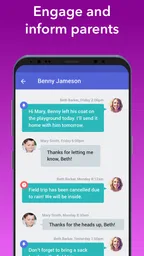
- The app supports direct messaging between families and childcare staff.
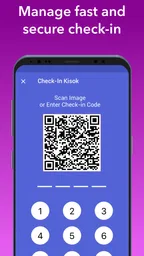
- Digital check-in and check-out can simplify daily drop-off routines.
- Families can view attendance records and classroom activity updates.
- The platform can keep childcare communication in one shared place.
What could be better
- Features available may vary by childcare provider.
- Parents need their provider to use brightwheel to access its updates.
- Frequent notifications may feel distracting during busy days.
- Some childcare services may require families to use paid features.
- App access depends on a reliable internet connection.





