



BoldVoice - Accent Training review
 Analysis by Appsdrops
I can see why accent practice is easier to start than to sustain: it is uncomfortable to hear your own speech, and broad advice like “speak more clearly” rarely tells you what to change. BoldVoice makes that work feel more focused. It is an education app from BoldVoice for English pronunciation and American accent coaching, and its central appeal is the chance to practice specific sounds rather than hope that ordinary conversation gradually fixes them.
In my view, BoldVoice is most useful as a regular practice tool, not a shortcut to sounding like someone else. The first sessions can make pronunciation feel approachable, especially if you already know which sounds trip you up. The lasting question is whether its guided exercises fit into your routine after the initial curiosity wears off. That depends less on enthusiasm and more on whether you have a real reason to keep working on spoken English.
Why the first week feels approachable
The app’s focus is narrower than a general English course. It is concerned with pronunciation and an American accent, so it makes more sense for someone who can already communicate in English but wants listeners to understand them more easily or wants their speech to feel more natural in American contexts. That narrower scope is a strength: it keeps practice pointed at how words sound, rather than mixing pronunciation with every other part of language learning.
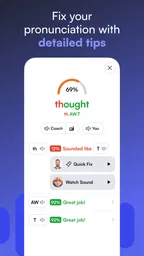
When I try a pronunciation coach, I want more than a list of phonetic symbols. I need to hear what I am aiming for, attempt it myself, and notice where the difference lies. BoldVoice’s coaching-oriented approach is built around that kind of active practice. It is a more deliberate starting point than simply replaying a pronunciation clip or reading a tip and moving on.
That can be particularly reassuring in the first week, when it is easy to feel that a persistent accent is one large, vague problem. A more helpful approach is to treat it as a collection of smaller choices: a vowel that needs a different shape, a consonant that is being softened, or a word whose stress is landing in the wrong place. I recommend choosing one recurring difficulty and giving it attention before trying to polish everything at once.
A useful everyday routine is to practice before a call, interview, or presentation, then listen for one target sound during the conversation. For instance, someone who often repeats a particular word at work can rehearse that word and a few related examples, then focus on making it clearer when the moment comes. The goal is not to monitor every syllable; it is to carry one practiced adjustment into real speech. This makes the app’s work more relevant than an isolated exercise session.
BoldVoice has a free price to get started, while in-app purchases range from $9.99 to $199.99 per item. I would treat that range as a reason to decide what you actually need before paying: try the practice style, identify whether it addresses a real speaking concern, and check the purchase details in the app store before committing. The free entry point makes exploration easier, but it does not mean every useful part of a longer learning routine will necessarily be free.
Turning coached practice into real speech
The most valuable habit is to connect practice with a situation outside the app. A learner preparing for a client call might note a handful of words they expect to use, practice the sounds that feel uncertain, and then reflect afterward on whether those words were easier to say. A student could do the same with a short class presentation. This is more actionable than completing exercises without deciding where the skill will be used.
I also suggest keeping a small personal list of difficult words. Write down words that cause hesitation in everyday conversation, rather than choosing only examples that feel like pronunciation drills. A few minutes spent on words you genuinely say can have more practical value than trying to perfect an accent in the abstract. This is an important distinction: clarity is often a better day-to-day goal than erasing every trace of a first language.
Does it earn a place after the novelty?
Pronunciation improvement is rarely a one-and-done task. Even when a sound becomes easier in a lesson, it may still slip back into its familiar form when you speak quickly, feel nervous, or concentrate on what you want to say. That is why the app’s month-to-month value depends on whether you can move from concentrated learning to brief maintenance sessions. A short, focused return to a troublesome sound can be more sustainable than treating every practice session as a major project.
I would use BoldVoice in phases. First, identify a small set of pronunciation habits that regularly affect your confidence or clarity. Next, practice them deliberately. Later, spend less time drilling and more time checking whether the change holds in conversation. If you keep working through lessons without noticing how they connect to your own speech, the routine can become a collection of completed tasks rather than a skill you carry with you.
There is also a realistic limit to what a pronunciation app can do on its own. It cannot replace the unpredictable back-and-forth of a live conversation, where people interrupt, change topics, and speak at different speeds. For fluency, vocabulary, grammar, or conversation confidence, I would pair it with real speaking practice or choose a broader English-learning resource. BoldVoice is better suited to a targeted pronunciation goal than to learning English from the beginning.
That comparison matters when choosing alternatives. Free pronunciation videos and dictionaries can be enough if you only need to check how a few words are said. They are easy to consult, but usually leave you to decide what to practice and whether you are making progress. A general language-learning app may cover more ground, yet pronunciation can become just one small part of a larger course. BoldVoice’s case is strongest when you want the accent and sound work to be the main event, and you are willing to practice rather than only watch or listen.
The effort and fatigue to plan around
Listening closely to your own voice can feel awkward, particularly at first. That discomfort is not unique to this app, but it is part of the work. Pronunciation practice asks you to slow down and notice details that ordinary conversation lets you ignore. If that makes you tense, keep sessions short and work on one sound at a time. Trying to correct every feature of your speech at once can make speaking feel less natural, not more.
Another source of fatigue is repetition. Repeating a sound can be useful, but repetition without a clear purpose quickly becomes dull. I would avoid turning practice into a streak obligation or measuring success only by how often you open the app. Instead, connect each session to a question: Which sound do I want to make clearer? Where will I use it? Did it feel easier when I spoke naturally afterward? Those questions help keep repetition purposeful.
There is a trade-off between accent refinement and spontaneity, too. If you are constantly checking your pronunciation while speaking, you may lose your train of thought. I would practice deliberately in private, then let the target sound become a background habit in conversation. The best result is not a voice that sounds carefully rehearsed in every exchange; it is speech that is easier to understand without having to think about each word.
For maintenance, a practical approach is to return to the app when a specific difficulty resurfaces, rather than assuming you must complete a long routine every day. Before a high-stakes conversation, a brief refresh can help focus attention. In an ordinary week, occasional practice tied to real speaking needs may be more sustainable. The right cadence depends on your goal and schedule, so I would judge the routine by whether it helps your actual communication rather than by an arbitrary daily target.
Who will benefit, and who should look elsewhere
I would recommend BoldVoice to an English speaker who wants focused help with American pronunciation, has noticed particular sounds causing misunderstandings, or wants to feel more prepared for speaking at work or school. It can also suit someone who is comfortable practicing independently and prefers guided exercises over assembling a plan from scattered videos. The app is rated for Everyone, and its audience is not limited to one profession or age group, though the practical value still depends on having a pronunciation goal.
I would skip it if you are looking for a complete English curriculum, a replacement for conversation with other people, or a way to remove your accent entirely. Those are different aims. Someone who only needs occasional word pronunciations may be better served by a dictionary, while a learner who needs help with vocabulary and grammar should prioritize a broader course. And if your main concern is being understood in a particular local or international setting rather than sounding American, the app’s specific focus may not match what you need.
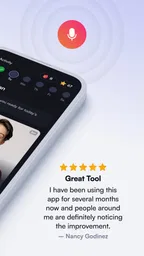
As a product with an established audience, BoldVoice has a 4.7 average from around 13,000 ratings, and it has passed one million installs. Those figures suggest that many people have found the focused approach worth trying, but they cannot tell you whether its style will suit your own voice or routine. I would use them as context, not as a substitute for testing whether the exercises address the sounds you personally want to change.
The app was released on June 16, 2021, and version 5.1.9 is the current version. It requires Android 8.0 or later, a useful detail to check before installing on an older device. Since the app is free to download with in-app purchases, I would also review the available options before building a long-term plan around paid content. That simple check helps avoid confusing the cost of starting with the cost of continuing.
My long-term verdict
BoldVoice can earn lasting space on my phone when I treat it as a coach for a defined purpose: clearer pronunciation, especially in American English, supported by practice that carries into real conversations. Its most compelling value is not the novelty of hearing a pronunciation lesson; it is having a reason to revisit a sound, work on it deliberately, and then notice it in everyday speech. Used that way, it can make an otherwise vague goal feel manageable.
It is less convincing as an app to open automatically without a plan. Repetition can become tiring, and the work does not replace live speaking or broader language study. My recommendation is to begin with one concrete communication problem, test whether the coaching helps, and keep only the parts of the routine that transfer to your life. For focused accent practice, BoldVoice is worth trying; for all-purpose English learning, it is too specialized to be the only tool.
What we like
- Short practice sessions make it easier to build a daily routine.
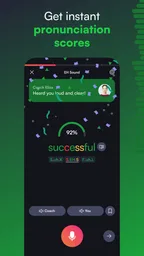
- Speech feedback helps identify sounds that need more work.
- Lessons cover pronunciation patterns used in everyday conversation.
- Video guidance from coaches adds context to the exercises.
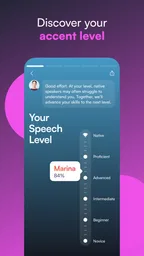
- Progress tracking can help learners notice improvement over time.
What could be better
- Some lessons and features may require a paid subscription.
- Speech recognition may struggle with background noise.
- Feedback can feel limited when a sound needs detailed explanation.
- The app requires a microphone for its speaking exercises.
- Accent training takes consistent practice and results vary by learner.





