BioLife Plasma Services review
 Analysis by Appsdrops
Donating plasma is already a process that takes planning, so anything that makes it easier to manage is worth a look. BioLife Plasma Services is a free medical app from Takeda Pharmaceuticals built around a straightforward purpose: helping make plasma donation easier to handle. I see its value less as a replacement for the donation process and more as a companion for people who want a more convenient way to stay connected to it.
A practical companion for plasma donation
The app’s central appeal is right there in its focus on plasma donation. Instead of trying to be a general health platform, it is designed for people engaging with BioLife’s plasma services. That narrow purpose can be a real advantage: when an app is built around one particular activity, it is easier to understand why you might keep it on your phone and when you would open it.
For a donor, the benefit of a dedicated mobile app is convenience. A phone is usually close at hand, making it a natural place to turn when you want to deal with donation-related tasks. The app is intended to make that experience easier, rather than asking users to treat plasma donation as something they can only manage when they are at a computer or speaking with someone in person.
That simple role matters because donating plasma involves more than deciding, on the spur of the moment, that you would like to donate. People need to fit the activity into everyday life, and a practical digital companion can make it feel more manageable. I appreciate that the app’s purpose is easy to grasp: it is for BioLife plasma donors, not an all-purpose medical reference that happens to mention donation.
Focused purpose, familiar format
A dedicated app can lower the small barriers that make routine tasks feel like a chore. Rather than searching through unrelated health content, users can start with an app whose identity is tied directly to BioLife Plasma Services. That focus gives the experience a clear context from the first moment, even for someone who has never used a plasma donation app before.
It is also worth keeping expectations in the right place. A mobile app can support the experience, but it does not change what plasma donation is or remove the need to follow the donation process itself. I would think of BioLife Plasma Services as a convenience tool that sits alongside a donor’s real-world arrangements, not as a substitute for them.
How the app fits into everyday use
The most useful way to approach a service app is to connect it to a real routine. If plasma donation is already part of your schedule, the app has an obvious place in that routine: it gives you a mobile point of contact for the service and is meant to make donating easier to manage. You can keep it in mind when planning around donation, rather than treating it as another general app you open without a particular reason.
That kind of practical fit can be more valuable than a long list of unrelated features. A donor does not necessarily need a complicated digital experience; they need the service to feel accessible when it is relevant. The app’s stated purpose speaks to that need, while its focused identity makes it clear who is most likely to benefit from installing it.
For someone new to plasma donation, a dedicated app can also make the service feel more approachable. Having a recognizable mobile companion may help make the process seem less disconnected from the rest of daily life. Still, I would treat it as one part of the overall experience. The app supports engagement with BioLife’s service; the donation itself remains a real-world activity that requires attention and planning.
Where it is most helpful
The strongest scenario is a person who already donates, or is actively considering donating, through BioLife. In that situation, the app’s purpose lines up with an existing need. It is easier to see a reason to keep a focused service app installed when you expect to use that service, rather than downloading it simply because it belongs to the medical category.
It may be less compelling for someone who is only casually curious about plasma donation and has no immediate plans to take part. The app is not presented as a broad education or wellness destination. Its appeal comes from its connection to BioLife’s donation services, so the closer you are to using those services, the more naturally the app fits.
I also think this focused approach suits people who prefer handling everyday tasks on a phone. If you like having service-related tools close by, a dedicated app can feel more convenient than remembering to seek out information elsewhere. If you rarely use mobile apps for practical errands, though, the advantage may be modest. The value depends on how well the format matches your habits.
Realistic expectations and tradeoffs
The biggest tradeoff is also a consequence of the app’s clear focus: it is relevant mainly to BioLife plasma donors. Someone looking for a general medical app, broad health tracking, or a resource for plasma services across different organizations should not assume that this is designed to meet those needs. Its identity is specific, and that is part of what makes its purpose easy to understand.
Another sensible expectation is that an app can make a process easier to manage without making every part of it effortless. Donation still involves a real appointment or visit and the steps that come with participating. A digital companion can support convenience, but it cannot replace the practical decisions and follow-through required from the donor.
That distinction is important for any health-related service. I would not install the app expecting it to provide medical advice or to answer every personal question about eligibility. Its stated purpose is to make donating plasma easier through BioLife, which is a more useful and grounded way to judge it. For health concerns or questions about whether donation is appropriate for you, the app should not be treated as a substitute for qualified guidance.
The app is free, so trying it does not require an upfront purchase. That makes it easier for an interested donor to see whether a mobile service companion suits their routine. The practical question is not whether every donor needs another app, but whether having BioLife-related support on a phone makes the donation experience more convenient for that individual.
Who is likely to get the most from it?
Regular BioLife donors are the clearest audience. They have an ongoing reason to use a service-focused app, and the promise of making plasma donation easier speaks directly to their needs. People who are preparing to become donors may also find the app relevant as they start engaging with the service, while occasional users can decide whether the convenience is useful enough to keep it installed.
On the other hand, people who do not plan to donate through BioLife may have little reason to use it. That is not a flaw so much as a reminder to match the app to the service it supports. A focused tool does not need to appeal to everyone; it needs to be useful to the people who rely on the underlying service.
The app has reached more than a million installs and holds an average rating of 3.9 from around 27,000 ratings. Those figures suggest a substantial audience, while leaving room for the fact that individual experiences with service apps can vary. I would use them as background rather than as a guarantee that the app will fit every donor’s preferences.
A clear, service-first choice
BioLife Plasma Services makes the most sense when judged by its main job: supporting the convenience of plasma donation through BioLife. Its appeal is not that it promises to transform healthcare, but that it offers a dedicated mobile companion for a specific service. That can be genuinely useful when donation is already part of your plans and you want the experience to fit more comfortably into everyday life.
For an existing or prospective BioLife donor, I think it is a reasonable app to consider. It is free, focused, and easy to understand in purpose. If you are looking for an all-purpose medical platform, it is probably not the right match; if you want a mobile tool connected to BioLife plasma donation, its central idea is practical and relevant. The best reason to install it is simple: it brings a donation-focused companion to the service you intend to use.
What we like
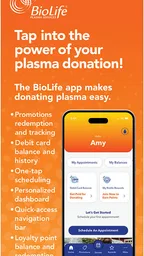
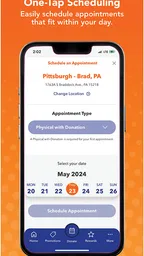
- Appointments can be scheduled through the app.
- Donors can review visit details before arriving.
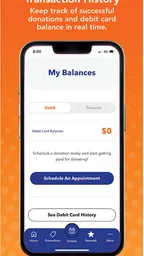
- The app provides access to donation history.
- Eligibility information helps users prepare for a visit.
- Center details make it easier to find a nearby location.
What could be better
- Some features may require an active donor account.
- Appointment availability varies by donation center.
- Location access may be needed for nearby center results.
- App information may not replace staff guidance on eligibility.
- Technical issues could make account details temporarily unavailable.





