
BigFuture® School review
 Analysis by Appsdrops
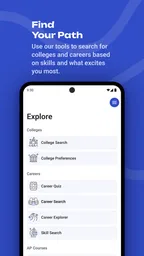
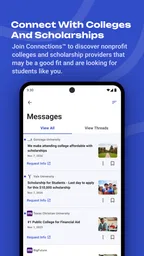
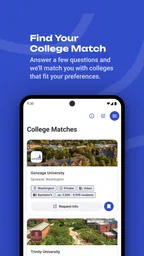
I think BigFuture® School is most useful when you treat it as a practical planning companion rather than a complete college-admissions guide. It brings several important parts of the post-high-school decision process into one education app: checking scores, exploring colleges and scholarships, and looking into careers. That combination can help a student turn scattered questions into a more organized next step, especially when college still feels like a distant, intimidating project.
Published by Collegeboard, BigFuture® School is free and rated for Everyone. Its focus is education, but the intended audience is broader than students who have already chosen a college: it can also help someone who is still weighing career directions or trying to understand what options might be available. I would recommend it to students who want a central place to explore, while keeping in mind that a planning app cannot make the choices—or verify every detail—for them.
What the app is useful for today
The app’s appeal is the connection between information that students often look up separately. A score can matter when thinking about next steps; a college search can raise questions about affordability; and career exploration can change which programs seem worth considering. Having these topics within the same product makes it easier to move from one question to another without treating each decision as an unrelated task.
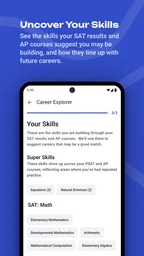
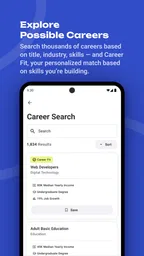
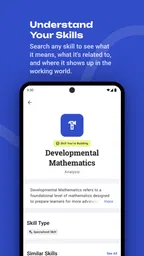
That joined-up perspective is more valuable than a long list of options on its own. If I were helping a student who says, “I’m not sure what I want to do after school,” I would use the app as a starting point for a conversation: first look at the available career directions, then connect that curiosity to colleges and scholarships worth investigating. The point is not to settle on a life plan in one sitting. It is to make the next useful question easier to find.
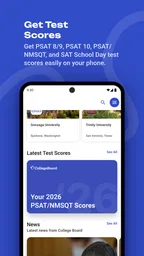
Score access is another reason a student may return to the app, rather than using it only once during an initial search. When scores are part of the planning process, being able to check them alongside college and scholarship exploration can make the overall journey feel less fragmented. I would still treat a score as one input, not a verdict about which schools or careers are suitable.
The strongest fit is someone who benefits from guided exploration: a student who wants to browse possibilities, compare directions, and keep college and career questions in view together. Parents or other supporters may find it useful as a conversation aid, too, though the student should remain at the center of the decisions. A tool can make options easier to discuss without deciding which trade-offs matter most to a particular family.
A realistic way to use it
Imagine a student with a free evening who has been putting off college research because the choices feel too broad. Instead of trying to build a perfect college list immediately, they could start with a career area that sounds interesting, explore related possibilities, and then look at colleges or scholarships that may be relevant to the direction they are considering. They can also check their score information as part of that broader picture. The useful outcome is a short list of questions to research next, not an instant final answer.
A small but important workflow tip is to keep a separate note of anything that needs confirmation before acting. If a scholarship or school catches your eye, record what appealed to you and what you still need to check, such as eligibility, deadlines, or program details. Then use the app to discover leads and the institution or scholarship’s own materials to confirm current requirements. That habit makes exploration more dependable and helps prevent an attractive result from being mistaken for a complete application plan.
How it fits beside other planning tools
Compared with using a search engine, separate college websites, and standalone career resources, BigFuture School’s main advantage is the way it places connected questions in one environment. A general web search can be better when you already know exactly what information you need or want to compare a very specific detail. A spreadsheet can be better for tracking application deadlines, costs, and personal notes across many schools. This app is more naturally suited to discovery and orientation than to serving as a student’s entire admissions-management system.
That distinction matters because exploration and decision-making are different jobs. Browsing options can help a student notice paths they had not considered; choosing among them usually requires closer checks of academic fit, location, costs, admissions requirements, and personal priorities. I would use the app to generate and organize possibilities, then move to more detailed sources when a possibility becomes a serious contender.
What the version history tells me—and what it does not
The Android release began on August 24, 2023, and the current version is 3.1.0.2249. Those are useful markers for understanding that the product has had time to develop beyond its initial release. They do not, by themselves, reveal which screens or capabilities changed, so I would not infer a particular redesign or new tool from the version number alone.
For someone already using the app, the practical takeaway is modest: it is a maintained product with a current version, but an update label is not a promise that a familiar workflow has changed in a particular way. If something looks different after updating, I would check the feature itself before assuming that saved plans or earlier choices have been affected. For a new user, the current version is the relevant experience to evaluate; older impressions may not describe it precisely.
Its reach gives a little more context without settling the question of fit. BigFuture School has over 500,000 installs, an average rating of 4.2 from around 2,100 ratings, and about 400 written reviews. I read that as evidence that it has attracted a meaningful audience, not as proof that every student will find its approach useful. The best test is whether its college, scholarship, career, and score-related areas match the questions you actually need to answer.
Where I would be cautious
The first limitation is that an all-in-one starting point can still leave important work outside the app. A student may find a promising school or scholarship and then need to check details directly with the relevant institution or program. Requirements and deadlines are exactly the sort of information I would verify before making a plan around them, rather than relying on discovery alone.
The second is that broad exploration can become overwhelming if you open the app without a question in mind. When a student is already anxious about choosing a future, seeing more possibilities is not automatically helpful. I would narrow each session to one task—such as exploring a career direction or checking score information—and write down a next step before moving on. That makes the app a tool for progress rather than another place to browse indefinitely.
It is also not the right choice for every stage of the process. A student who has already built a college shortlist and needs detailed application tracking may be better served by a spreadsheet or a dedicated planning system. Someone who wants in-depth career counseling should not expect a mobile app to replace conversations with a school counselor or other knowledgeable adviser. BigFuture School can support those conversations, but it cannot know a student’s circumstances as well as a person who understands them.
Who should try it, and what to watch next
I would suggest trying it if you are beginning to connect your interests with possible careers, colleges, and scholarships, or if you want those topics close at hand while checking scores. Its free price lowers the barrier to trying that style of exploration, and the Everyone age rating makes the product broadly accessible. Still, being accessible does not mean every part of college planning is appropriate to handle alone; students should involve a trusted adult or counselor when choices involve money, eligibility, or major commitments.
I would skip it as a primary tool if you are looking for a detailed application calendar, personalized counseling, or a final authority on admissions and scholarship rules. In those cases, use a more specialized tracker or speak directly with the relevant school or adviser. The app makes more sense as a discovery and orientation layer than as a substitute for those sources.
What I would watch for in future use is whether the app continues to make the transition between scores, college choices, scholarships, and career exploration feel clear rather than crowded. The version number shows that the product has progressed since launch, but it is better to judge any future update by the actual workflows it improves. For now, my recommendation is straightforward: use BigFuture School to find promising directions, keep your own notes about why they matter, and verify consequential details before acting. That is where this app can be genuinely helpful without asking it to do a counselor’s or admissions office’s job.
What we like
- College planning tools help students explore schools and career paths.
- Scholarship search features can help users find potential funding.
- Interest assessments provide a starting point for career exploration.
- The app is designed for high school students planning their next steps.
- Free access makes its planning resources easier to try.
What could be better
- Some tools may require students to provide personal information.
- Scholarship listings may need extra research to confirm eligibility.
- College information may not reflect every recent policy change.
- The app may be less useful for students outside the United States.
- Planning features cannot replace advice from a school counselor.





