
BCBSTX review
 Analysis by Appsdrops
If your health plan is with Blue Cross and Blue Shield of Texas, BCBSTX is best understood as a member companion rather than a general health app. I’d consider installing it before I need to look up a plan detail or handle a routine insurance task. It is free, made by Blue Cross and Blue Shield of Texas, and sits in the medical category; its purpose is tied to membership, so its usefulness depends on whether you have a connection to that plan.
The app has a 4.6 average from around 12,000 ratings, and it has passed one million installs. Those figures suggest plenty of members have found a reason to keep it, but they are not a promise that every plan or personal situation will feel equally smooth. My practical recommendation is to approach it with one specific goal in mind—such as getting oriented to your member information—rather than expecting it to replace every conversation with an insurer, doctor, or pharmacist.
What to expect from a member-focused app
The first thing I would keep in mind is that BCBSTX is not a broad wellness tracker or a medical advice service. It is an account-oriented health insurance app. That distinction matters: someone looking for symptom checks, exercise plans, or general medical research is likely to be better served by another kind of app, while a Texas Blue Cross and Blue Shield member may appreciate having a mobile route to plan-related information.
That membership focus is also the app’s main boundary. It makes most sense when you need information connected to your coverage, not when you want to browse health topics without an insurance account. If you are helping a family member, do not assume that having the app on your phone automatically gives you access to their member information. The account and the plan are central to the experience, so start with the person whose coverage you are trying to manage.
BCBSTX is rated for Everyone, but that age classification should not be confused with broad usefulness for every age or every user. A person who is not a member may have little reason to keep it installed. For someone who is enrolled, though, a dedicated member app can be more convenient than searching through saved emails or returning to a desktop browser whenever a plan question comes up.
Getting ready for the first sign-in
Before opening the app, I’d make sure I know which member account I intend to use and have the associated sign-in details available. This small bit of preparation can prevent a frustrating first session: if you are unsure whether you have an account or which credentials apply, downloading the app alone may not get you to useful information. Treat the initial visit as account setup, not as a quick guest-mode tour.
After installing it, check that you have the current app version available for your device. The current release is 7.34.0, and the stated minimum operating-system requirement is version 9. If an older device cannot install or update the app, checking your plan through another supported route is more sensible than repeatedly trying the same download. The app is free, so the main practical question is not purchase cost but whether your phone and member access are ready.
I would also choose a calm moment for the first login rather than waiting until I am standing at a pharmacy counter or trying to answer a time-sensitive question. That is not because setup is necessarily difficult; it is because account access is the gateway to the app’s value. Getting through that step at home gives you a chance to sort out a sign-in snag without pressure and learn where you would go later.
Your first useful result
A good first-session goal is simple: sign in and locate the member information you installed the app to check. That is a more useful test than tapping around every screen. If you can reach the relevant information and understand what it means for your immediate question, you have completed the first meaningful action. If the app does not get you there, pause and verify the account details before assuming that the plan itself is unavailable.
For example, imagine you are preparing for an appointment and want to review your plan information beforehand. I would open BCBSTX at home, sign in, and look for the member details relevant to that appointment. If something remains unclear, I would note the exact question and contact the appropriate support channel rather than guessing from a screen. The useful role of the app is to make member information easier to reach; it should not be treated as a substitute for a clinician’s guidance or a definitive answer to every coverage question.
One practical habit is to use the app before you are in a hurry. When a routine task comes up, take a minute to learn which area contains the information you need, then remember that path. The benefit is not just fewer steps next time: you are less likely to confuse a plan-related detail with medical advice or a provider’s own instructions. Keep those sources distinct, especially when a health decision is involved.
Where confusion can creep in
The most common source of friction for a member app is the difference between being able to open the app and being able to see the right account information. If you are helping another person, using an old login, or unsure which plan account applies, do not keep testing random details. Confirm whose membership you are trying to access and use the account credentials associated with that coverage. This simple check is more useful than treating a sign-in problem as evidence that the app has no value.
Another reasonable expectation to set is that an insurer’s app and a provider’s office do different jobs. BCBSTX is for member information; your clinic remains the place to clarify appointment details and medical decisions. Likewise, if your question needs a personal explanation rather than a quick account lookup, speaking with the insurer may be clearer than trying to infer an answer from the app. I would use the app to prepare for that conversation, not to avoid it when a specific answer matters.
It is also worth separating app access from coverage certainty. A detail visible in a member account may help you understand your plan, but a complicated or unusual situation can still deserve a direct check with the insurer or provider. For instance, before relying on an assumption about a service, I would verify the point that affects the decision rather than relying on a general impression. That cautious approach is particularly useful when cost or timing is important.
For privacy, be deliberate about whose account is signed in on a shared phone. A health-plan app can surface personal member information, so I would sign out or otherwise secure access when another person regularly uses the device. This is a sensible everyday safeguard, especially in a household where one phone is used for errands by more than one family member.
How it compares with other ways to manage a plan
The usual alternatives are a desktop account, saved plan documents, or contacting the insurer directly. Each has a place. A computer can be more comfortable when you are comparing several details or reading at length; saved paperwork can help when you are offline or need to refer to a document; direct contact is better when your situation needs an explanation. The app’s advantage is having member information close at hand when a small question arises away from your desk.
That convenience is most valuable for people who already use their phone to handle routine tasks and have an active BCBSTX membership. It is less compelling if you rarely need plan information, prefer paper records, or are not covered by the insurer. I would not install it expecting a general-purpose medical toolkit. Its narrower purpose is a strength for the right member and a clear reason for other users to skip it.
There is also a trade-off between convenience and having a fuller view. A phone is excellent for a quick check, but not always the best place to work through a complicated insurance question. If you find yourself switching between screens, trying to interpret several details, or needing an explanation, move to a larger screen or contact the insurer. Choosing the right channel is part of using the app well, not a failure of the app itself.
Who is likely to get the most from it
I would recommend trying BCBSTX if you are a Blue Cross and Blue Shield of Texas member who wants a direct mobile way to approach member information. It may be particularly handy for someone who is often away from a computer, wants to prepare before a routine healthcare interaction, or would rather check their account than search old messages. A first-time user can keep expectations manageable: install, sign in, find one relevant piece of information, and decide whether that saves enough effort to make the app worth keeping.
I would skip it if you are not a member, need general health education, or are looking for a replacement for professional medical advice. I would also choose another route when the question is complex enough that a conversation or a fuller document view would be more reliable. Being honest about those limits makes the app easier to judge: it is a focused member tool, not a single place for every health-related task.
BCBSTX has been available since December 17, 2010, and its current version is 7.34.0. What matters more to a new user than its history is whether the first sign-in leads to information they actually need. My advice is to install it before a rushed moment, confirm you are using the correct member account, and test it with one straightforward plan question. If that first task is easy, it can become a practical shortcut; if you need broader medical help or a detailed explanation, use the app as a starting point and turn to the more appropriate source.
What we like
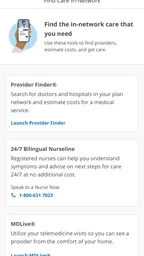
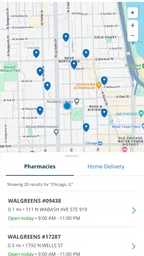
- Find in-network doctors and care facilities through provider search.
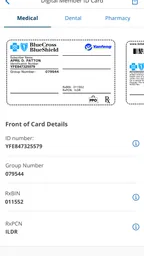
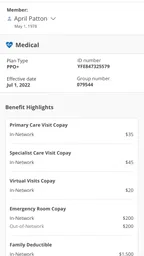
- View digital ID cards without carrying a physical card.
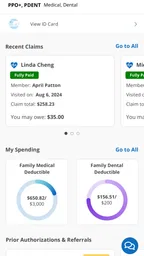
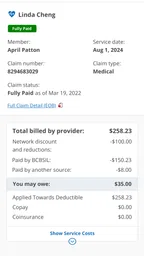
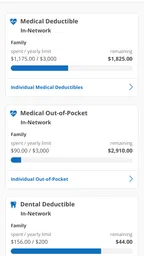
- Check claims and benefit details from a mobile device.
- Use the app to locate nearby urgent care options.
- Secure account access helps protect personal health information.
What could be better
- Some features require an active Blue Cross and Blue Shield of Texas plan.
- Available tools can vary by plan and employer.
- Provider search results may not reflect real-time appointment availability.
- Some account tasks may redirect users to a website.
- App usefulness depends on having reliable internet access.





