

athenaPatient review
 Analysis by Appsdrops
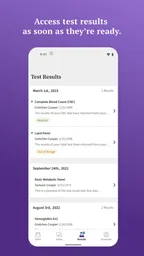
When I need to check a health detail or get in touch with my care team, I would rather start in one familiar place than hunt through old messages and paperwork. That is the practical appeal of athenaPatient: it is a medical app from athenahealth built around accessing health information and communicating with the people involved in your care. It is most useful when your provider’s practice uses athenahealth services and you want a convenient companion to that relationship, not a replacement for medical advice or urgent care.
A steady routine for everyday care
My recommended starting point is simple: open the app when you have a specific care task, find the relevant information, and use its communication option when a question belongs with your care team. That keeps the app tied to practical moments rather than turning it into another screen to check without a reason. The main benefit is having a mobile route to health information and care-team communication instead of relying only on a desktop browser, paper notes, or a phone call.
For example, imagine you have a routine appointment coming up and want to review a detail you discussed with your provider. Rather than searching through a stack of papers, you can check what is available through the app and send a message if the question needs a response from the practice. I find that division helpful: the app can make information easier to reach, while the care team remains the right source for interpretation and decisions.
One important caveat is that the experience depends on your connection to a practice that supports the service. Installing a medical app does not automatically give it useful information about every provider you have seen. Before making it part of your routine, confirm that your care team uses athenahealth and that you can access the relevant account. If your providers use another patient portal, that portal is likely to be the more useful everyday choice.
athenaPatient is free, rated for Everyone, and listed in the medical category. Its developer is athenahealth. Those details make it approachable for a broad range of patients, but they do not change the most important practical question: whether your own practice uses it. I would treat compatibility with your provider as the deciding factor, rather than downloading it simply because you want a general-purpose health organizer.
Make the first visit purposeful
On your first use, focus on getting access and learning where the information you care about lives. Avoid assuming that every medical detail will appear in one place or that every practice interaction can be handled inside the app. Patient portals vary according to the services a practice makes available. A useful first check is whether you can locate the information you came for and understand how to contact the care team through your account.
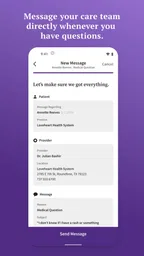
I also recommend deciding what belongs in an app message before you send one. A question about a routine care detail may be suitable for a message, while severe or rapidly worsening symptoms call for an appropriate urgent-care route rather than waiting for a reply. That is not a special feature of this app; it is a sensible boundary for any portal. Keeping that distinction clear prevents the convenience of messaging from creating a false sense that someone is monitoring it like an emergency line.
Settings and habits worth checking
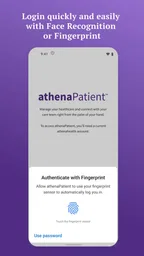
Rather than expecting a particular set of controls, I would review the account and device settings that are actually available to you. Check that you can sign in reliably, that your contact details are current where the app allows you to manage them, and that you understand how the app behaves when you are signed out or using a new device. If your phone offers notification controls, choose an arrangement that suits your privacy and how quickly you want to notice care-team updates.
This is especially worth considering if your phone is shared or often visible to other people. A notification preview can be convenient, but health-related messages are personal. I would balance quick visibility against privacy by choosing the device-level notification style that feels comfortable, rather than assuming that every alert should display its full contents. The right choice depends on your circumstances, not on a universal setting.
A repeatable routine helps more than constant checking. For instance, you might open the app after a visit to review anything your practice has made available, then return when you have a specific question or need to check for a response. If you are already juggling several provider portals, keep a note of which practice uses which system. That small bit of organization can prevent the frustrating cycle of trying the wrong login when you are in a hurry.
There is also a useful boundary between records and personal tracking. If you want to keep a detailed symptom diary, medication schedule, or long-term health journal, a dedicated tool or a simple private note may serve you better, depending on your needs. A patient portal is strongest as a connection to a participating care team and the information associated with that relationship. I would not rely on it as the only place to record every health observation unless its available tools genuinely fit that purpose.
Faster patterns for repeat users
Once access is working, speed comes from reducing unnecessary steps rather than hunting for shortcuts that may not exist. I would keep the app easy to find on my phone, sign in before a moment when I expect to need it, and use a consistent order: check the relevant information first, then write a concise message if something remains unclear. That sequence avoids sending a question that the available information already answers, while still making it easy to ask for clarification.
When writing to a care team, include the context they need to understand the question. Refer to the particular visit or issue in plain language, explain what you are trying to find out, and keep separate concerns in separate messages when that makes them easier to address. Clear writing is a practical efficiency tool: it can reduce back-and-forth and help a staff member route your question. It cannot guarantee a faster response, so do not use messaging when timing is critical.
A helpful repeat-user habit is to make the app part of an existing routine. After an appointment, you could check for relevant information when you have time to read it carefully; before a follow-up, you could review the details that matter to your questions. This is more reliable than trying to reconstruct a conversation from memory at the last minute. If something is confusing, note the exact point you want explained instead of assuming that a portal entry tells the whole story.
For households coordinating care, be deliberate about whose account is open and whose information you are viewing. Do not assume that one person’s access automatically covers another person’s records. Use the access arrangements the practice and app make available, and keep account details private. This caution is particularly important when a family member is helping an older adult or someone with a complex schedule: convenience should not blur whose information is being discussed or who is authorized to see it.
Where it fits among other options
Compared with calling a practice, a portal can be more convenient for a non-urgent question that does not require a live conversation. Compared with a general health app, athenaPatient has a different job: it is connected to care-team communication and health information rather than being a universal wellness tracker. And compared with keeping paper records, a phone-based route can be easier to reach when you are away from home, provided the information you need is available through your practice.
Those alternatives still matter. A phone call may be better if the issue is complicated, sensitive, or difficult to explain in writing. Paper notes can be useful as a personal backup or when you are preparing questions for an appointment. A separate tracking app may suit someone who wants detailed daily logging. I would choose the method that matches the task, rather than expecting one portal to replace every conversation, record, and health tool.
The app has a 4.8 average from around 78,000 ratings, and it has been installed over a million times. That broad adoption offers useful context, but it is not a promise that every practice will provide the same experience. A portal’s value depends heavily on the services connected to your own care. If your provider’s setup is limited, the app may feel sparse even though the general idea is convenient.
Limits to keep in mind
The biggest limitation is that a patient portal is only as useful as the connection between the app and your care team. If your practice does not use athenahealth, or does not make the information you need available through its setup, the app may not solve your problem. This is not the right choice for someone seeking a standalone medical encyclopedia, a complete personal health record across unrelated providers, or a substitute for a clinician’s assessment.
There is also a difference between being able to send a message and knowing when it will be answered. I would treat the app as a convenient communication channel for appropriate, non-urgent matters, not as a live chat. If a question needs an immediate answer, use a more direct route offered by your practice or seek the suitable level of care. That expectation is worth setting before you depend on the app during a stressful moment.
As a software product, it has a current version of 1.25.9 and requires iOS 11 or later. It was released on November 9, 2022. Keeping the app updated and using a compatible device are sensible basics for a smoother experience, but your provider’s participation remains more important than version details. If your device cannot run it, or you prefer handling health tasks on a computer, a practice’s other access options may be a better fit.
Who I would recommend it to
I would recommend athenaPatient to someone whose care team uses athenahealth and who wants a straightforward mobile way to reach available health information and communicate about routine matters. It is particularly appealing if you dislike searching through emails or calling for every non-urgent question. The strongest use case is not an elaborate personal health system; it is a dependable, repeatable connection to a participating practice.
I would skip it if your providers use a different portal, if you need a broad tracker for health habits, or if you expect every care interaction to happen instantly inside an app. For someone who has only occasional questions and is comfortable calling, the phone may remain simpler. For someone coordinating multiple unrelated practices, separate portals or a carefully maintained personal record may be necessary alongside this one.
athenaPatient has been available since November 9, 2022, and the experience is now at version 1.25.9. For me, the best way to judge it is not by expecting it to do everything, but by testing whether it makes one real part of care easier: finding information or reaching the right team. If that connection is in place, a small habit of checking it at sensible moments can save time and make routine follow-up feel more organized.
My verdict: athenaPatient is a useful, focused medical companion when your practice is part of its ecosystem. I like the idea of having routine care information and a messaging route close at hand, but I would keep expectations grounded: availability depends on the practice, messages are not emergency communication, and the app does not replace a clinician or a complete health record. If those boundaries match what you need, it is worth trying as part of your everyday care routine.
What we like
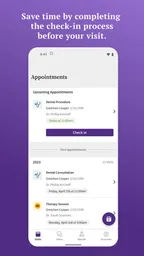
- Access appointment details and health records in one place.
- Secure messaging makes it easier to contact your care team.
- Prescription refill requests can save time between visits.
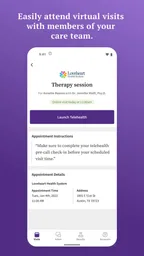
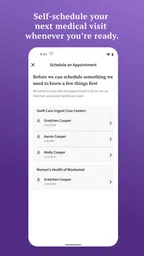
- The app supports convenient online appointment scheduling.
- Health information is available from a mobile device.
What could be better
- Access depends on your healthcare provider using athenahealth.
- Some features may not be enabled by your provider.
- Sign-in setup can require provider-specific information.
- The app may not replace phone calls for urgent concerns.
- Available records can vary across healthcare organizations.





