
APPatient review
 Analysis by Appsdrops
Keeping up with healthcare often means juggling small tasks: checking when the next appointment is, updating a record, and getting a message to the right provider. APPatient brings several of those patient-facing jobs into one mobile app, with a focus on staying connected to a medical practice. I find its appeal easy to understand: instead of treating each interaction as a separate chore, it gives patients a place to handle routine account and appointment needs.
A patient’s routine, gathered in one place
The app is a medical tool from ModMed, designed around practical tasks rather than general health advice or fitness tracking. Its core promise is straightforward: update medical records, view upcoming appointments, and message a provider. That makes APPatient most useful as a companion to an existing care relationship, not as a replacement for a clinician or a way to diagnose a problem independently.
That distinction matters in everyday use. A patient may open the app with one specific goal—confirming what is coming up, making sure a record is current, or sending a question through the provider’s messaging channel. The app’s value is in making those interactions more accessible from a phone. For people who already receive care through a participating practice, a single patient-facing hub can feel more manageable than keeping every detail in memory or searching through old communications.
The first step in that workflow is simply having a reason to return to the app. An upcoming appointment is a natural prompt: I can check the schedule, then decide whether my information needs attention or whether I should contact my provider. The app’s stated tools support that sequence without making the experience sound more complicated than it needs to be. It is about helping patients participate in the administrative side of care, one task at a time.
From appointment check to record update
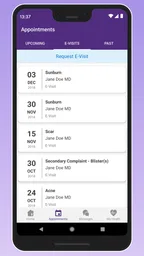
Appointment access is one of the clearest starting points. When I want to know what is coming up, being able to view upcoming appointments in the same app used for other patient tasks keeps the process focused. It also gives the visit a useful place in the wider care workflow: checking the date can prompt me to review whether my medical information is up to date before I speak with the practice.
Record updates are another important part of that flow. Medical details can change, and an app that lets patients update their records gives them a direct role in keeping information current. I see this as a practical convenience, especially when a patient wants to take care of a routine update without turning it into a separate phone call. The feature is not a substitute for clinical review, but it can make the patient’s contribution to the record easier to manage.
The best way to think about this process is as a short loop: check what is ahead, review the information associated with care, and reach out to the provider if something needs attention. APPatient brings those actions together under a single patient-facing experience. That organization is the main benefit; it reduces the sense that appointments, records, and communication are unrelated errands.
For a new user, the usefulness will depend on whether the app fits into an existing relationship with a provider. The app is built for patient engagement, so its role becomes clearer when there is a real appointment to check or a care team to contact. If someone downloads it without a practical task in mind, the value may be less immediate. I would approach it as a tool for managing ongoing care rather than an app to browse casually.
Messaging and the handoff to a provider
Messaging a provider is the part of the workflow that turns a personal task into a handoff. A patient can move from noticing a question or concern to using the app’s communication option, rather than treating the app as a one-way record viewer. That connection is important because healthcare often involves coordination: the patient supplies information, the provider receives it, and the next step depends on the care team’s response.
I like that this puts communication alongside appointments and records. Those pieces often inform one another. A patient checking a visit may realize there is something to clarify; someone updating a record may want to share context with the provider. Having a messaging option within the same patient tool makes the transition feel natural, even though the actual clinical exchange still belongs with the provider.
There is a useful boundary here. The app supports contact with a provider, but it should not be treated as a promise of instant medical advice or emergency assistance. A message is a handoff, not a diagnosis. For urgent needs, patients should use the appropriate urgent or emergency care channel rather than relying on routine app communication. Keeping that distinction in mind helps set sensible expectations for any patient portal.
The handoff also highlights why the app is most effective when both sides of the relationship use the connected workflow. Patients can initiate routine communication, but the practical outcome depends on the provider’s process and the information available to the care team. From the patient’s perspective, that can still be worthwhile: there is a dedicated place to reach out, and the task is less scattered than managing a healthcare question across unrelated apps or notes.
What the workflow delivers
When the pieces work together, the result is a more organized way to handle ordinary patient responsibilities. I can picture opening the app to review an upcoming appointment, checking whether my record needs an update, and sending a message if something should be discussed. None of those actions is flashy, but they are exactly the kinds of small interactions that can make healthcare feel easier to keep track of.
The app’s strength is therefore less about offering a broad collection of health tools and more about connecting a few relevant tasks. The workflow moves from patient awareness to action: see what is scheduled, keep information current, and communicate with the provider. For people who prefer handling routine details on a phone, that setup can make participation feel more convenient and less dependent on remembering to follow up later.
There is also a reassuring sense of purpose in a focused medical app. APPatient is not trying to be a social network, a general wellness dashboard, or an all-purpose encyclopedia. Its listed role is patient engagement, and the available functions align with that role. I would recommend judging it by how well it fits the care relationship a person already has, rather than expecting it to independently manage every part of healthcare.
Its reach suggests that plenty of patients have found a reason to try it: APPatient has more than a million installs. It holds an average rating of 4.0 from around eleven thousand ratings, with roughly four and a half thousand written reviews. Those figures offer context, but they do not tell me how smoothly the app will fit a particular practice’s workflow. The real test for an individual is whether the provider relationship and the app’s patient tools line up with their needs.
Where the experience can feel less smooth
The same focus that makes the app easy to understand also defines its limits. It is centered on a provider relationship, so its usefulness is tied to having care to manage through that channel. Someone looking for self-guided treatment plans, health education, or broad wellness tracking may find that this is not the kind of medical app they had in mind. That is not necessarily a flaw; it is a reminder to match the tool to the task.
There can also be friction whenever a digital workflow crosses from patient to practice. Sending a message is only one part of communication, and a patient still has to wait for the provider’s side of the handoff. Similarly, viewing or updating information is helpful only when it supports the care process the patient is actually using. The app can organize the interaction, but it cannot remove every delay or coordination step involved in healthcare.
For me, the most sensible expectation is that APPatient helps with routine access and communication rather than guaranteeing a seamless clinical journey. Patients should still keep track of important instructions and use the channels their provider recommends. If an issue is time-sensitive, a normal portal message may not be the right route. These are ordinary boundaries for patient-facing technology, and recognizing them prevents a convenience tool from being asked to do too much.
The app is free and is rated for mature users aged 17 and over. It first appeared on March 2, 2016, and its current version is 7.15.0 (6245868), with Android 7.0 listed as the minimum operating system. Those details help identify the app and its compatibility context, while the day-to-day decision still comes down to whether its appointment, record, and provider-messaging functions are useful in a patient’s own care routine.
My take on APPatient
Overall, I see APPatient as a practical patient companion with a clear job: bring appointment visibility, record updates, and provider messaging together in one place. Its best use case is easy to picture—someone already connected to a medical practice wants to keep routine details organized and communicate without adding another disconnected step. The app’s strongest idea is the flow between those tasks, not any claim that a phone can replace professional care.
I would choose it when my provider’s patient workflow makes these tools relevant, and I would keep expectations grounded in that purpose. It can help a patient move from checking a visit to reviewing information and reaching out, while the provider remains responsible for clinical guidance. That makes it a sensible option for people who want a more convenient way to participate in their care. For the right patient-provider relationship, APPatient offers a focused route from routine healthcare tasks to a clearer next step.
What we like
- Provides convenient access to health records and care services.
- Supports communication with participating healthcare providers.
- Can help users manage appointments from a mobile device.
- Offers access to test results when enabled by the provider.
- Combines multiple patient tools in one app.
What could be better
- Available features depend on the healthcare provider.
- Some services may require an invitation or account setup.
- The app may not support every clinic or health system.
- Access to records can vary by provider and data integration.
- A stable internet connection is needed for most features.





