
AnkiDroid Flashcards review
 Analysis by Appsdrops
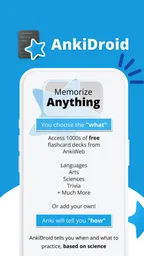
I like AnkiDroid Flashcards most when I treat it not as a quick quiz app, but as a place to build a steady study habit. It is an Android education app from the AnkiDroid Open Source Team, and its central idea is simple: review a prompt, try to recall the answer, then judge how well you remembered it. That makes it useful for language vocabulary, course facts, terminology, and other material that needs to stick beyond the next test.
The appeal is practical rather than flashy. AnkiDroid is free, rated for Everyone, and has a 4.7 average from around 169,000 ratings, with more than 10 million installs. Those figures suggest it has reached a broad audience, but the more important question is whether its way of studying fits you. In my experience, it works best for people willing to make small reviews part of their routine and to shape their own cards with care.
How the study routine feels in everyday use
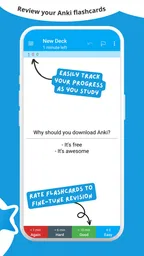
A normal session is built around active recall: I see a question or cue, answer from memory, reveal the card, and assess my response. That small pause before revealing the answer is the point. It makes studying more effortful than rereading notes, but it also helps expose what I can actually retrieve without a hint.
The review schedule is designed to bring cards back over time rather than ask me to repeat everything in one sitting. I can therefore use short gaps in the day—waiting for a bus, standing in a queue, or taking a break between tasks—to clear a manageable set. The best results come from returning regularly; leaving a growing queue untouched can make the next session feel like a chore.
For a realistic example, imagine preparing for a biology quiz while commuting. I might make cards for processes and definitions after class, then review a few during the ride home. A card that asks me to explain a process in my own words is more useful than one that merely asks me to recognize a term. That distinction is easy to miss when creating a deck, but it often determines whether a card tests understanding or just familiarity.
There are many pre-made decks to explore, which can help when I need a starting point or want to see how other learners organize a subject. I would still inspect a deck before relying on it. A ready-made set may use unfamiliar wording, include details beyond my course, or split ideas differently from the material I am expected to learn. Adapting a few cards can be more effective than blindly reviewing a large collection.
Where it stands among study alternatives
Compared with ordinary notes, AnkiDroid asks more of me: I have to retrieve an answer, not simply recognize a highlighted sentence. Compared with a basic flashcard app, its strength is the emphasis on scheduled review and the flexibility to work with varied decks. That flexibility is also its main trade-off. A simpler quiz tool may feel easier for someone who wants to open an app, pick a topic, and start immediately without making choices about card design or study organization.
It is not a full replacement for a textbook, lecture, or worked examples. Flashcards are good at revisiting discrete facts and prompts; they are less suited to teaching a topic from scratch or showing every step in a complicated argument. I use them to strengthen recall after learning the material elsewhere, not as proof that I understand a subject just because I can answer isolated cards.
Making cards that are worth reviewing
One useful habit is to keep each prompt focused. If a card asks for an entire chapter, a long list, and several exceptions at once, it becomes hard to judge whether I knew the answer. Splitting it into smaller questions makes review more honest, though too many tiny cards can create busywork. I aim for one clear idea per card and add context only when the answer would otherwise be ambiguous.
A second practical tip is to make prompts that require a meaningful response. For language study, a bare translation can be less revealing than a short sentence with the target word missing. For a technical subject, asking “what is this?” may encourage rote labeling; asking when a concept applies can test whether I can use it. The right prompt depends on the goal, so I would revise cards that repeatedly feel vague or too easy.
When a card is difficult, I try to diagnose why before adding more study time. Perhaps I forgot the fact, perhaps the wording is unclear, or perhaps the answer contains too much to retrieve at once. Rewriting a confusing card can solve a problem that repeated reviews will not. This is one of the app’s less obvious strengths: the review process can reveal weaknesses in the study material itself, not only in my memory.
Decks, setup, and the learning curve
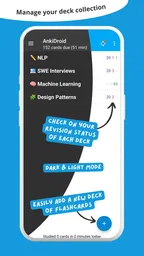
Pre-built decks are convenient, but I would treat them as a resource to assess rather than a promise of a complete course. Look through a sample of cards, check whether the language and level suit you, and remove or edit anything that does not match your goal. If I am following a class, cards based on my instructor’s terms and examples are usually more relevant than a broad deck assembled for a different syllabus.
The app offers more room to organize study than a bare-bones stack of cards, and that can take time to learn. A newcomer may need a little patience to understand how to arrange material and maintain a review routine. I would start with one small subject deck, learn how the daily cycle feels, and only then build a larger system. Beginning with a huge download can make it difficult to tell whether the method suits you or whether the deck itself is the problem.
It is also worth thinking about how you will create cards. Typing a concise question and answer is straightforward, but preparing a large, carefully structured collection takes deliberate effort. AnkiDroid rewards that work over time; it is less satisfying if I expect an app to turn an unorganized set of notes into effective study material automatically. The benefit is control, while the cost is that I remain responsible for the quality of what I review.
What existing users gain—and what can still feel rough
For someone already using flashcards, the main benefit is having a repeatable review routine on an Android device without paying for the app. Existing users can keep refining how they phrase prompts and which material they prioritize. The method does not remove the need to study, but it can make review more deliberate than flipping through a pile of cards whenever there happens to be time.
The app’s depth can be friction for people who prefer a polished, guided course. It does not make every deck equally useful, and the freedom to decide what to study may feel like extra work when a learner wants a fixed lesson path. There is also a real risk of confusing card completion with mastery: quick answers to familiar prompts do not necessarily mean I can explain a topic or apply it in a new setting.
That is why I would not recommend relying on flashcards alone for subjects built around extended reasoning, problem solving, or visual demonstrations. Use them for definitions, steps, and key distinctions, then pair them with practice questions, reading, or hands-on work. If the main goal is guided instruction with a clear sequence of lessons, a course-based learning app may be a better first choice.
What to expect from its development
As an open-source project maintained by the AnkiDroid Open Source Team, the app is shaped by a different model from a tightly packaged commercial course. That makes the project’s identity appealing to users who value a dedicated flashcard tool, but it is not a reason to assume that every part of the experience will suit every learner. I would judge it by the current study workflow and the quality of the decks I use, rather than by predictions about future changes.
I cannot responsibly point to a particular recent release or claim that a specific feature has just changed. For someone deciding whether to install it, the sensible approach is to check the current app-store version and its release notes before updating, especially if a familiar workflow matters to them. Existing users should also keep their study material organized and follow the app’s own guidance when making significant changes; that is a prudent habit with any long-running study collection.
What I would watch for over time is whether the app continues to make its powerful study options understandable to newcomers without losing the flexibility experienced users rely on. Clearer onboarding and smooth handling of large personal collections would matter more to me than adding complexity for its own sake. Those are expectations, not claims about changes already made.
Who I would recommend it to
I would recommend AnkiDroid to Android users who want a free, adaptable way to revisit material and are willing to spend a little time making good prompts. It is a particularly strong fit for language learners, students with recurring terminology to learn, and anyone who benefits from short, repeated recall sessions. Its Everyone age rating makes it broadly accessible, although younger learners may still benefit from help choosing appropriate decks and setting a manageable routine.
I would suggest a different option if you want lessons that teach a subject from the beginning, a highly guided interface, or a study tool that requires almost no setup. I would also avoid importing a giant deck just because it is available. Start with a small, relevant set, review it consistently for a while, and see whether the scheduled recall style helps you remember more reliably than rereading.
My overall view is that AnkiDroid is at its best when I use it as a practical memory tool, not as a complete education system. Its flexibility gives careful learners room to create a study workflow that matches their goals, while its learning curve and dependence on good cards are genuine limitations. If you are happy to shape your own material and return to it regularly, it is a capable, no-cost option; if you want the app to supply the teaching structure, look elsewhere.
What we like
- Create cards with text images audio and LaTeX.
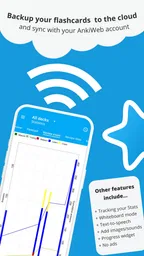
- Sync decks across devices through AnkiWeb.
- Study offline after downloading decks.
- Use spaced repetition to focus on cards due for review.
- Import shared decks and export your own collections.
What could be better
- The interface can feel dated and difficult to navigate.
- Advanced deck settings may confuse first-time users.
- Syncing requires an AnkiWeb account and internet access.
- Large shared decks can take time to download and organize.
- The Android app does not include Anki's desktop editing tools.





