
Aetna Health review
 Analysis by Appsdrops
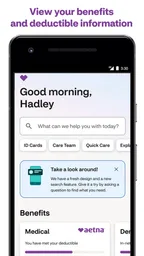
When I need to check a health-plan detail, I want to get to the right information quickly and then get on with my day. Aetna Health is designed for that kind of practical task: it brings health-care management into a mobile app rather than making every errand start with a phone call or a search through paperwork. My overall take is that it makes the most sense as a companion for people who already use Aetna and want a convenient place to handle routine plan-related tasks. It is less compelling as a general health app for someone without an Aetna connection.
Where the app fits into everyday care
This is a free medical app from Aetna Inc, and its purpose is closely tied to managing health care rather than tracking wellness for its own sake. That distinction matters. I would open it when I have a practical question about my coverage or care, not as a replacement for a doctor, a medical record system, or a broad health-tracking app.
A realistic use case is planning for an appointment during a busy week. Instead of waiting until I am at the clinic to wonder whether I have the right plan information, I can make checking the app part of the preparation routine. The useful habit is to look before I leave home, while I still have time to sort out a question or switch to another way of getting help. For time-sensitive decisions, I would not assume that a mobile screen is a substitute for confirming details with the relevant provider or Aetna support.
The app has an average rating of 4.3 from around 110,000 ratings, with roughly 8,700 written reviews and over one million installs. Those figures suggest that many people have tried it, but they do not tell me whether it will work equally well for every plan or situation. Health-benefit apps are especially dependent on the person’s own coverage, so the practical value is likely to vary with how often someone needs to manage Aetna-related matters.
What I would expect from its speed
For an app like this, speed is not just a matter of how quickly it opens. The important question is whether I can reach the relevant information without getting lost in a long sequence of screens. I would judge the experience by a few focused tasks: finding the section I need, understanding what it says, and knowing what to do next. A clean route through those steps is more valuable than decorative motion or extra features I rarely use.
I would also separate the app’s responsiveness from the time it takes to retrieve account-specific information. A screen that depends on a connection or on personal plan details may take longer than a locally stored page. If something seems slow, I would first check whether the phone has a reliable connection and whether the app is fully updated before assuming the service itself is failing. That is a practical troubleshooting step, not a guarantee that every delay has the same cause.
My tip is to avoid saving an important check for the moment it becomes urgent. If I expect to need plan information for an appointment, I would review it beforehand and note any question that remains. This reduces the pressure of trying to interpret a screen in a waiting room, where poor reception, time pressure, or a crowded interface can make even a simple task feel harder.
When use gets more demanding
The app is likely to feel most useful when several health-care errands land close together: preparing for a visit, checking a plan-related detail, and following up afterward. Those are the moments when keeping the relevant information on a phone can save effort. They are also when I would be most careful not to mistake convenience for completeness. If a decision depends on a precise coverage rule or a provider’s current instructions, I would confirm the detail rather than rely on a quick glance alone.
A less obvious workflow is to use the app as a starting point, not the entire process. I can check what I already know, identify the exact part I do not understand, and then ask a more specific question through an appropriate support channel if needed. That approach is better than repeatedly tapping around without a clear goal. It also makes any follow-up conversation more efficient, because I can explain what I checked and what remains unclear.
There is a trade-off here: consolidating health-plan tasks in one place can reduce the need to remember where information lives, but it also makes the app’s usefulness depend on having the right account context and enough time to navigate it. I would not treat it as an emergency-care tool. In an urgent medical situation, contacting emergency services or a clinician is more appropriate than trying to solve the problem through an insurance-management app.
Reliability and sensible recovery habits
For an app handling personal health-care tasks, reliability means more than avoiding a crash. I want the information to be understandable, the path back to a task to be clear, and the app to recover gracefully if I have to leave midway. I cannot judge those qualities solely from a store rating, so my practical recommendation is to test the routine tasks I expect to use while I am not under pressure.
If the app stops responding or a page does not load, I would close and reopen it, check the connection, and try again later rather than repeatedly submitting the same action. If the problem concerns an important account detail, I would use another available way to contact Aetna instead of assuming the issue has resolved itself. For any change or request that matters, I would look for a clear confirmation before considering the task complete.
One useful habit is to keep the phone’s operating system and the app reasonably current. The current version is 7.67.0.561-prod, and the minimum operating-system requirement is version 12. That requirement is worth checking before downloading, especially on an older device. Keeping an app updated can help with compatibility, although it does not ensure that every device or connection will behave identically.
Device limits and who should think twice
The minimum OS requirement of 12 means that some older phones may not be able to install the app. That is a straightforward constraint, but it is important if the phone is an older backup device or if someone is helping a family member manage care from a spare handset. Before planning around the app, I would confirm that the device meets the requirement and that the person who needs it can comfortably read and navigate a phone screen.
The content rating is Mature 17+, so it is not positioned as an app for children to use independently. A parent or caregiver who is helping a younger person with health logistics should make that decision with the age rating in mind and use an appropriate adult account and support process. I would not assume that a family member can access another person’s information just because the app is installed on the same phone; account access and privacy should be handled carefully.
Someone who is not an Aetna member, or who rarely needs to manage plan-related matters, may get little value from installing it. A general health journal, a clinic’s own patient portal, or direct contact with a provider may be a better fit depending on the task. Those alternatives serve different purposes: this app is most relevant when the question is connected to Aetna coverage and care rather than personal fitness, symptom tracking, or a single clinic’s records.
How it compares with the usual alternatives
Compared with calling for every routine question, a dedicated health-plan app can be more convenient when I know what I am looking for and can find it myself. Compared with a provider portal, it serves a different role: a clinic’s system is usually the natural place for appointment-specific communication and records, while Aetna Health is for the member’s relationship with the health plan. I would use the tool that matches the question instead of expecting one app to cover every part of care.
That distinction is especially helpful when a task crosses boundaries. If I need to understand a plan-related matter, I would start here. If I need clinical advice, a diagnosis, or guidance about symptoms, I would contact a qualified health professional. If I need details that only a particular clinic can confirm, I would use that clinic’s channel. The app can make administrative steps easier, but it should not blur the line between insurance information and medical care.
Aetna Health is free to download, which makes trying it a reasonable option for an eligible member. Still, I would judge it by whether it reduces friction in the tasks I actually perform, not by how many times I open it. If the relevant information is easy to reach and the app saves me a call or a paper search, it has earned a place on my phone. If I only need a one-time answer, another route may be simpler.
My performance verdict
As a medical app, Aetna Health is best understood as a practical account companion rather than an all-purpose health platform. Its biggest potential strength is convenience: routine plan-related checks can be handled from a phone, and the app may help me prepare for care instead of scrambling at the last minute. Its main limitation is equally clear: the experience is only useful when the task belongs to Aetna and the information I need is available through the app.
I would recommend it to Aetna members who regularly manage appointments, coverage questions, or other health-plan errands on their phone. I would suggest testing the tasks that matter most before relying on it during a stressful moment, and keeping another way to get help available for anything urgent or unclear. With that expectation, it can be a sensible convenience. Without an Aetna-related need, or on a device that cannot meet the OS requirement, I would choose a more relevant option.
My bottom line: this is worth trying when it matches your plan and your everyday workflow, but I would treat it as one useful route through health-care administration—not as a substitute for a clinician, a provider portal, or direct support when a decision needs confirmation.
What we like
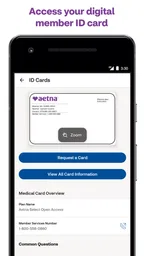
- Member ID cards are easy to access from a phone.
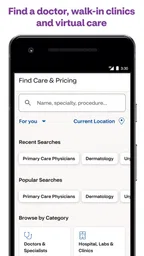
- The app helps users find in-network doctors and facilities.
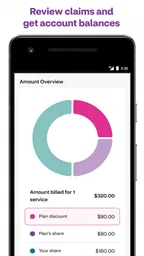
- Claims and plan details are available in one place.
- Members can check their health savings account balance.
- Some plans offer appointment scheduling through the app.
What could be better
- Features vary depending on the member's plan.
- Some services require signing in with an Aetna account.
- Provider listings may not always reflect recent changes.
- Certain claims can take time to appear in the app.
- Some features may redirect users to external websites.





