
AdventHealth review
 Analysis by Appsdrops
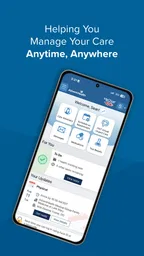
I think of AdventHealth as a practical starting point for handling health care through a phone, rather than as a substitute for a clinician or a universal medical record. It is a medical app from AdventHealth, and its appeal is most obvious when you already interact with that health system and want a more convenient route to care-related tasks. In my view, that distinction matters: a health app is useful when it fits the way you receive care, not simply because it puts health information on a screen.
The AdventHealth app is free and rated for Everyone, so there is no purchase decision or age-restricted framing to consider before trying it. It has an average rating of 4.1 from around 6,700 ratings, with about 2,800 written reviews and over 500,000 installs. Those figures suggest a substantial audience, but they don’t tell me whether it will fit your particular clinic, needs, or routine. The more useful question is whether your care already runs through AdventHealth.
Start with the care you already receive
My recommended first step is to treat the app as an extension of an existing relationship with AdventHealth. Before relying on it for something time-sensitive, install it, open it when you have a few quiet minutes, and see which parts of your care it actually helps you manage. That small trial is more useful than waiting until you are trying to solve a problem in a hurry.
A sensible baseline is to identify the task you expect to do most often, then learn the route to it while you are not under pressure. If you mainly want a convenient way to engage with your health care, make that your first test. If you are looking for general health advice, emergency guidance, or a complete organizer for care from multiple unrelated providers, don’t assume this app covers those needs just because it belongs to the medical category.
That system-specific focus is both its strength and its main trade-off. People who receive care through AdventHealth have a clearer reason to keep the app close at hand than someone whose appointments and clinicians are spread across other organizations. For the latter, a phone’s calendar, a secure notes tool, or a broader health-record option may be a more natural center of gravity.
For a realistic everyday example, imagine you are planning a routine appointment and want to avoid leaving every related task until the day before. I would use the app in advance to become familiar with its available care pathways, then keep any practical reminders in the calendar or system I already check. The benefit is not a dramatic new habit; it is reducing the number of steps between thinking, “I should take care of this,” and knowing where to begin.
Build a routine before you need one
Health apps are easy to install and just as easy to forget. I’d give this one a specific job: be the place I check when I need to interact with AdventHealth, not a screen I open repeatedly hoping for something useful. A clear purpose makes it easier to judge whether it earns a spot on your home screen and whether it is worth keeping after the first few weeks.
One practical habit is to review the app before a planned care interaction, rather than treating it as an emergency tool. If you are preparing for an appointment, use that moment to check what the app makes available and note anything you still need to handle elsewhere. This avoids the common mistake of assuming a provider’s app replaces every phone call, paper instruction, or personal reminder.
I would also keep a separate personal record of details you routinely need to recall, such as questions you want to raise at a visit. That is a workflow suggestion, not a claim about a built-in note feature. It makes the app easier to use as a point of access without depending on it to serve as a complete archive of your health history.
Settings worth checking before relying on it
Rather than turning on every option automatically, I recommend checking the app’s available settings and choosing only what supports your routine. Pay attention to how it handles notifications and account access, if those controls are offered on your device. A health-related alert can be convenient, but it can also appear at an awkward moment on a shared or visible screen, so consider your phone’s lock-screen privacy as well.
It is worth checking that your device is using a screen lock you are comfortable with before placing health-related activity on it. This is general phone hygiene, not a claim about a specific AdventHealth security feature. If other people sometimes use your phone, be deliberate about what they can see and whether you want notifications displayed openly.
The app’s current version is 5.6.15, and it requires iOS 11 or later. I would check compatibility before planning a new routine around it, especially if you keep an older device. Updating the app when an update is available is a sensible maintenance habit, but I would not assume that an update will change which services are available to you or resolve every account-specific issue.
There is also a useful distinction between settings that improve convenience and settings that affect what you actually need from care. A notification preference can help you notice an update; it cannot guarantee that an appointment, message, or other task is handled in the way you expect. For anything important, confirm the next step in the app or through the appropriate AdventHealth contact route rather than relying on a notification alone.
Make common tasks quicker with repeatable habits
Experienced users often get more value by making a small routine repeatable than by hunting for shortcuts that may not exist. I’d keep the app somewhere easy to reach, learn its navigation during a low-pressure moment, and use the same starting point each time. That reduces the mental effort of remembering where to go, without pretending there is a hidden quick-action feature.
If you have a recurring reason to open the app, connect it to an existing habit. For example, check it while organizing the week or preparing for an upcoming care interaction, rather than adding a new daily check-in to your schedule. This keeps the app useful without turning it into another source of routine notifications or unnecessary screen time.
Another small but helpful practice is to decide what belongs in the app and what belongs elsewhere. I would use AdventHealth for tasks connected to AdventHealth, a calendar for dates I need to remember, and a private note for questions I want to ask. That division avoids trying to make one app perform as a calendar, medical reference library, and all-provider record at once.
If you are helping a family member, agree on who will use the app and how you will keep track of follow-up tasks. Don’t assume that installing it on a relative’s phone automatically gives you access to their account or makes shared management straightforward. For a caregiver, clarity about access and responsibility matters as much as convenience; use the appropriate account and consent arrangements for the person receiving care.
Where it fits—and where it does not
Compared with a general-purpose health tracker, AdventHealth is more compelling when your goal is to engage with the provider behind it. A tracker is usually centered on personal habits or measurements; a provider app is most relevant to care connected with that organization. Those are different jobs, and I would not choose one expecting it to replace the other.
It also differs from using a phone calendar and a collection of calls or messages. A calendar is often better for simple reminders and can cover appointments from any provider, while a provider-specific app may be the more natural place to begin when you need to interact with AdventHealth. If you receive care across several systems, however, you may still need a broader personal workflow to keep everything together.
The key limitation is scope. This is not the option I would recommend as a universal health companion for someone who wants broad medical explanations, emergency triage, or one consolidated view of care from many organizations. Nor would I use any provider app as a reason to delay urgent help. For a medical emergency, contact emergency services rather than waiting for an app-based route.
There can also be a learning curve when your expectations are broader than the app’s role. The name and medical focus may make it tempting to expect every health-related task to live in one place. I’d approach it more narrowly: check what it helps you do with AdventHealth, then keep other tools for needs outside that relationship. That expectation makes the experience easier to assess fairly.
Who will get the most from it
I’d recommend giving it a try if you receive care through AdventHealth and want a convenient mobile entry point for that relationship. It is also a reasonable choice if you prefer handling routine planning from your phone and are willing to learn the app before you need it. Its free price makes a trial straightforward, while the Everyone content rating makes it broadly accessible from an age-rating standpoint.
I’d be less enthusiastic if your providers are mostly outside AdventHealth, if you want a single hub for all your health records, or if you are expecting a general-purpose fitness and wellness tracker. In those cases, a calendar, a broader health-record app, or the tools recommended by your other providers may be more useful. You can still keep AdventHealth for care connected to its system, but it may not deserve to be your one health app.
The app was released on June 28, 2019, and its ongoing version history is represented by the current 5.6.15 release. I treat that as context, not a promise that every workflow will suit every user. The important test is still personal: can you reliably find the care-related tasks you need, on the device and account you actually use?
My overall view is that AdventHealth makes the most sense as a focused companion to care from AdventHealth, not as a replacement for a doctor, a complete medical organizer, or a general wellness app. Start by checking its available functions and settings, build one repeatable habit around a real need, and keep a backup route for anything important. If that focused role matches your life, it is worth trying; if you need a provider-neutral health hub, another option will likely serve you better.
What we like
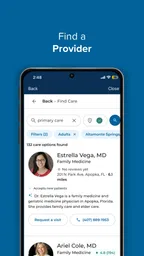
- Find care options and providers through one mobile app.
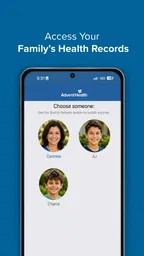
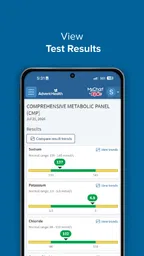
- Access health records and test results in one place.
- Manage appointments without calling the care team.
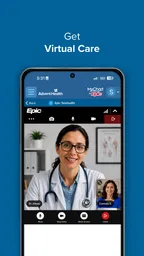
- Use telehealth for eligible visits from home.
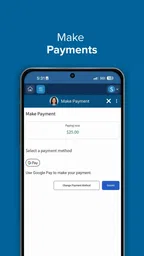
- View bills and make payments through the app.
What could be better
- Some features may require an AdventHealth account.
- Available services can vary by location.
- Certain records may take time to appear.
- Telehealth depends on a stable internet connection.
- The app may be less useful outside the AdventHealth network.





