



ABCmouse: Kids Learning Games review
 Analysis by Appsdrops
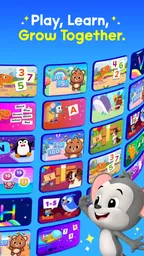
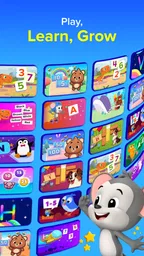
When I think about a learning app for a young child, I care less about how much content it promises than about whether it can fit calmly into an ordinary day. ABCmouse is aimed at children from toddler age through eight, combining early reading and math learning with playful activities. My main impression is that it is best treated as a guided learning space for short sessions, rather than as a quick game to hand over without thought. Its strongest appeal is the breadth of its educational focus; the trade-off is that families should be ready to manage screen time and check whether the app’s pace suits their child.
What the learning experience is built for
This is an education app from Age of Learning, Inc., designed for children who are still building foundational skills. The intended age range is wide enough to cover very different stages: a toddler meeting letters for the first time and an older child practising early reading are unlikely to need the same level of challenge. That makes adult guidance useful, especially when deciding which activity is appropriate rather than simply leaving a child to explore indefinitely.
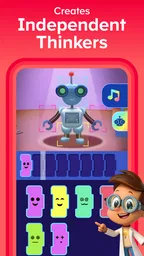
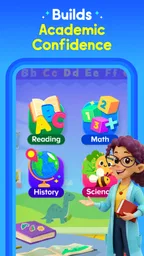
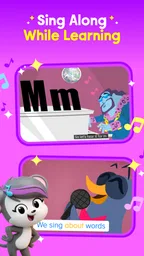
The app’s core mix of phonics, reading, and math gives it a broader role than a single-purpose alphabet game. I see that as a practical advantage for families who want one familiar place for several kinds of early learning. It also means parents should look at the actual activity their child is doing, not assume that every playful interaction is equally suited to every age or learning goal.
ABCmouse is free to download, while in-app purchases range from $3.99 to $104.99 per item. I would check the purchase details in the app store and review the device’s purchase controls before handing a phone or tablet to a child. That is particularly worthwhile when a young user is likely to tap through menus quickly. Its content rating is Everyone, but an all-ages rating does not replace a parent’s judgement about session length, supervision, or whether the material fits a particular child.
The app has a 4.5 average from around 34,000 ratings, with more than five million installs. Those figures suggest that it has found a substantial audience, but popularity alone cannot tell me whether a child will enjoy its style. The more useful test is to try a short, supervised session and see whether the child can stay engaged without needing constant help.
How quickly it fits into a child’s routine
For a child, “fast” often means being able to begin an activity without waiting for an adult to navigate several screens. That is the practical speed test I would use here: can the child reach something appropriate, understand what to do, and move on when attention starts to drift? I would avoid expecting any educational app to work like a simple one-button arcade game. Learning activities need enough explanation and interaction to make the task understandable, and that can feel slower to a child who only wants immediate entertainment.
A useful routine is to choose a small goal before opening the app: practise a few letter sounds, spend a little time on a reading activity, or try a math task together. This limits aimless browsing and gives the session a natural endpoint. It also helps a parent notice whether the child is actually engaging with the learning or just tapping through to reach the next screen.
In a realistic everyday use, I can imagine opening ABCmouse after breakfast while a parent finishes getting ready, or using it during a quiet stretch before dinner. I would keep the adult nearby, set the task in advance, and stop while the child is still content rather than waiting for frustration or restlessness. That approach makes the app easier to fit around family life and reduces the temptation to treat it as a substitute for reading together or hands-on play.
For very young children, the adult’s role is more than choosing an activity. A parent can say the letter aloud, ask the child to find a familiar object that starts with that sound, or connect a counting exercise to toys on the floor. Those small follow-ups turn screen time into a bridge to real-world practice. They are also a sensible way to check that the child understands what the activity is teaching.
When a session gets busy
Longer use is a different test from opening the app for a quick activity. A child may move between reading and math, lose interest, ask for help, or want to repeat something familiar. I would plan for those changes rather than assume that a single session will hold attention from start to finish. Breaking use into brief visits gives a parent more chances to redirect the child and makes it easier to end on a positive note.
One non-obvious trade-off of a broad learning app is that choice can help one child and distract another. A confident child may enjoy deciding what to try; a child who is easily overwhelmed may do better when an adult points to one activity and keeps the rest out of the conversation. If browsing becomes the main event, simplifying the session is more useful than encouraging the child to explore every available option.
I also would not judge progress by how long a child stays in the app. A short activity followed by a conversation, a picture book, or counting real objects can be more meaningful than an extended stretch of tapping. For a child who wants to repeat the same task, repetition can be reassuring, but it is worth checking whether they are practising the skill or simply enjoying a familiar sequence.
As with any app used by young children, heavy use can expose ordinary frustrations: a child may tap faster than a screen can respond, lose track of what they were doing, or need an adult to help them settle back into the activity. I would keep sessions supervised and avoid relying on the app as the only plan for keeping a child occupied. If a moment feels rushed, closing the session and returning later is often better than turning a minor interruption into a struggle.
Reliability and getting back on track
I would approach reliability in practical terms: does the app open when needed, can the child follow an activity, and can an adult help them resume after an interruption? I cannot responsibly promise that every device or session will behave identically. The version listed is 1.73.0, and the app was released on February 14, 2025; those details help identify the product, but they do not guarantee a particular loading speed or uninterrupted performance on every device.
For a smoother routine, I would open the app before the child’s planned session and make sure the device is ready. That simple habit avoids discovering a delay at the exact moment a child expects to start. If the app is interrupted, I would calmly reopen it and guide the child back to a suitable activity instead of assuming they will remember where they left off. This is especially helpful for younger users who may not yet manage navigation independently.
A parent can also make recovery easier by keeping the session goal simple. If a child gets distracted or needs to stop, it is less disruptive to return later to one clear task than to expect them to reconstruct a complicated plan. I would treat the app as a flexible practice tool, not as a strict lesson that has to be completed in one sitting.
For families comparing it with a basic phonics game, the difference is scope. A narrowly focused alternative may be simpler to start and easier to use for one specific skill. ABCmouse is more appealing when a family wants reading and math activities in the same learning environment and is willing to guide a child through the choices. A paper book, flash cards, or counting objects around the home can be better when the goal is a screen-free activity or when a child needs direct conversation rather than an on-screen task.
Device fit and family setup
The listed minimum operating-system requirement is 7.1. Before installing, I would check the device’s operating system and make sure there is enough room for normal app use, particularly if the device is already busy with other children’s games and media. I would not assume that meeting the minimum requirement automatically means every newer activity will feel equally smooth on an older device; age and general condition can affect the experience.
Performance matters most when it interrupts a child’s attention. A brief pause can be manageable with an adult present, while repeated delays can make an otherwise suitable activity frustrating. If the device feels sluggish in other apps too, I would not blame ABCmouse alone. Closing unused apps and restarting the device are reasonable first steps before deciding that the learning app itself is a poor fit.
For families with one shared device, it helps to decide in advance when the child can use it and what the session is for. That avoids the app becoming a default response whenever a parent needs a few minutes. It also gives caregivers a chance to check the in-app purchase settings and choose an appropriate activity before the child begins. These are small setup steps, but they matter more with a young audience than they would with an independent adult user.
The app’s age range is another reason to assess fit rather than rely on a label. A toddler may need an adult to sit alongside them, while an older child may be ready to explore more independently. If a child is already confident with the skills offered, or becomes bored by the way activities are presented, a more targeted learning resource or a real-world activity may be a better match. Likewise, families seeking a completely screen-free routine should skip this option rather than try to make it serve a purpose it was not built for.
Who I would recommend it to
I would consider ABCmouse for parents who want a flexible collection of early learning activities and are comfortable staying involved. It is particularly sensible for a household that wants to alternate between reading practice and basic math without switching between several unrelated apps. The best results are likely to come when an adult chooses a manageable activity, watches how the child responds, and connects the screen lesson to conversation or play afterward.
I would be more cautious if a child becomes distressed by transitions, struggles with touch-screen choices, or tends to keep tapping long after they have stopped paying attention. In those cases, a short book, a one-skill activity with fewer choices, or a parent-led game may work better. The same applies if the family’s priority is a completely offline routine: this app can support learning, but it cannot replace the social and tactile parts of early childhood practice.
My performance verdict is measured rather than dramatic. The product is designed for a broad early-learning role, and its range can be useful, but the quality of the experience depends on the device, the child’s age, and how thoughtfully the session is managed. I would start with a brief trial, check whether the child can stay focused on one activity, and keep an adult available to help with navigation and transitions.
Overall, I see it as a worthwhile option for families who want guided digital practice in reading and math, not as an automatic solution for every child or every quiet moment. Its free download makes it easy to consider, while the in-app purchase range makes checking the purchase controls a sensible part of setup. If your child enjoys structured screen activities and you are willing to shape how they use them, it may earn a place in the routine; if simplicity, offline play, or a single tightly focused skill matters more, a different approach may suit you better.
What we like
- Lessons cover reading math science and art for young learners.
- Activities combine games videos books and puzzles.
- Progress tracking helps parents follow a child's learning.
- Multiple child profiles support families with siblings.
- A parent dashboard makes it easier to manage learning time.
What could be better
- A paid subscription is needed for full access.
- The large activity library can feel overwhelming at first.
- Some activities require an internet connection.
- The app may use significant storage as content is downloaded.
- Older children may find the lessons too easy.





