



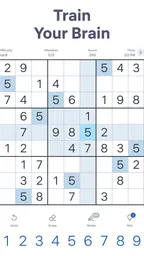


Sudoku.com - Sudoku Puzzle review
 Analysis by Appsdrops
I turn to Sudoku.com when I want a puzzle that gives my attention something to do without demanding a long setup or a complicated rulebook. It takes the familiar number-placement format and keeps the focus on solving: scan the grid, work out what can go where, and make progress at a pace that suits the moment. As a free puzzle game from Easybrain, it is an easy one to try, though its in-app purchases mean “free” does not necessarily describe every optional purchase a player may encounter.
A familiar grid, shaped for everyday play
The central appeal is also the game’s main constraint: this is Sudoku, not a broader collection of logic puzzles. If you already enjoy eliminating possibilities and spotting patterns, the format is immediately understandable. If you are looking for a story, changing objectives, or a stream of different puzzle types, this is unlikely to hold your interest for long.
I find that distinction useful when deciding whether to install it. Sudoku.com is best treated as a focused place to play number puzzles, whether you are new to the genre or already comfortable with its basic rules. The store description frames it as a way to exercise logic, but I would think of that as an appealing side effect rather than a promise of measurable improvement. The enjoyment comes from solving, not from a claim that a few grids will transform your skills.
The game sits in the puzzle category and is rated for Everyone, so it is suitable for a broad audience in terms of age classification. Its simple premise makes it approachable, but Sudoku itself can still be demanding: a difficult grid asks for patience and careful reasoning, not quick reactions. That makes it a better fit for a quiet break than for someone who wants constant action or a game that can be played without much concentration.
Sudoku.com has an average rating of 4.7 from around 2.5 million ratings, with roughly 87,000 written reviews and over 100 million installs. Those figures suggest that it has reached a large audience, but popularity does not settle the personal question: the right difficulty, pace, and play style matter more than how many people have downloaded it. I would choose it because the core activity suits me, not because a big audience guarantees a perfect match.
Why the straightforward approach works
Compared with a paper book, an app makes it easier to start a puzzle whenever a spare moment appears, without carrying a pencil or eraser. Compared with a general brain-game bundle, this one keeps its attention on Sudoku rather than asking you to switch between unrelated challenges. That focus is a strength if you want to build a regular solving habit; it is a limitation if variety is what keeps you engaged.
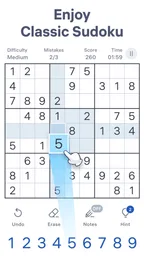
A practical way to play is to begin by scanning rows, columns, and boxes for numbers that are nearly complete, then narrow down possible placements rather than guessing. On a phone, the grid can feel more crowded than a printed page, so I would take an extra moment to check the full row, column, and box before entering a number. That small pause helps avoid the familiar frustration of making a confident-looking move that creates trouble several steps later.
What the version history can and cannot tell you
The game was released on November 26, 2017, and its current version is 7.10.0. That gives a useful sense of its age and present release state, but a version number alone does not tell me which screens, controls, or puzzle options have changed over time. I would not treat it as evidence of a particular new feature or a complete redesign.
For someone who has played before, the practical question is whether the current build still feels comfortable for their routine. A version update can matter when an app changes how familiar tasks work, but I would judge this game by the actual solving experience after updating: whether the grid remains easy to read, whether number entry feels dependable, and whether the pace fits the way I like to play. Those are the details that affect an existing player far more than the release number by itself.
For a new player, the version is mainly a reminder to check that their device can run the current app. The listed minimum operating system is version 8.0, which makes the requirement clear for older devices, though compatibility can still depend on the device and its software. The game is free to download, with in-app purchases listed at $2.49 to $14.99 per item. I would approach those as optional spending choices, not as a reason to assume that every useful part of solving requires a purchase.
Making a short session count
One realistic use is a commute or waiting-room break. I might open a puzzle while waiting for an appointment, solve a few placements, and put the phone away when my turn comes. Sudoku works well in that setting because the player can think through a grid at their own speed; it does not rely on reflexes or a rapid sequence of actions. The trade-off is that a complex puzzle may be awkward to resume mentally after an interruption, so I would choose a manageable challenge when I know I will only have a few minutes.
Another good routine is to use one puzzle as a deliberate pause between tasks. Rather than opening the game every time I have a spare second, I would set aside a short break and work through the grid attentively. That approach makes it easier to enjoy the logic without turning the session into distracted tapping. It also helps set realistic expectations: a Sudoku is not always a quick win, and some boards naturally take more thought than others.
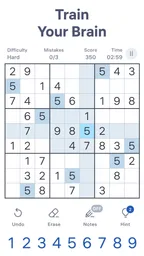
If I am stuck, I try not to fill the grid with guesses just to keep moving. I revisit the rows, columns, and boxes where a number has the fewest possible locations, then check whether one placement rules out candidates elsewhere. This is a useful habit in any Sudoku app, and it is particularly relevant on a small screen, where it is easy to overlook a relationship across the grid. The game is most satisfying when I can explain to myself why a number belongs in a cell.
Where it may not be the right choice
The strongest reason to skip this game is simple: you may not like Sudoku. If you prefer word puzzles, spatial challenges, or games with a clear narrative and changing goals, a dedicated number-grid app will feel narrow. Even among Sudoku players, people who mainly enjoy solving on paper may prefer a larger physical grid they can annotate freely. A phone is convenient, but it does not automatically offer the same comfort as a book and pencil.
There is also a difference between wanting a relaxing game and wanting an effortless one. Sudoku can be calming because it moves at a measured pace, but a challenging puzzle still asks you to hold several possibilities in mind. If you are tired or distracted, that can feel like work rather than a break. I would choose a lighter activity when I want to switch off completely, and save Sudoku.com for moments when I am willing to focus.
Players who want a broad training program may also find the single-puzzle focus restrictive. A collection of different logic games is a better fit if variety matters more than repeated practice with one format. Conversely, if your aim is to become more comfortable with Sudoku specifically, staying with one familiar style can be more useful than constantly changing rules. The right alternative depends on what you want from a break, not on which app claims to do more.
Small choices that improve the experience
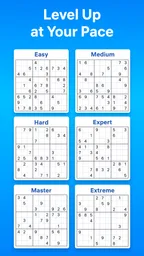
I would start with a puzzle that feels comfortably solvable rather than choosing the hardest option just to prove a point. Easy grids are good for learning how to scan systematically; more demanding ones reward patience and a willingness to revisit earlier deductions. If the game offers a choice of difficulty in the version you use, treat it as a way to match your current attention level, not as a badge of skill. This keeps a brief session pleasant and gives a longer session room to stretch.
It also helps to make each entry intentional. Before tapping a number, check that the same digit is not already in its row, column, or box, then look for what the move makes possible elsewhere. This habit reduces avoidable mistakes and turns the screen into a reasoning aid instead of a place to enter guesses. When I cannot see a justified move, I take that as a cue to rescan rather than force progress.
For someone deciding whether the cost is manageable, the key point is that the game is free to download while optional in-app items have listed prices ranging from $2.49 to $14.99. I would check the purchase prompt carefully before confirming anything, especially if a child is playing on a shared device. The Everyone age rating describes the intended content classification; it does not remove the need for a household to manage purchases in the way that suits them.
What I would watch as a returning player
When returning after a break, I would first see whether the current build still suits my device and whether the board remains comfortable to use. Then I would play a low-pressure puzzle before committing to a long session. This is a better test of day-to-day fit than assuming that a newer version must have changed the experience in a particular way. The useful evidence is what I can actually see and how smoothly I can solve.
I would also keep an eye on whether the game continues to serve the purpose I installed it for. If I use it for a focused pause, a simple, familiar Sudoku experience may be exactly enough. If I start wanting variety, deeper instruction, or a different way to record possibilities, that is a sign to compare it with another Sudoku app or return to paper rather than expecting this one title to cover every preference.
Overall, I recommend Sudoku.com to anyone who wants a convenient, dedicated Sudoku game and is happy to spend a break thinking through one grid at a time. Easybrain’s title has broad reach, a free starting point, and a clear focus, while its narrow scope and the effort Sudoku demands are worth considering before you install it. I would keep it on my phone for patient, self-paced puzzle sessions; I would choose something else when I wanted a wider mix of games or a completely effortless way to unwind.
What we like
- Offers multiple difficulty levels for beginners and experienced players.
- Daily challenges provide a reason to return and practice regularly.
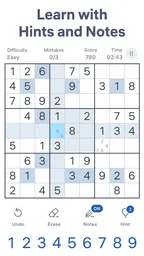
- Notes help track possible numbers in each empty cell.
- Hints can help players move past a difficult puzzle.
- Offline play makes it convenient without an internet connection.
What could be better
- Some features may require watching ads or making in-app purchases.
- A hint can reveal too much and reduce the challenge.
- The small grid may be difficult to use on compact screens.
- Frequent ads can interrupt the flow of play.
- No multiplayer mode is available for competitive play.







