
Arrow Puzzle: Tap Puzzle Games review
 Analysis by Appsdrops
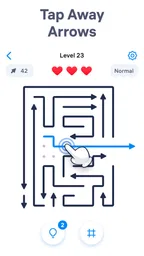
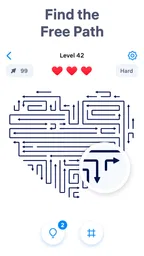
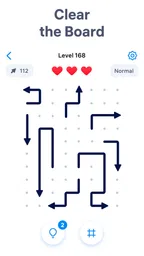
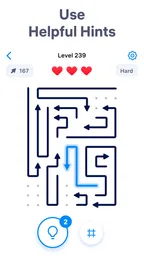
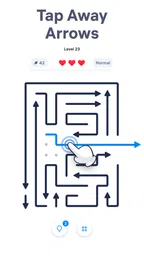
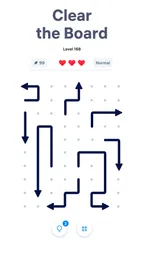
I like puzzle games that give me one clear problem to think through rather than a long set of instructions. Arrow Puzzle: Tap Puzzle Games is built around that kind of decision: arrows fill a maze-like arrangement, and I tap them in an order that lets them escape. The idea is easy to grasp, but the interesting part is working out which arrow is actually free to move and which one is blocked by the others.
That makes this a tidy fit for brief play sessions. I can look at a crowded layout, pause to trace a route, and make a move without needing to remember a complicated story or a collection of controls. Its main appeal is not a sprawling set of puzzle mechanics; it is the small, satisfying act of turning a tangled arrangement into a sequence of sensible choices.
One simple rule turns the board into a planning puzzle
The central capability is the arrow-based escape mechanic. Each tap is a commitment to a direction, so I have to consider what lies in the way before moving. The board is not merely a picture to clear at random: the arrows’ positions and orientations are clues to the order in which I should act.
In practice, I start by looking for an arrow with a clear path out. Removing it can open space for another, while tapping an obstructed arrow too soon may not help me make progress. That creates a useful little loop: scan the layout, spot a likely first move, then check how it changes the choices still on the board.
The best part is that planning happens in the puzzle itself. I do not need to learn a large rulebook before the challenge begins. The visual arrangement supplies the problem, and the arrows give me a direct way to test my reading of it. When I solve a layout, the reward comes from recognizing a sequence rather than from memorizing a long combination of controls.
This is a different sort of mental exercise from a word puzzle or a classic number grid. Those ask me to work with clues, vocabulary, or repeated numerical constraints. Here, I am thinking spatially: which direction is open, what is blocking it, and what will become possible after a move? If that kind of visual reasoning is appealing, the basic concept has a clear draw.
How I approach a crowded layout
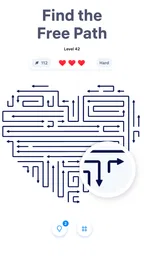
When several arrows appear to have possible exits, I find it more useful to trace their paths than to tap quickly. I follow each arrow’s direction with my eyes and check whether another part of the arrangement seems to obstruct it. That simple pause helps me distinguish a genuinely open move from one that only looks promising at first glance.
A practical habit is to identify the most constrained arrows first. If an arrow has only one apparent route, I check whether another arrow is preventing it from taking that route. Then I look for a move that could remove that obstruction. This is not a guarantee that I have found the correct order, but it makes the board feel like a small planning problem rather than a guessing game.
I also try not to treat every tap as an equally good experiment. In a puzzle built around clearing arrows, a move matters because of the space and options it leaves behind. Before tapping, I ask myself what I expect the board to look like afterward. Even when my prediction is wrong, that question gives me a clearer reason to reconsider the layout instead of repeating the same kind of move.
For a quick session, I would use the game as a focused break: open a puzzle, give it my attention, and stop when I have solved it or need a fresh look. It suits a short wait or a pause between tasks better than an activity that demands a long, uninterrupted stretch. The one-board-at-a-time quality also makes it easy to return to the central challenge without having to reacquaint myself with a plot.
Why the arrow mechanic works especially well in short breaks
Imagine having a few minutes before leaving home. I could open a puzzle, scan the arrows while waiting, and use the first moments to plan a likely sequence. If the arrangement takes longer than expected, I can still spend that time thinking through one particular obstruction instead of needing to settle in for a lengthy session. The game’s premise supports that stop-and-start rhythm naturally.
It can also be a good choice when I want something more active than passive scrolling but do not want a high-pressure game. The challenge comes from observation and order, not from reacting to a fast-moving scene. That makes it easier to play at my own pace, although I still need to give the board enough attention to notice how its pieces relate.
For someone who enjoys explaining a solution aloud, the mechanic offers a neat way to talk through the reasoning: “That arrow needs this route clear first.” It is a small benefit, but it makes the puzzle understandable to a friend who has not played before. The board itself is the conversation starter; there is no need to explain an elaborate backstory before sharing the challenge.
Where it differs from familiar puzzle alternatives
Compared with a traditional jigsaw puzzle, this is less about assembling a finished image and more about sequencing moves. Compared with a sudoku-style game, it asks for less symbolic calculation and more attention to direction and obstruction. And compared with word games, it does not depend on vocabulary. I would choose it when I want to reason about space, not when I am in the mood to decode clues or build a word list.
That focus is also a limitation. If I want a puzzle game that continually changes its central rule, tells a substantial story, or gives me a broad variety of activities, the arrow-escape idea may feel narrow. Its strength is the clarity of its main interaction, and that same clarity means the experience is best for players who are happy to revisit one kind of spatial challenge.
There is another trade-off: visual puzzles reward careful inspection, but they can become frustrating if I am tired or playing while distracted. A layout that seems obvious when I am focused may be harder to read when I am glancing at my screen between other tasks. I would rather slow down and inspect the directions than assume that a quick tap will always reveal the answer.
What to expect from the game and its cost
Easybrain developed the game, and it sits in the puzzle category. It is free to download, with in-app purchases listed from $1.99 to $99.99 per item. That gives me a no-cost way to try the core idea, but the purchase range is worth keeping in mind if I prefer to avoid optional spending. I would check any purchase screen carefully before confirming a transaction.
Its audience figures suggest that the concept has reached a wide player base: it has over 100 million installs, and its average rating is 4.8 from around 1.7 million ratings. Those figures do not tell me whether I personally will enjoy tracing arrow paths, but they do indicate that this is an established mobile puzzle rather than an obscure experiment. It has around 6,900 written reviews as well, though I would still judge the game by whether its central mechanic suits me.
The game is free and carries an Everyone age rating, which makes it broadly approachable for families looking for a straightforward visual puzzle. That does not mean every child will enjoy careful sequencing, of course. I would expect a player to be comfortable looking closely at the board and thinking about how one move affects another; younger players may find it more engaging when someone talks through the first few decisions with them.
The listed release date is November 14, 2025, and the current version is 1.13.0. It requires Android 8.0 or later. If I am considering installing it on an older Android device, checking the device’s operating-system version first is a sensible step. The available details here identify Android compatibility, so iPhone and iPad users should check their own app store before assuming availability on their device.
Small habits that make the puzzles less frustrating
My most useful tip is to separate “an arrow that looks open” from “an arrow whose path is actually clear.” Following the direction carefully before tapping can prevent a rushed choice. If I am stuck, I revisit the arrows that seem most blocked and ask what would have to move first; that often gives me a more productive starting point than scanning every arrow equally.
I also find it helpful to take a brief visual reset when the board stops making sense. Looking away for a moment and returning to the arrangement can make its directions easier to see. That is especially useful during a short break, when I may have opened the game in the middle of another task and brought my attention with me. The puzzle does not become easier by tapping faster; a fresh look is often the better move.
For parents or friends introducing the game to someone new, I would explain the goal through one board rather than describing a strategy in advance. Let the player spot a possible route, then ask what might be blocking it. This keeps the interaction approachable while letting the player discover the logic themselves. It is a more natural introduction than turning a simple puzzle into a lecture.
Who will enjoy it, and who may want something else
I would recommend Arrow Puzzle: Tap Puzzle Games to people who like compact, visual brainteasers and enjoy planning a sequence before acting. It is particularly suitable for players who want a low-pressure activity they can pick up in a spare moment and who prefer spatial reasoning to word clues or number-heavy challenges. The best match is someone who finds it satisfying to inspect a layout and gradually uncover a workable order.
I would steer away from it if I wanted a large variety of puzzle formats, a deep narrative, or a game that rewards rapid reactions. A dedicated sudoku game is a better fit for someone who wants number-based deduction; a word puzzle is better for someone who enjoys language. And if I am looking for an experience to occupy a long evening with changing systems, this focused arrow mechanic may not provide enough variety on its own.
Overall, I find the game’s appeal refreshingly easy to explain: read the directions, work out what is in the way, and choose a sequence that clears the board. The design makes a good use of a simple idea, especially when I have only a few minutes to spare. Its narrow focus is real, so it will not replace every kind of puzzle game, but for a quick exercise in visual planning, it is an easy one to try.
What we like
- Easy-to-understand tap controls make it accessible to new players.
- Short levels suit quick play sessions.
- Arrow layouts offer a clear visual goal.
- Gradually harder puzzles provide a steady challenge.
- The minimalist presentation keeps attention on solving each board.
What could be better
- Some puzzles may feel repetitive after extended play.
- Later levels can require trial and error.
- Small arrows may be harder to distinguish on compact screens.
- Mistaps can disrupt a carefully planned move sequence.
- Progress may feel slow for players seeking fast-paced action.







