


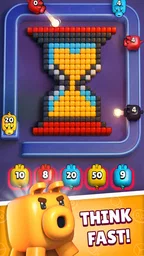



Pixel Flow! review
 Analysis by Appsdrops
I can see why a game called Pixel Flow! might earn a spot on someone’s phone: it promises a focused puzzle experience, something easy to pick up when there’s a spare moment. But the real test is not whether it feels appealing at first. It’s whether its puzzle-making stays satisfying after the novelty wears off, and whether it asks for more attention, time, or spending than I want to give it.
Pig’s Pops! is the store summary for this puzzle game from Loom Games A.Ş. It’s free to install, rated for Everyone, and has drawn a sizable audience, with more than ten million installs and an average rating of 4.5 from around 248,000 ratings. Those figures make it look like a well-established choice in mobile puzzles, though popularity alone can’t tell you whether its particular style suits you. My main recommendation is to approach it as a casual game to try, then judge it by how enjoyable its moment-to-moment puzzles remain for you.
How the first week is likely to feel
The appeal of a compact puzzle game is usually strongest in the first few sessions. You open it during a break, work through a challenge, and get the small satisfaction of bringing order to a screen. That rhythm is a natural fit for people who want an activity that feels more engaging than scrolling but less demanding than starting a long game. I’d try it in short visits rather than expecting a deep, uninterrupted session straight away.
In the puzzle genre, the closest alternatives tend to fall into two camps: games built around quick, repeated rounds, and those that emphasize longer problems requiring sustained thought. Pixel Flow! is best considered for the former kind of routine if you’re looking for something to dip into. If you prefer a puzzle that gives you a substantial challenge to solve in one sitting, a dedicated logic or word game may be a better match. The distinction matters because a pleasant five-minute habit and a demanding evening game serve different moods.
The early question I’d ask is whether the basic puzzle interaction feels clear and satisfying, not whether I can race through content. A useful test is to stop after a short session and notice whether I want to return because I’m curious, or merely because the game has made it easy to continue. That difference helps separate genuine enjoyment from the momentum of tapping through one more round.
Its audience figures suggest that many players have found a reason to try it, but they don’t guarantee that everyone will connect with it. The game has around 8,700 reviews as well as its large pool of ratings, which gives prospective players more user feedback to consider in the app store. I’d still treat ratings as a starting point: puzzle preferences are personal, and a popular game can be a poor fit if its pace or style doesn’t match yours.
Make the first sessions a fair test
For a better read on whether it belongs in your routine, play when you have a little breathing room rather than while distracted by several other tasks. If I try a puzzle while replying to messages or watching something, a mistake can feel like the game’s fault when I simply wasn’t paying attention. A few focused, brief sessions are a more useful test of the game’s own appeal.
I’d also avoid turning the first day into a marathon. Short visits make it easier to tell whether the game’s central activity holds up, and they reduce the chance that any casual puzzle starts to feel repetitive before you’ve decided whether you actually like it. That’s especially helpful if you’re choosing among several free games: sample each at a sensible pace instead of letting the one with the most immediate pull consume all your time.
What keeps a puzzle game worth revisiting
After the initial curiosity, recurring value depends on whether the game continues to fit the player’s day. I find casual puzzles most useful as a small transition: a few minutes while waiting, a short reset between focused tasks, or a low-effort activity before putting the phone away. In those situations, the game doesn’t need to replace a larger hobby. It needs to offer a pleasant, self-contained break without making the break harder to end.
That last point is important. A game can be enjoyable and still be a poor choice for someone trying to keep screen time in check. I’d decide before opening it whether I have time for one short visit, then stop when that window is over. This is a practical way to preserve the appeal of a casual puzzle: the game stays a small treat rather than becoming the default response to every idle moment.
If Pixel Flow! continues to make you think a little while remaining easy to return to, it may earn regular use. If you find yourself opening it automatically but no longer enjoying the puzzles, that’s a sign its habit is surviving longer than its value. I’d be comfortable deleting it or taking a break in that situation; a free game still spends your attention, and keeping it installed should feel worthwhile.
There’s also a useful distinction between replay value and routine value. Replay value means you want to return because the game remains interesting. Routine value means it happens to be convenient. The strongest fit is when both are present: you enjoy the puzzles and they slot naturally into a spare moment. If convenience is doing all the work, another activity—reading a few pages, taking a walk, or simply resting your eyes—may be a better use of that pause.
Keep the cost and commitment in perspective
The game is free to install, with in-app purchases listed from $1.99 to $99.99 per item. That range is worth keeping in mind before spending, especially because a casual puzzle can make small purchases feel like an effortless way to keep playing. I’d first decide whether the free experience is enjoyable on its own and set a spending limit before considering any optional purchase. If you don’t want to spend at all, treat that as a firm choice rather than revisiting it whenever you feel impatient.
For families, the Everyone content rating makes the game broadly suitable by age classification, but that isn’t the same as a judgment about screen habits or spending. If a child uses it, I’d discuss purchases and set device-level limits as appropriate. The purchase range makes that conversation more useful than assuming a free download can never lead to spending.
One practical way to protect its value is to use it only for a defined purpose: a quick puzzle break, not an open-ended filler for every quiet moment. That gives you a clear standard for deciding whether to keep it. If you finish a session feeling refreshed or pleased with a problem solved, it’s doing its job. If you mainly feel pulled into another round without much satisfaction, it may be time to move on.
Maintenance, friction, and fatigue
Maintenance for a mobile game is less about chores than about keeping an eye on whether it still suits your habits. The current version is 0.38.2, and it requires Android 6.0 or later. Those details matter if you’re checking compatibility on an older Android device, but they don’t by themselves tell you how smoothly it will run on every phone. I’d make sure the device has room for the game and judge performance on the device I actually plan to use.
On iOS, or on any platform where you’re considering installing it, check the relevant app store for the version and compatibility details shown for your device. I wouldn’t assume that an Android requirement automatically answers questions about another platform. That small check is more useful than downloading first and finding out that the game doesn’t fit your device or preferences.
The ongoing burden is also about attention. Casual games can quietly become a reflex, especially when they’re easy to open and close. I’d keep notifications and other prompts in perspective if they interrupt you, and use the phone’s controls to limit distractions where needed. I’m not claiming a particular notification system here; the point is simply to notice whether the game is helping you take a break or repeatedly pulling you away from something you meant to do.
Fatigue can come from repetition even when a puzzle is pleasant at first. If the core action starts to feel automatic, take a few days away rather than forcing yourself to keep playing. Returning later gives you a cleaner test of whether the game still feels fresh. If it doesn’t, there’s no need to maintain a daily streak or invent a reason to keep it installed; a puzzle should earn its place through enjoyment, not obligation.
Who should choose something else
I’d steer away from this kind of casual puzzle if you want a narrative, a strong sense of progression, or a game designed for long, involved sessions. A more substantial strategy or adventure game would better satisfy that appetite. Likewise, if you’re trying to remove quick phone distractions, installing another easy-to-open game may work against your goal, even if the game itself is harmless and appropriate for a wide audience.
Players who dislike optional spending in free games should be cautious rather than assuming that every part of the experience will be equally appealing without purchases. The listed purchase range is broad, so I’d make a deliberate choice to play without spending or set a limit in advance. If the game only feels worthwhile when you pay, it isn’t the right value for you.
By contrast, it is a reasonable candidate for someone who likes small puzzles, wants a free game to sample, and is happy to keep sessions brief. Its large player base and strong average rating are reassuring signals of broad appeal, but they are not a substitute for checking whether the actual puzzle rhythm suits you. I’d give it a fair trial, then keep it only if it continues to be a welcome break rather than a reflex.
My long-term verdict
Pixel Flow! is worth a try if what you want is a casual puzzle game that can occupy a spare moment. Its free entry point makes sampling easy, and the game’s audience suggests it has found substantial interest. I’m less persuaded by popularity as a reason to keep playing than by a simple question: after several visits, do I still enjoy solving its puzzles?
My advice is to give it a few short sessions, pay attention to whether the play itself remains satisfying, and decide early how you want to handle optional purchases. Keep it if it adds a small, enjoyable pause to your day. Take a break or uninstall it if the novelty fades and habit is all that remains. For me, that is the fairest standard for whether any casual game earns lasting space on a phone.
What we like
- Easy-to-learn rules make it approachable for new players.
- Short stages work well for quick play sessions.
- Pixel-art visuals give the game a distinct look.
- Increasing difficulty provides a steady challenge.
- The puzzle format encourages planning before each move.
What could be better
- Later stages may feel repetitive to some players.
- Mistakes can make certain puzzles frustrating to solve.
- The game may require patience as challenges grow harder.
- Small details can be difficult to see on compact screens.
- Frequent play may reveal limited variety in the core gameplay.







