





Loop Sort review
 Analysis by Appsdrops
I can see Loop Sort working best as a small, shared-device diversion: one person hands over the phone, the next takes a turn, and the appeal is in trying to keep a simple sorting task under control. Its puzzle premise is easy to explain, which matters when someone is waiting for a ride or a household has a few spare minutes before dinner. I like games that do not require a long introduction, and this one’s truck-to-conveyor setup gives new players an immediate idea of what they are doing.
That simplicity does not make it a deep group game, though. Each person is still playing a solo puzzle on the same device rather than collaborating inside a shared session. As a free puzzle game from VOODOO, it is an approachable option for casual turns, but I would not choose it when the main goal is conversation, cooperative play, or a structured family activity.
Passing the phone makes sense for quick turns
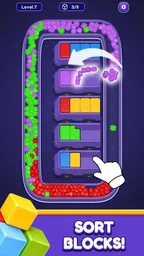
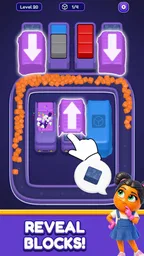
The central task is to send cubes from a truck onto a conveyor and sort them. The one-tap approach keeps the interaction direct: you can focus on the order and flow of the pieces instead of learning a long list of controls. In my view, that makes the game especially suitable for short turns between other activities. A player can try a run, pass the phone, and let someone else have a go without needing to explain a complicated control scheme.
For a household, the useful distinction is between sharing the device and sharing progress. Passing a phone can make the game feel social, especially when players compare how they handled a tricky moment, but it does not turn the puzzle into a team challenge. I would treat each turn as an individual attempt and agree beforehand who is playing, rather than assuming the game manages turns or keeps separate household profiles.
A practical example: during a quiet stretch in a waiting room, one person can play while another watches for a moment when the conveyor becomes difficult to manage. Then they can swap. That works because the premise is visible on screen and the basic interaction is easy to pick up. It is less suitable if you need a game that can be put down mid-task without losing a train of thought; even a simple sorting puzzle asks the player to pay attention to the moving pieces.
The strongest shared-use feature is its low explanation burden, not any built-in family coordination. I would keep the phone in one person’s hands at a time and make the handoff clear. That avoids confusion over whose attempt is underway and helps prevent a casual game from becoming an argument about who changed something. The game can provide the activity, but the household still supplies the rules for sharing.
What the sorting loop asks of you
Although the controls sound simple, the puzzle depends on noticing how the cubes move through the available route. A useful habit is to look at the conveyor before tapping rather than reacting to every cube as soon as it appears. That small pause helps you think about what is already in motion and whether the next action will make the flow easier or more crowded. It is a more reliable approach than tapping quickly just because the controls allow it.
Another practical tip is to treat each attempt as a chance to learn the rhythm, not just to chase a better result. When a sequence goes wrong, remember which decision created the bottleneck. On the next try, changing that one decision can teach you more than repeating the same frantic pattern. This is a useful way to share the game with a younger or less experienced player, too: offer a question such as “What is coming next?” rather than taking over the phone and solving it for them.
That advice also points to the game’s main limitation. A one-tap puzzle can become repetitive if you want varied mechanics, a longer narrative, or a large set of different ways to play. Loop Sort is built around a narrow action, so its enjoyment depends on whether you find that action satisfying. If you prefer puzzles that involve words, spatial transformations, or long-term planning across a campaign, a different kind of puzzle game will offer more variety.
Keep the device and account boundaries simple
On a shared phone or tablet, I would decide whose device account is in use before opening the game. That is ordinary good practice for any app with optional purchases, and it matters here because the game is free to download but offers in-app purchases ranging from ninety-nine cents to ninety-nine dollars and ninety-nine cents per item. Those purchase options are a reason to keep payment access under the account owner’s control, particularly when children use the same device.
I would not assume that the game provides separate profiles, household permissions, or a way to distinguish one player’s activity from another’s. The safest arrangement is to rely on the device’s own account and purchase settings, then let players take turns without changing those settings. If a child is using a parent’s device, an adult should handle any purchase prompts and make the household rule clear before play begins.
This is also where “free” needs a little context. There is no purchase price to start, which makes it easy to try casually, but optional paid items mean it is not the same as a game with no spending choices at all. I would present it as a free-to-start puzzle rather than promise that every part of the experience is cost-free. For families that prefer games with no in-app spending at all, checking the app store’s purchase information and device controls before handing over the phone is the sensible choice.
For a shared device, another low-effort boundary is to make one person responsible for installing and updating the game. The current version is 4.11.0, and the minimum operating-system requirement is version 8.0. Those details can help an adult decide whether an older device is compatible, but the more important household habit is avoiding multiple people changing app or account settings just to take a turn.
Age suitability and what trust means here
The game is rated for Everyone, so its stated age context is broad. I still think the best way to judge whether it suits a particular child is to watch how they respond to the pace and repetition. Some children enjoy repeating a short puzzle to improve their approach; others get frustrated when a quick mistake disrupts the flow. A brief shared play session is a better test than assuming the age label guarantees that every child will enjoy it.
For an adult, the trust question is less about the sorting mechanic and more about the shared device. The purchase range deserves attention if a child can access payment methods, while any household expectations about screen time should be handled outside the game. I would not treat an Everyone rating as a substitute for those decisions. It describes the intended age suitability, not a promise that the app itself will coordinate family rules.
Loop Sort has reached more than five million installs and has an average rating of 4.5 from around forty-four thousand ratings, with roughly two and a half thousand written reviews. Those figures suggest that many players have found the simple puzzle loop appealing, but they do not tell me whether it will suit a particular household. The more useful question is whether your group likes taking turns at a compact, attention-based challenge or would rather play something designed for direct cooperation.
How it compares with other casual puzzles
Compared with match-three games, word puzzles, or tile-placement challenges, this one keeps the focus on moving cubes through a truck-and-conveyor arrangement. That gives it a more immediate, process-oriented feel: the satisfying moment is managing the flow, not building a word or planning a board over many moves. If you enjoy watching a small system become harder to manage, that difference is a genuine draw.
The trade-off is that this focused loop may not provide the breadth people expect from a longer puzzle game. I would pick it for short breaks and casual experimentation, not as my only puzzle app for a long trip. Players who want a quieter, slower activity may prefer a puzzle that lets them consider each move without the same sense of ongoing flow, while players seeking cooperative play should choose a game that explicitly builds teamwork into its design.
Its developer, VOODOO, is associated with a straightforward casual-game style here: the premise is quickly understood, and the interaction does not ask for a lengthy tutorial. The game is free, and the content rating is Everyone. Those are useful reasons to give it a try, but I would balance them against the narrowness of the central mechanic and the presence of optional purchases when deciding whether it belongs on a family device.
My household verdict
I recommend Loop Sort to people who want a quick puzzle that can be explained in a sentence and passed around informally. It suits a shared device when players are happy to take separate turns, when an adult can keep purchase access in view, and when everyone understands that the game itself is not acting as a family organizer. The app’s September 17, 2025 release and current version identify the build, but the decision to install it should come down to whether its sorting challenge feels enjoyable after a few attempts.
I would skip it if your household needs distinct player accounts, built-in turn management, a cooperative objective, or a puzzle with substantial mechanical variety. I would also look elsewhere for a fully hands-off choice for children if you do not want to supervise optional spending on a shared device. Those are not failures of the core idea; they are boundaries of what this particular kind of casual puzzle is best at.
For me, the best way to use it is modestly: install it for short breaks, take turns deliberately, and let each player figure out their own rhythm rather than turning every run into a contest. That keeps the appeal where it belongs—in the small satisfaction of sorting a moving stream of cubes—and makes it easier to decide whether the simple loop still feels fresh after the novelty wears off.
What we like
- Simple sorting rules are easy to learn.
- Short rounds make it suitable for quick play sessions.
- The core puzzle works well with touch controls.
- Each level offers a clear goal to focus on.
- It can provide a relaxing break from action-heavy games.
What could be better
- Later puzzles may feel repetitive.
- Some levels can become challenging without clear hints.
- Frequent ads may interrupt the flow of play.
- Progress may feel slow for players who prefer rapid rewards.
- The game may offer limited variety between levels.







