






Foodstars: Merge & Cook review
 Analysis by Appsdrops
Foodstars: Merge & Cook brings a restaurant theme to the familiar puzzle idea of combining ingredients. I like the way that simple premise connects two kinds of progress: solving board puzzles and growing a food business. It gives each session a clear purpose, rather than asking me to match pieces with no context. Still, the appeal depends on whether you enjoy both the merging and the longer-term restaurant framing; someone seeking a pure logic challenge may prefer a different puzzle game.
What the restaurant theme adds to the puzzle
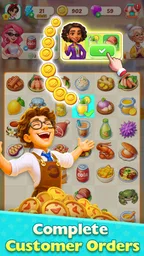
At its core, this is a free puzzle game from Happibits Game, built around merging ingredients and learning from chefs as you work toward a restaurant empire. That setup gives the puzzle a satisfying theme: ingredients feel like part of a kitchen workflow, and progress has a destination beyond clearing a board. The game is rated for Everyone, making its premise approachable for a broad audience.
The key question for a merge game is whether combining items stays engaging after the first few sessions. Foodstars has a natural advantage here: food is an easy subject to read at a glance, and the restaurant goal can make small puzzle advances feel connected. I find this style best when I want a relaxed game that gives me something to build toward without requiring the concentration of a dense strategy or word puzzle.
The developer is Happibits Game, and the game has reached over five million installs, with an average rating of 4.5 from around 22,000 ratings. Those figures suggest that the combination of food and merging has found an audience, but they do not tell me whether its pacing suits every player. I would treat them as context, not a guarantee that the game will match your preferences.
The current version is 1.56.0, and it runs on Android 8.0 or later. That makes it an option for people using a range of Android devices, though the version requirement is worth checking before installing on an older phone. I would also consider available storage and device performance as I would with any game, especially if I plan to keep it installed alongside other mobile titles.
How to get more from short sessions
Foodstars makes the most sense as a game to dip into during small breaks. A useful way to approach a merge puzzle is to pause before combining items and consider what the next step is meant to accomplish. If a board offers several possible merges, prioritizing the chain that supports your current goal can help avoid spending moves or space on items that do not move progress forward. That kind of quick planning is more rewarding than tapping every available match at once.
For example, on a commute or while waiting for an appointment, I would focus on one immediate objective rather than trying to optimize the whole restaurant journey. That keeps a short session manageable and reduces the chance that I lose track of why I was combining particular ingredients. When I have more time, I can think about how the puzzle’s rewards fit into the larger business-building loop.
This is also a useful distinction from many standard match-three games. Those usually emphasize clearing a specific board pattern, while a merge-centered game invites you to think about how items develop through combinations. If you enjoy watching a small ingredient become part of a larger chain, Foodstars may feel more involving than a puzzle that resets completely after each level. If you prefer quick, self-contained rounds with a clear finish line, the ongoing restaurant framing may feel like extra context rather than a benefit.
Progress is appealing, but pacing matters
The promise of learning from master chefs and building a restaurant gives progress a narrative flavor, but it also sets an expectation: I want each play session to feel as though it contributes to something tangible. Merge games can be especially satisfying when a chain of small decisions produces a visible result. They can also become fiddly if the board or objective starts to feel like a bottleneck. That is the main trade-off I would watch for here: whether the restaurant goals keep the puzzle meaningful or make advancement feel like a chore.
A practical tip is to play in focused bursts rather than opening the game whenever a few seconds appear. A merge puzzle rewards attention to what is on the board and what you are trying to create. Even if the controls are approachable, the satisfaction comes from making purposeful combinations. If I am distracted, I am more likely to play mechanically and less likely to enjoy the planning that distinguishes this format from a simple tap-and-clear puzzle.
The store details do not establish how quickly restaurant progress unfolds or how much time a player needs to reach particular goals, so I would not assume that the game is either fast or slow. The best test is whether the early loop feels enjoyable on its own. If merging ingredients is fun before the restaurant ambitions become important, the game has a stronger chance of holding my attention over time.
Spending and fairness: what can be said
The game is free to download and includes in-app purchases priced from $0.99 to $99.99 per item. That is the clearest purchase context I can offer: optional items span a wide range, so anyone concerned about spending should check each offer carefully and set a personal limit before buying. I would not treat a high-priced option as necessary simply because it appears in a game; first decide whether the free experience is enjoyable at your own pace.
Those price points alone do not reveal what purchases contain, whether they affect progress, or how the game balances paying and non-paying players. I cannot responsibly call the system fair or unfair based only on the presence and range of purchase prices. My practical advice is to play without spending at first, notice whether you feel pressured to buy, and only consider a purchase if its contents and value are clear in the moment.
That approach is particularly helpful for a game designed around gradual building. If you enjoy the puzzle and can accept a steady pace, there is little reason to spend just to make progress feel more immediate. If waiting or repeated play starts to frustrate you, pause before paying and ask whether you still like the core merge loop. Paying to bypass a part of the game you do not enjoy is unlikely to make the overall experience more satisfying.
Parents may also want to review purchase controls on the device before letting a child play. The Everyone age rating is a helpful indicator of broad content suitability, but it does not remove the need to manage purchases. I would use the device’s own purchase protections and explain that free installation does not mean every optional item is free.
Who should choose it, and who should pass
I would recommend Foodstars to someone who likes food-themed puzzles, enjoys combining items, and wants a continuing goal attached to individual puzzle decisions. It may suit casual players who want a game they can revisit in short sessions, as well as people who find restaurant-building themes more motivating than abstract boards. Its broad age rating also makes the premise easy to understand across different age groups, while purchase settings remain worth considering for family use.
I would steer away from it if you want a competitive puzzle with a strong emphasis on head-to-head skill, or if you prefer games whose levels feel fully separate and self-contained. The available details do not establish a competitive mode or explain how players might be ranked against one another, so I would not install it expecting a contest. For a more direct test of puzzle skill, a traditional logic game or a match-three title with clearly defined rounds may be a better fit.
It may also be a poor choice if you dislike games that tie puzzles to a larger progression theme. Some players want to solve a challenge and move on; others enjoy having a restaurant to develop. Foodstars clearly leans toward the second kind of motivation. I would make the decision based on whether that ongoing goal sounds pleasant rather than assuming the food setting alone will carry the experience.
What I would check before committing
Foodstars has 924 written reviews alongside its broader rating history. I would read recent comments in the app store with a specific question in mind: do players describe the merge loop and pacing in a way that matches what I want? Reviews are most useful when they identify a concrete friction point, rather than simply saying a game is good or bad. Since experiences can differ, I would look for recurring themes instead of relying on one especially positive or negative account.
Its release date is December 10, 2025. As with any game that continues to receive versions, I would keep the installed build current when possible and check that it remains compatible with my device. The important point for a prospective player is not to infer a particular update schedule, but to confirm that the version available to them works on their operating system before investing time in a long-running game.
The game’s store summary describes a progression involving ingredients, chefs, and restaurants, but there are details a player should judge directly: how often objectives change, how much board planning they demand, and whether progress feels rewarding without purchases. These are the parts that determine whether a merge game becomes a pleasant routine or starts to feel repetitive. A brief trial is more informative than a rating alone.
My verdict on trust and value
My overall view is cautiously positive. Foodstars has a clear identity: it combines ingredient merging with a restaurant-building ambition, which gives the puzzle a more personal destination than an abstract score. The free entry point makes it easy to try, while the listed in-app purchase range means I would stay attentive to spending rather than assume every extra is a small add-on.
There is a straightforward way to decide whether it deserves space on your phone: try the core merging loop, pay attention to whether you enjoy planning combinations, and see whether restaurant progress adds motivation instead of pressure. If both parts work for you, it has the ingredients for a comfortable casual puzzle habit. If the board decisions feel repetitive or the larger goals do not interest you, a focused logic puzzle or a quick-round match game is likely a better use of your time.
Foodstars: Merge & Cook is worth a look for players who want a food-centered merge puzzle with a continuing business theme, not for those expecting a confirmed competitive experience or a purely standalone series of challenges. I would start free, keep purchase limits in mind, and let the feel of the puzzle—not the promise of a grand restaurant—decide whether to stick with it.
What we like
- Merging ingredients creates a simple and satisfying puzzle loop.
- Restaurant upgrades give you clear goals to work toward.
- The cooking theme makes the game easy to pick up.
- New orders add variety to the merge board.
- Short sessions suit casual play.
What could be better
- Energy limits can interrupt longer play sessions.
- Board space can become tight as items accumulate.
- Progress may slow while waiting for requested ingredients.
- Repeated merging can feel routine over time.
- Some upgrades may require substantial in-game resources.







