




Dot Link - Connect the Dots review
 Analysis by Appsdrops
I like puzzle games that give me something to think about without demanding a long session, and Dot Link fits that mood. It is a free puzzle game from Bluetile built around connecting matching colored dots on a board. The idea is easy to understand, but a move that looks obvious can leave awkward gaps elsewhere, so the game rewards a little planning rather than hurried finger work. Its appeal is the balance between quick access and small, satisfying decisions.
Quick moves, thoughtful boards
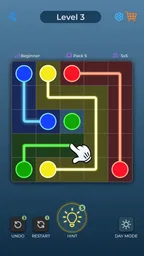
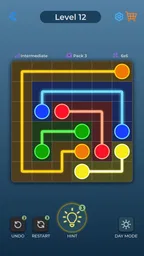
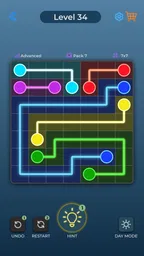
The basic rhythm is simple: find two dots of the same color and draw a path between them. The challenge comes from fitting those paths together sensibly. I find that the best approach is to look across the whole board before committing to the first match I notice. A route that solves one pair neatly might make another pair harder to connect, so choosing the order matters.
This makes the game feel more deliberate than a basic matching pastime. It is not about tapping the first two similar-looking pieces and moving on; the connecting action asks me to consider where a line will go and what space it leaves behind. When I get stuck, I try tracing the most constrained pair first, then check whether the remaining colors still have room. That small habit can prevent a promising start from turning into a board full of blocked options.
For short breaks, that structure works well. I can focus on a single puzzle while waiting for a drink or sitting through a quiet stretch of a commute, then put the phone away without needing to remember a complicated story or a long sequence of actions. The rules are light enough to pick up quickly, but there is still a reason to pause and rethink a route.
What the pace feels like in practice
I would describe the pace as player-led rather than automatically fast. The connecting action itself is straightforward, but solving a board can take longer when I rush and have to reconsider my choices. If I scan the colors and plan a couple of routes first, play feels smooth; if I treat every connection as an isolated decision, I create extra work for myself. That makes the game a better fit for calm focus than for frantic, reflex-based play.
It also means “quick” depends on what I want from a session. A simple board can serve as a brief mental reset, while a more awkward arrangement can hold my attention longer because I am testing how the paths might coexist. I would not choose it when I want continuous action or a constant stream of new visual effects. I would choose it when I want a small puzzle that lets me set my own tempo.
The most useful practical tip is to check the open space before drawing a line, not just the two endpoints. A path can look short while taking away a useful corridor for another color. Thinking about where a connection must pass, and which pairs have fewer plausible routes, gives me a clearer starting point than simply matching the nearest dots.
When a board gets demanding
Longer play changes the experience less through speed than through attention. After several puzzles, I notice that I am more likely to make careless choices because I assume I have seen the whole board at a glance. Taking a moment to re-scan the colors is a better remedy than drawing faster. The game’s central challenge is spatial planning, so concentration matters more than quick reactions.
That focus is also a limitation for some situations. If I am trying to follow a conversation, keep an eye on something else, or play in a very distracted setting, I may lose track of which routes I have already considered. Dot Link is easy to pause in the ordinary sense of putting the device down, but the puzzle itself is more satisfying when I can give it a little attention. It is not my first choice for a game I want to play entirely on autopilot.
For a daily routine, I would use it in short intervals rather than treating it as background entertainment. One or two puzzles can make a waiting period feel occupied without pulling me into a sprawling task. If I am looking for a longer, more absorbing session, I would instead pick a puzzle game with a broader set of mechanics or a campaign that builds on earlier progress. Dot Link keeps its focus narrow, and that is both its strength and its boundary.
Reliability and the feel of repeated play
In my experience of the game’s simple premise, there is little to learn between sessions: the same matching-and-routing idea remains the center of play. That makes it easy to return after a break. I do not need to reacquaint myself with a complicated control scheme before making a useful move. The dependable part is the clarity of the task, not a promise that every session will feel fresh.
That distinction matters if you are deciding whether to keep it installed. Players who enjoy refining their approach to a repeated puzzle format may appreciate the consistency. Players who need a steady succession of new modes, characters, or mechanics may find the loop too focused. I would judge it as a compact puzzle companion, rather than a game whose appeal depends on a large variety of systems.
When a solution does not come together, I find it helpful to mentally reset instead of extending a bad plan. I look again at the pairs with the least room to maneuver and imagine their routes before committing to the easier-looking ones. This is a practical way to recover from a mistaken assumption: return to the layout, reconsider the order, and avoid treating the first route as fixed just because it seemed convenient.
Device fit, cost, and who should try it
The game is suitable for Everyone and supports Android 7.0 or later. It is currently version 3.3.0. Those details make it easier to judge basic compatibility, but they do not tell me how it will feel on every individual device. Since the core activity is drawing connections across a puzzle board, I would expect the quality of the experience to depend more on having a screen that feels comfortable to view and touch than on demanding high-end hardware. I would avoid making a stronger claim about battery use or performance across devices without testing each one.
Dot Link is free to download, with optional in-app purchases ranging from $0.99 to $17.99 per item. I would start with the free experience and decide whether the game’s puzzle loop suits me before considering any purchase. Those purchase options are worth keeping in mind if you prefer games with no optional spending at all, especially when choosing something for a younger player. The game’s Everyone age rating is a useful sign of its intended broad audience, but I would still use the usual family judgment around in-app purchases.
It has an average rating of 4.8 from around 720,000 ratings, and it has passed 10 million installs. Those figures suggest that the simple format has found a large audience, but they do not tell me whether its particular style will be right for you. I would recommend it to someone who likes visual logic puzzles, wants rules they can grasp quickly, and enjoys thinking ahead without needing a timer-driven challenge.
By contrast, I would steer away from it if your favorite puzzle games rely on wordplay, physics, story chapters, or rapid matching. The usual alternatives in the puzzle category can offer more varied mechanics or a stronger narrative, while Dot Link keeps the focus on routing colored pairs. That narrowness makes it easy to understand, but it also means the game cannot satisfy every kind of puzzle appetite.
My verdict on the connecting-puzzle loop
Dot Link is a good choice when you want a clear, low-barrier logic puzzle that still rewards planning. I especially like the way a simple connection can force me to think about the rest of the board, and the short-session format suits ordinary pockets of downtime. My practical advice is to inspect the tightest routes first and avoid committing to an easy-looking match until you have checked what space it uses.
Bluetile’s puzzle game is free to try, and the large player base is consistent with its accessible premise. I would keep expectations realistic: its appeal is the repeated pleasure of arranging paths, not a broad collection of different activities or a high-speed test. If that focused challenge sounds relaxing, it is an easy recommendation. If you need constant novelty or action, another kind of puzzle game will probably hold your attention better.
After playing, I see Dot Link as a tidy option for anyone who enjoys pausing, scanning a board, and finding a route that leaves the rest of the puzzle workable. It is at its best when I treat each move as part of the whole layout rather than a quick match in isolation. For that kind of quiet, portable problem-solving, I would happily suggest giving it a try.
What we like
- Easy-to-understand rules make it accessible to new players.
- Short levels suit quick play sessions.
- Connect-the-dots puzzles provide a satisfying logic challenge.
- Gradually harder stages help maintain a sense of progress.
- Touch controls make drawing paths feel natural on mobile.
What could be better
- Some levels may feel repetitive after extended play.
- Later puzzles can require trial and error.
- A small screen may make crowded boards harder to read.
- Frequent interruptions can break the flow of a puzzle.
- Players seeking a story or varied game modes may find it limited.







