
Arrow Puzzle 3D - Arrows Out review
 Analysis by Appsdrops
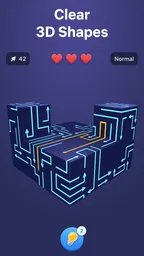
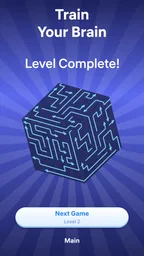
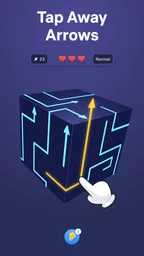
I like puzzle games that let me settle into a clear problem without demanding a long session, and Arrow Puzzle 3D has an appealing premise: work out which arrows can be tapped away from a cube, then use the changing shape to uncover the next move. Its puzzles have a spatial, maze-like quality, so the challenge is less about speed than about reading how the pieces fit together. That makes it an easy game to consider for a short break, though its 3D presentation also asks for more careful visual inspection than a flat grid puzzle does.
Reading the cube and finding a route through each puzzle
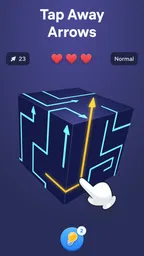
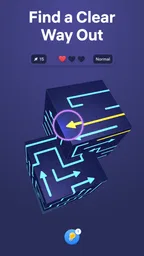
The basic idea is approachable: inspect the cube, identify an arrow that can move outward, and tap it. The interesting part is planning the order. An arrow that seems obvious at first may depend on clearing another one, and each removal changes what is visible or reachable. I find this kind of puzzle satisfying because a pause to look carefully can be more useful than tapping quickly.
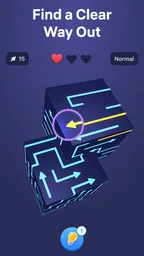
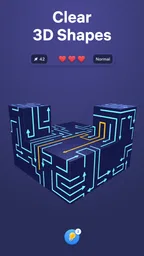
The cube gives the game a different feel from familiar line puzzles or block-matching games. Instead of scanning rows and columns, I have to consider the arrangement as a small three-dimensional structure. That is a welcome change if I enjoy spatial reasoning, but it can also make a puzzle harder to read at a glance. I would approach a new board by checking the exposed directions first, then looking for arrows whose paths appear obstructed before committing to a sequence.
This is a puzzle game from Easybrain, designed around a compact action-and-observation loop rather than a story or a collection of unrelated activities. The store’s short label is “Arrow Puzzle 3D,” while the fuller name, Arrow Puzzle 3D - Arrows Out, describes the central task well. I would recommend it most to someone who enjoys untangling a visual arrangement and does not mind taking a few moments to inspect a board before acting.
Clarity, visual scanning, and navigation
Because the central object is a cube covered in arrows, visual clarity matters more here than in a simple number puzzle. The player needs to distinguish arrow directions, notice which pieces are accessible, and keep track of how the remaining layout changes. In practice, I would avoid treating the board as a single image: scan one visible area at a time, identify a likely move, and then reassess after the cube changes. That small routine reduces the chance of tapping based on an assumption about a hidden or blocked path.
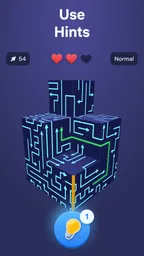
The 3D view is both the game’s defining strength and a source of effort. Spatial depth makes the puzzle feel tangible, but it can demand extra concentration from players who find perspective-heavy scenes difficult to parse. If a particular arrangement is confusing, taking a moment to inspect the visible faces rather than rapidly testing moves is a sensible approach. The game’s appeal rests on thoughtful observation, so a slower pace is not a disadvantage.
I also see a useful distinction between this and a conventional maze. A maze usually asks me to trace a route through connected passages; here, the question is which arrows can leave the structure and how that removal affects the puzzle. Players who enjoy sequencing and spatial deduction may find that refreshing. Someone looking for a clearly marked path, extensive written instructions, or a narrative reason to progress may prefer another style of puzzle.
Touch, pace, and sensory demands
The interaction is based on tapping arrows, which is straightforward in concept. Even so, a 3D object can make precise selection feel more demanding than tapping a large tile in a flat layout. I would use deliberate taps and give myself time to confirm what I am selecting, especially when several arrows sit close together visually. This game seems better suited to calm, considered input than to hurried play.
Its puzzle format can be a good fit for players who prefer thinking time over reflex tests. I do not need to treat every board as a race; the core satisfaction comes from spotting a workable order. That can make a session feel manageable when I want a focused mental exercise without the pressure of fast reactions. On the other hand, anyone who finds dense visual patterns tiring may want to keep sessions brief and stop when the cube becomes hard to scan comfortably.
One practical tip is to reset attention, not necessarily the game: after a move changes the layout, pause and inspect the newly exposed arrangement from the beginning. Carrying forward a mental picture of the old board can lead to mistakes, because the available choices may have shifted. This is a small but meaningful workflow for a puzzle built around removing pieces from a changing 3D structure.
Where it fits into an ordinary day
The game is presented for offline play, which makes it useful when a connection is unreliable or unavailable. I can imagine opening it during a commute with no signal, while waiting for an appointment, or during a quiet break when I want something more engaging than scrolling. Offline access is particularly relevant for a puzzle game because it lets the session depend on the board in front of me rather than on an online match or a live event.
That does not mean it is ideal in every setting. The 3D layout needs attention, so I would not choose it while walking, crossing a street, or trying to follow a conversation. It is more suitable for a seated pause when I can look at the screen steadily. For a noisy or visually distracting environment, a simpler word or number puzzle may be easier to pick up and put down without losing track of the problem.
A realistic use case is a short wait where I have enough time to examine one puzzle but not enough to begin a long game. I can work through the visible arrows at my own pace, then stop when the appointment begins. If I prefer games with a strong sense of completion in each brief session, this format is appealing; if I need a persistent campaign, a plot, or social competition to stay interested, it may feel too focused on the immediate board.
Who is likely to enjoy it—and who may not
I would point spatial-puzzle fans toward this one, particularly people who like discovering a sequence rather than relying on trial and error. It may also suit players who want a quiet offline option and appreciate puzzles that reward patience. The cube gives familiar tapping a more three-dimensional twist, and that specific change is the main reason to choose it over a standard grid-based brain teaser.
I would be less quick to recommend it to someone who dislikes visual depth, has difficulty distinguishing directional symbols, or wants large, plainly separated controls. Those concerns are not a judgment about a player’s ability; they are a practical match between the game’s visual task and what feels comfortable. If perspective itself is tiring, a flat tile puzzle is likely to be a better everyday choice. If the appeal of a puzzle is mainly quick action, a reflex-focused game will provide a different kind of challenge.
There is also a difference between a puzzle that is difficult because of logic and one that is difficult because the board is hard to read. My advice is to notice which kind of effort you are experiencing. If I can explain why an arrow is blocked but cannot easily see the relevant arrangement, the issue is visual scanning rather than reasoning. Taking more time may help, but if that friction continues, another puzzle format may be more comfortable.
Price, audience, and what to expect
Arrow Puzzle 3D - Arrows Out is free to download, with in-app purchases listed at $14.99 per item. I would treat the free entry point as a low-commitment way to see whether the 3D arrow puzzles suit me, while keeping in mind that optional purchases can affect the overall experience. The game is rated for Everyone, which makes its stated audience broad, though personal comfort with visual puzzles will still vary.
Its store audience is substantial: it has a 4.8 average from around 102 thousand ratings and more than a million installs. Those figures suggest many players have tried it, but they do not tell me whether its particular visual style will work for me. The useful question is simpler: do I enjoy inspecting a cube, noticing which arrows can be removed, and adapting when the arrangement changes? If yes, the premise is focused and easy to understand.
The current version is 1.6.0, and the game was released on May 15, 2026. It requires Android 8.0 or later. Those details matter when checking whether it will run on a device, but the more important day-to-day consideration is whether the screen size and viewing comfort make the 3D layout easy to examine. A puzzle can be broadly accessible in age rating and still demand a particular kind of visual attention.
Remaining friction and my inclusive verdict
The main barrier I see is the same feature that makes the game distinctive: interpreting a three-dimensional arrangement through a screen. A player may understand the rules yet still find it hard to judge directions or distinguish an open route from an obstructed one. The game’s simple tapping premise does not remove that visual workload. It is worth trying if spatial puzzles sound appealing, but I would not assume that a straightforward rule automatically means effortless play for everyone.
Another trade-off is its narrow focus. This is a game about solving arrow-and-cube puzzles, not a broad collection of modes or a social destination. That focus can be a strength when I want one clear activity and a weakness when I need variety. Compared with a flat logic puzzle, it offers a stronger sense of depth but asks for more visual interpretation; compared with a fast arcade game, it gives me room to think but less emphasis on reflexes.
Overall, I would recommend it to a friend who likes patient spatial reasoning and wants an offline puzzle for short, attentive sessions. I would suggest a flat-grid alternative to someone who finds 3D layouts tiring, and a faster game to anyone seeking constant action. My practical advice is to try a board slowly, reassess the cube after every removal, and pay attention to whether the challenge feels logical rather than visually frustrating. That is the best way to tell whether this particular puzzle style is a comfortable fit.
What we like
- Simple swipe controls are easy to learn.
- Short levels make it suitable for quick play sessions.,3D visuals help distinguish the arrow directions.
- The puzzles encourage planning before each move.
- Gradually harder stages provide a steady challenge.
What could be better
- Some levels may feel repetitive after extended play.
- Later puzzles can require trial and error.
- Ads may interrupt the flow between stages.
- The 3D perspective can make directions harder to judge.
- Progress may feel slow for players seeking varied modes.







