


ZEvents Invite Maker Hobnob review
 Analysis by Appsdrops
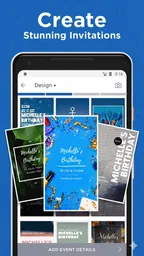
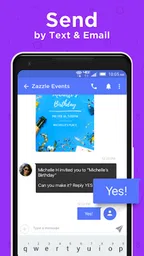
I would try ZEvents Invite Maker Hobnob if I wanted an invitation to feel more considered than a quick message in a group chat, without turning the planning into a design project. It is an events app from Zazzle, built around making invitations that can be sent by text. That makes it especially relevant for birthdays, weddings, graduations, and baby showers, where the invitation is often the first practical detail guests receive.
The app is free to install, and its Everyone age rating makes it an easy option to consider for a household or a shared planning task. It has a 4.4 average from around 6,200 ratings, with over 500,000 installs. Those figures suggest that it has found an audience, but they do not tell me whether it suits every kind of event. The useful question is simpler: can it help you create an invitation that looks right and gets the key information across? For a first-time user, that is the standard I would use.
What to expect from a text-first invitation app
ZEvents Invite Maker Hobnob is best approached as a focused way to prepare and send an event invitation, rather than as an all-purpose planning hub. Its appeal is the short path from having an occasion in mind to sharing a designed invitation with people. If you usually type the details into a message, the app offers a more polished presentation; if you already use a full event-management service, its narrower purpose may feel limiting.
That distinction matters before you start. An invitation can make the date, time, and occasion feel clear, but it is not the same thing as a complete planning workflow. I would use it to get the initial message out, then keep any more involved organizing in whatever method the group already relies on. That avoids expecting one invitation app to handle every question, change, and coordination task that follows.
The event examples associated with the app cover both casual and milestone occasions. A birthday invite may need a friendly tone and a simple set of details; a wedding or graduation announcement can call for a more deliberate look. For a baby shower, the invitation may need to communicate the event’s mood as well as the logistics. Choosing the right design is therefore not just decoration: it sets expectations before guests arrive.
Zazzle is the developer, and the app’s current version is 4.3.20. It is available at no charge to install, while in-app purchases range from $3.99 to $284.99 per item. I would treat that broad purchase range as a reason to check any paid option carefully rather than assume that every design or service is included for free. You can begin by exploring the app’s basic invitation-making path, then decide whether a paid item offers something you genuinely need.
Start with the event, not the artwork
My first-time-user advice is to settle the practical details before spending time choosing a look. Have the event name, date, time, and location ready, and decide what guests should do next. Even an attractive invitation becomes frustrating if you have to stop halfway through to ask someone for a missing detail or revise the message repeatedly.
It also helps to decide who the invitation is for. A message to close friends can be informal, while a wedding invitation sent to relatives and colleagues may need a more measured tone. Thinking about the audience first makes it easier to choose a design that feels appropriate instead of picking one solely because it catches your eye.
A simple route to the first useful result
Once the event details are settled, I would open the app and look for an invitation style that matches the occasion, then work through the creation process with the essential information close at hand. Keep the first attempt uncomplicated. A clear invitation with accurate details is a better first success than a heavily customized design that takes longer to finish and is harder to read on a phone.
Before sending, read the invitation as if you were a guest seeing it for the first time. Check that the occasion is obvious, the date and time are easy to spot, and the location or next step is understandable. This small review catches a common problem with designed invitations: a decorative layout can draw attention away from the information people actually need.
For a realistic example, imagine arranging a child’s birthday party after work. You already know the date and venue, but you do not want to spend the evening formatting a message for several relatives and friends. I would use the app to create one invitation, check that the details are legible, and share it by text. The meaningful win is not elaborate design; it is getting a consistent, complete invitation to the group without rewriting the same information for each person.
That workflow is also useful when one person is coordinating the event but another person needs to help send the invitation. Prepare the wording and check the details before sharing it, rather than asking each helper to improvise their own version. A single approved invitation reduces the chance of different guests receiving conflicting times or incomplete directions.
Small choices that prevent avoidable hassle
Keep the invitation focused on decisions guests must make. If attendees need to respond, say plainly what response is wanted and by when, if you have set a deadline. Do not bury that request in decorative wording. The app can help present the invitation, but the clarity of the request still depends on what you put in it.
For events where details may change, consider waiting until the essentials are stable before sending the invitation. A last-minute change to a venue or start time can leave people relying on an outdated message. If you do need to make a change, send a direct follow-up that clearly identifies what changed instead of assuming everyone will notice an edited or repeated invitation.
For a more formal occasion, I would check the design on the same kind of screen guests are likely to use. Text invitations are often read quickly on phones, so long wording and low-contrast decorative elements can make important details easy to miss. This is a practical reason to favor readability over a design that looks impressive at a glance.
Where first-time users may hesitate
The first likely point of confusion is the difference between making an invitation and managing an event. A polished invite can start the process, but guests may still reply in different conversations or ask follow-up questions through text. If keeping responses organized is essential to you, decide in advance how you will track them. A simple note or a dedicated group conversation may be enough for a small gathering; a larger event may call for a more structured planning tool.
Another possible snag is the cost boundary. Free installation does not mean every in-app item is free, and the listed purchase range is wide. Before choosing a paid item, check what it costs and whether it solves a real problem for your event. If all you need is a straightforward invitation, do not spend simply because a premium option is visible.
There is also a trade-off between personalization and speed. Tweaking a design can make an invitation feel more personal, but it can consume time that would be better spent confirming the guest list or checking the venue details. For a casual get-together, a clean, simple result is usually enough. For a milestone event, more care may be worthwhile, provided it does not make the practical information harder to find.
Since this is a mobile app, it is worth checking compatibility before planning around it. The minimum operating system is 7.0, so users with older devices should confirm that their phone can run it. The app is rated for Everyone, but that describes its content rating rather than guaranteeing that every purchase or event workflow will suit a particular family’s needs.
How it compares with a group chat or a broader planner
The usual alternative is simply typing an invitation into a messaging app. That approach is fast and flexible, and it may be the better choice if the event is informal or the details are still changing. ZEvents is more appealing when you want an invitation with a designed presentation and a consistent appearance, rather than a plain block of text that gets lost among everyday messages.
A broader event-planning service may be a better fit when your main challenge is managing responses, schedules, or several moving parts. I would not choose ZEvents on the assumption that an attractive invite alone will organize a complicated gathering. Its practical strength is the invitation itself. Pairing it with a separate planning method is sensible when the event needs more coordination than the initial message can provide.
Compared with making a graphic in a general design app, a purpose-built invitation app can feel more direct for someone who wants to complete a specific task rather than build a layout from scratch. The trade-off is that a general design tool may offer a different kind of creative control. If you enjoy designing every detail, or need a format beyond a text-shared invitation, that broader route may suit you better.
Who should give it a try—and who should look elsewhere
I would recommend trying it if you regularly organize social events, want invitations to look more intentional than ordinary texts, and are comfortable keeping the rest of the planning simple. It is also a sensible option for someone who needs a first invitation quickly: prepare the details, select a suitable design, proofread it, and send it by text.
I would skip it if your priority is a comprehensive system for guest responses and event logistics, if you prefer plain messages, or if you need complete control over a custom design. It may also be the wrong fit if you are unwilling to consider in-app purchases at all and the particular design or item you want is not available without one. In that case, a messaging app or a general design tool may better match your expectations.
Overall, I see ZEvents as a practical middle ground between a bare text and a more involved planning service. Its 4.3.20 version is aimed at a straightforward job: help turn event details into a shareable invitation. Start with one uncomplicated occasion, keep the important information prominent, and check any purchase before committing. If that first invite saves you time while giving guests a clearer, more thoughtful message, the app has done the job I would want it to do.
What we like
- Guests can RSVP without creating an account.
- Hosts can track responses from a single guest list.
- Invitation details are easy to update after sharing.
- The app supports both digital and printed invitations.
- Event reminders can help guests remember the date.
What could be better
- Some designs or features may require in-app purchases.
- Guests without smartphones may need a separate invite option.
- The app depends on internet access for sharing and updates.
- Managing a large guest list can take time.
- Availability and features may vary by device or region.





