







Invitation Maker: Cards & RSVP review
 Analysis by Appsdrops
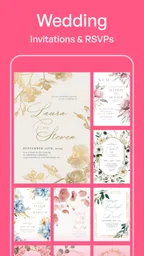
I like an invitation app best when it takes the awkward work out of getting an event announcement ready without making me learn a design program. Invitation Maker: Cards & RSVP is aimed at that practical middle ground: it is an Events app from Greetings Island for creating invitations and cards for different occasions. It is free to install, though some in-app purchases range from about a dollar to around twenty-seven dollars per item. My overall impression is that it is most useful when you want a polished-looking invitation quickly, but still want enough control to make it feel personal.
Where the invitation process can snag
The first decision is not about fonts or colors; it is about what you need the invitation to do. A casual get-together may only need a clear date, place, and message. A larger gathering needs wording guests can act on, and may need a way to keep responses organized. I recommend deciding those details before choosing a design. That simple preparation makes editing less fiddly and helps avoid leaving out information while concentrating on appearance.
Like many design apps, the creative part can initially distract from the practical part. A template may look attractive, but the event details still need to be readable and complete. I would check the finished wording at normal screen size rather than judging only by the zoomed-in editor view. Names, dates, times, and location instructions are the details guests rely on; decorative changes are secondary if those are hard to scan.
Another likely point of friction is choice. An app built around invitations and cards can offer many visual directions, and browsing too long can turn a quick task into a project. I find it helps to start with the occasion and the tone—formal, playful, or simple—then narrow the design from there. If I am making something for a family event, I would prioritize legibility and warmth over elaborate decoration.
Do not assume that an attractive design automatically solves the guest-management side of an event. An invitation communicates the plan; keeping track of replies is a separate task unless the particular workflow you choose supports it. Before sending anything, I would decide how guests should respond and make that instruction explicit in the invitation. This is especially useful when some people are likely to reply by text, while others may simply mention their plans in person.
Set up the event before styling it
My most reliable workflow starts with a small checklist: occasion, host name, date, start time, venue, and any useful instructions such as what guests should bring. I write the wording first, then choose a design that has room for it. This avoids trying to squeeze a long message into a layout that was better suited to a short announcement.
For a realistic example, imagine arranging a weekend birthday gathering while juggling work and family messages. I would settle the time and location first, draft a short invitation, then personalize the design. Before sharing it, I would read the text once as the host and once as a guest: can someone tell when to arrive, where to go, and how to respond without asking a follow-up? That final check often matters more than another round of decorative edits.
It is also worth checking the device basics before beginning. The app’s minimum operating-system requirement is version 7.0, so I would confirm that the phone or tablet meets it and that the app is current. The current version is 3.13.0. If the app behaves oddly, updating through the app store and reopening it are sensible first steps; they are general checks, not a guarantee that every issue is caused by software.
Keep the original event wording somewhere easy to retrieve while you work. If you need to rebuild an invitation or switch designs, having the exact names, times, and directions in a note prevents small transcription mistakes. This is a particularly useful habit for events with several hosts or a venue where guests need specific arrival guidance.
Recovering a workflow without making more work
If you have made several edits and the result no longer feels right, I would pause rather than keep changing details at random. Return to the essentials: is the event information correct, is the message concise, and can guests read it? Then adjust the visual choices one at a time. This makes it easier to identify what improved the result and avoids losing time in a cycle of unrelated tweaks.
If a design is becoming crowded, shorten the message before shrinking or rearranging everything. Put only the information guests need on the invitation and send extra context separately if appropriate. For example, a long note about parking or what to bring can make the main details harder to spot. A concise invitation with a clear response instruction is often more useful than a miniature event newsletter.
Before sharing, I would proofread names and numbers slowly, then inspect the invitation as a whole. Dates and times are easy to mistype, and a polished layout can make an error less noticeable to its creator. If you are preparing invitations for a group, ask another person to check the event details. That second look is a simple safeguard, especially when the invitation is going out to many guests.
When a change does not appear as expected, avoid immediately recreating the whole invitation. Reopen the design and inspect the specific text or visual element you changed. If the problem persists, close and reopen the app, check for an update, and try again when the device is behaving normally. These are cautious troubleshooting steps; they do not rely on assuming a particular saving or sharing feature.
When the app may not be the problem
Some apparent invitation problems are really communication problems. A guest may miss the date because the message is buried in a busy design, or fail to respond because the invitation does not say how. A clearer layout and an explicit reply instruction can prevent those misunderstandings. Likewise, if a guest says they cannot find the venue, the issue may be that the location wording needs a landmark or a more complete address, not that the design itself is faulty.
There is also a difference between making an invitation and coordinating an event. If you need a detailed guest list, ongoing updates, or a dependable way to reconcile replies from several channels, you may be better served by a dedicated event-planning or group-messaging tool alongside the invitation. I would use this app for the visual announcement and keep the response process simple and familiar unless its available options clearly meet the event’s needs.
Cost deserves a quick check before you settle on a particular design or finish. The app is free, but it includes optional in-app purchases, with items priced from about a dollar to around twenty-seven dollars. I would look at the purchase prompt carefully before confirming anything and decide whether the available free choices already suit the occasion. The price range means it is sensible to treat paid items as optional rather than assume every design or element is included at no cost.
Who will get the most from it
I would recommend Invitation Maker: Cards & RSVP to someone who wants a more personal announcement than a plain text message, but does not want to start from a blank canvas. It is especially appealing for birthdays, family occasions, and informal gatherings where a visually coordinated invitation adds a nice touch without requiring professional design skills. The app is rated 4.9 on average from around 192 thousand ratings, and it has more than 10 million installs, which suggests that it has reached a broad audience; those figures are useful context, not a promise that every workflow will suit every person.
Its age rating is Everyone, so it is broadly positioned for general audiences. Greetings Island is the developer, and the app has been available since May 15, 2018. Those details are less important to day-to-day editing than whether the layout fits your event, but they help place it as an established invitation-making app rather than a one-purpose tool for a single celebration.
Compared with sending a message in a chat app, a designed invitation gives the event a clearer visual identity and keeps the key details together. Compared with making a card from scratch in a full design editor, a purpose-built invitation app should feel more approachable for this particular job. The trade-off is flexibility: if you need exact brand controls, complex multi-page artwork, or extensive coordination tools, a general design suite or event platform may be a better fit.
I would skip it if you only need to tell a few friends a time and place, or if you prefer plain text and do not care about a designed card. I would also look elsewhere if your event depends on detailed attendance management, or if paying for optional design items would frustrate you. In those cases, a basic group message or a dedicated planning service may be more practical than adding a creative step.
My practical verdict
Invitation Maker: Cards & RSVP is a useful choice when the invitation itself matters and you want to produce something more considered than a quick message. Its strongest practical advantage is the way it focuses the task: choose a visual direction, add the event details, and prepare a card that feels appropriate to the occasion. My best advice is to write the essential information first, keep the text lean, and proofread the finished design before sharing it.
I would not treat it as a complete event-management system or assume every appealing option is included for free. Used for what it does well—helping turn event details into a presentable invitation—it can save effort and make a small gathering feel thoughtfully organized. If that is the job you need done, I think it is worth trying; if your main challenge is tracking guests rather than designing the announcement, choose a tool built around that instead.
My recommendation: use it when you want a personal, polished invitation with minimal design effort, and keep a separate, simple plan for collecting replies if the event needs more than a basic response.
What we like
- Templates make it easy to create invitations without design experience.
- Text and layout can be adjusted to suit different occasions.
- Digital invitations are convenient to share with guests.
- RSVP tools help track guest responses in one place.
- A range of invitation styles supports both casual and formal events.
What could be better
- Some templates and design options may require a paid upgrade.
- The free version may include advertisements.
- Advanced customization can take time to learn.
- A stable internet connection may be needed for some features.
- Guests may need to follow a link to respond to an invitation.





