



Fever: Events & Tickets review
 Analysis by Appsdrops
I tend to open Fever: Events & Tickets when I know I want to go out but haven’t decided what to do. Its appeal is less about replacing every ticketing service and more about making the first step easier: browsing experiences in a city and finding something that feels worth planning around. In my view, that makes it most useful for people who enjoy discovering events, rather than people who already know the exact venue or show they want.
Browsing is the main attraction
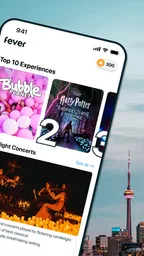
Fever is an events app from Fever Labs, built around finding things to do in places including New York City, Los Angeles, Chicago, Washington, DC, and Miami. The app is free, and its Teen age rating makes it broadly suitable for older children and adults, though individual events will naturally have their own audiences and requirements.
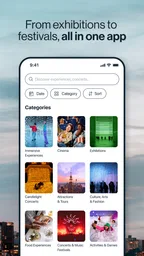
The experience is strongest when I treat it as an idea finder. Instead of starting with a performer, venue, or date and searching for one exact ticket, I can browse with a looser question in mind: what would make a good evening, a different weekend plan, or an outing with friends? That distinction matters. A conventional ticketing app can be more direct when I already know the event; Fever is more interesting when I want options I might not have thought to look for.
That discovery-first approach also means the app’s usefulness depends on where I am and what kind of outing I want. The city list points to a broad geographic reach, but a large city does not guarantee that every neighborhood, date, or event type will suit me. I’d check the actual selection for my location before relying on it as my only planning tool.
How quickly it gets me to a decision
For casual browsing, I expect the app to feel most rewarding when I arrive with a flexible plan. If I am choosing between a relaxed afternoon and a more structured night out, browsing can surface possibilities without requiring me to search across several venue pages first. The trade-off is that discovery takes time: scrolling through appealing ideas is not always faster than going straight to a venue’s own ticket page.
I’d make the search more efficient by deciding on one constraint before opening the app: the day, the general area, or the kind of outing. Then I would compare a small set of candidates rather than browsing indefinitely. This is a useful habit when an event catalog can make every option look tempting, but the real decision depends on travel time, companions, and available hours.
If I already have a specific event in mind, I would compare Fever’s offering with the event organizer or venue’s own ticketing route. That gives me a second place to check details and helps prevent a discovery-focused interface from becoming an unnecessary detour. For people who want an answer quickly, a direct search in a familiar ticketing service may be the better starting point.
When the app gets a heavier workout
The most demanding use case is not simply opening the app; it is planning with other people. A group might browse separately, send suggestions in a chat, and then have to settle on one date and outing. Fever can provide a shared pool of ideas, but it cannot make everyone agree. I find it helps to narrow the choice to a couple of realistic options before asking friends to decide, especially when schedules and budgets differ.
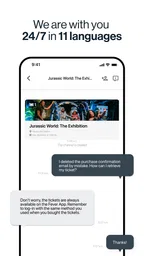
Another busy moment is making a plan close to the day itself. In that situation I would check the event details carefully before committing, then keep the relevant confirmation accessible rather than assuming I can reconstruct everything from memory later. That small bit of preparation is valuable with any ticket app, particularly when a plan involves travel or other people depending on me.
For a spontaneous evening, the app is best used as a starting point, not as a promise that a suitable ticket will always be available at the last minute. I would first decide what kinds of experiences I am willing to consider, then check the current options and their practical details. If nothing fits, switching to a venue’s own listings or another event service is a sensible fallback rather than spending the whole evening scrolling.
One useful trade-off is that a curated discovery experience can make unfamiliar plans feel easier to consider, but it may not be the most comprehensive way to compare every event in a city. When I care about a particular artist, venue, or date, I would search directly as well. When I care more about being surprised by a new idea, Fever has a clearer reason to be open.
Reliability, planning, and what to double-check
Fever has an average rating of 4.7 from around 144,000 ratings, and it has been installed over 10 million times. Those figures suggest that many people have made it part of their event discovery routine, but they are not a guarantee that every listing or purchase will match every user’s expectations. I would still read the details of the particular event I am considering instead of relying on a general impression of the app.
For a plan that matters, I’d make a simple recovery plan before leaving: keep the purchase confirmation easy to find and make sure everyone in the group knows the event and timing. This is practical rather than a special app trick; it reduces the chance that a busy entrance or a low battery turns a straightforward outing into a scramble. I would also avoid leaving the final booking step until the group is already on the way.
If the app feels slow or behaves unexpectedly, I would first close and reopen it, check that my connection is working, and retry before assuming a booking has or has not gone through. The important point is to verify the order in the app or its confirmation before attempting to purchase again. Repeating a payment action without checking can create avoidable confusion, regardless of which ticketing service is involved.
Fever’s current version is 5.251.1. App updates can change how an experience feels over time, so my practical advice is to keep the installed version current and allow a moment to check the details before a time-sensitive purchase. I would not judge the app’s reliability solely by how quickly a page appears; the ticket information and confirmation are what matter when plans depend on it.
Device limits and everyday comfort
The listed minimum operating system is version 7.0, which gives the app a low stated software threshold. That does not tell me how smooth it will feel on every older phone, though. Browsing an event catalog can be more demanding than opening a simple text page, and older devices may feel less responsive when storage is tight or many apps are running. If performance matters, I would close unused apps and make sure the phone has room for updates.
I would also think about battery and connectivity as part of the outing, not just the browsing session. Looking through options at home on a reliable connection is easier than trying to make a decision while moving between places. Once I have chosen an event, keeping the confirmation readily available is a better plan than counting on being able to load every screen instantly at the entrance.
Fever is not the right fit for someone who wants a bare-bones ticket wallet and already knows exactly where they are going. A venue’s own app or a conventional ticket marketplace may be more direct for that job. It is also less compelling if the available events in a person’s area do not match their interests; no amount of smooth browsing can make an irrelevant selection useful.
Who I’d recommend it to
I’d recommend Fever to people who like outings but often get stuck at the “what should we do?” stage. It is especially handy for a date night, a visiting friend, or a weekend when the usual routine sounds dull. For example, if I had a free Saturday and no fixed plan, I’d browse for ideas, shortlist a couple that work with the day, and then check the event details before inviting someone along. That workflow keeps discovery enjoyable without letting it take over the day.
It can also help a group that wants inspiration before choosing a plan. I would share a short list of options rather than asking everyone to browse from scratch; that gives friends something concrete to react to and makes it easier to compare timing and location. The app is less useful if the group needs extensive side-by-side comparisons across many ticket sellers, in which case checking the event organizers directly is likely more practical.
The app is free, which makes trying it out a low-commitment way to see whether its event selection suits my city and tastes. The company’s established audience is reassuring context, not a substitute for checking each event’s terms and details. I’d use it as one discovery channel, then make the final decision based on whether a specific outing works for my schedule and companions.
My performance verdict
Fever’s strongest performance is in helping me move from vague intent to a plausible plan. Its value comes from browsing experiences in a city, not from being the fastest route to every ticket on sale. For a relaxed search, I’d expect that discovery-led approach to feel worthwhile; for urgent, exact-event shopping, a direct venue or ticketing search is often the more efficient option.
I see it as a useful companion app rather than a complete solution for every event-planning task. A 4.7 average across a large audience gives it a strong reputation, while the practical experience still depends on location, event choice, device, and connection. My recommendation is simple: open it when you want ideas, narrow your options with a real-world constraint, and verify the details before you commit. If you prefer to know exactly what you want before searching, you can skip the browsing and go straight to the organizer instead.
What we like
- Browse concerts and local events in one place
- Discover events based on your interests
- Buy tickets directly through the app
- Save events to revisit them later
- Get event details and ticket information on the go
What could be better
- Event availability varies by location
- Some events may have limited ticket options
- Ticket prices can include service fees
- Popular events may sell out quickly
- Refund and resale rules depend on the event