



Gametime - Last Minute Tickets review
 Analysis by Appsdrops
I see Gametime as a useful option when the plan is already “let’s go out” and the missing piece is a ticket. It is an events app from Gametime, built around finding seats for sports, concerts, festivals, and comedy. Its central appeal is convenience: rather than starting with a particular venue’s box office, I can begin with the event I want and see whether a ticket deal makes an outing possible.
That focus also sets a limit. Gametime is most persuasive when I have some flexibility about what to attend, where to sit, or when to buy. If I need a particular seat for a major event well in advance, I would compare the venue’s official ticketing option and other sellers before deciding. I would treat Gametime as a practical place to check, not a guarantee that every event will have the right ticket at the right price.
Finding an event that fits the evening
The app’s event-first approach suits the way spontaneous plans actually happen. I might know that I want a live game or a comedy show, but not have a specific date or venue in mind. Browsing across event types gives me a way to turn that loose idea into a shortlist, then judge the options against my schedule and budget. That is more useful for a flexible night out than opening a single venue’s ticket page and finding out there is nothing suitable there.
There is a useful distinction between searching for a ticket and choosing an experience. A cheap seat is not automatically a good match if the event is far away, begins too late, or leaves little room for the rest of the evening. I recommend comparing the event itself, the seating option, and the logistics together instead of sorting mentally by price alone. For a last-minute purchase, that broader view can prevent a bargain from turning into an inconvenient plan.
As a realistic example, imagine a free evening after work and a friend who is open to either a game or a show. I would check what is happening nearby, narrow the choices to events we would genuinely enjoy, and then compare the available seats before committing. That workflow makes the app’s breadth matter: it can help answer “what can we do tonight?” rather than only “where can I buy a ticket for this one event?”
Where its breadth helps most
Sports, concerts, festivals, and comedy create different kinds of buying decisions. At a game, I may care more about joining the atmosphere than choosing an exact view; at a concert, the section can change the whole experience; for comedy, timing and convenience might matter more than being close to the stage. Having these event types within one app gives me a common place to start, while still requiring me to think about what makes a good seat for that particular outing.
Gametime is especially appealing for people who can be decisive once they find an option. If a group is debating plans, one person can use the app to bring concrete event choices into the conversation instead of sending everyone off to search separate venue pages. That does not eliminate the need to agree on the event, but it makes the discussion more grounded: compare a few real options, decide what the group values, and move on.
A less obvious strength of this approach is that it can broaden a night out without demanding a full itinerary. A person who normally checks only a favorite team or artist may notice a different event category that fits the same open evening. I would use that possibility deliberately when I am flexible, rather than expecting the app to do the decision-making for me. The more specific the plan, the more important it becomes to compare the exact event and seat rather than browse broadly.
Making a last-minute decision carefully
Last-minute shopping can feel urgent, but speed should not replace a final check. Before choosing, I would verify the event date and location, confirm that the seat or section suits the people going, and make sure the plan still works for travel and arrival. For a group, I would settle the number of tickets and the acceptable seating range before browsing; otherwise, a promising option can create a scramble when everyone has a different idea of what “good enough” means.
One practical trade-off is flexibility versus certainty. If I am willing to accept a wider range of sections or event types, I have more room to find a plan that works. If I need a specific view, a particular date, or seats together in a narrowly defined area, I should compare several purchase routes and be prepared to choose the one that fits those requirements, even if it is not the most convenient starting point.
I would also avoid letting an apparent deal decide the whole evening. The total value depends on whether the event is worth attending for me, whether the location works, and whether the seating meets my expectations. A lower-cost ticket to an event I do not really want is not a saving. This is simple advice, but it matters more in a last-minute setting, when a countdown mindset can make people focus too narrowly on securing anything at all.
What to weigh against the convenience
The biggest limitation is the nature of ticket shopping itself: availability and seat choice can vary, so the experience may be less satisfying when I have rigid requirements. A broad event search is helpful for discovery, but it cannot make an unsuitable date or section fit my plans. If I am organizing a special occasion where the exact seats matter, I would start with the venue or event’s official ticketing channel and use Gametime as another comparison point.
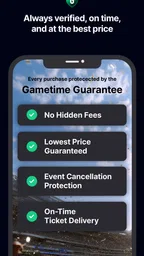
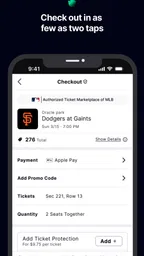
Price should be considered with care as well. The app is free to download, but that does not mean the tickets themselves are free. I would review the purchase details before completing an order and compare the final amount and seat against other options. This is a sensible habit with any ticket marketplace, particularly when a quick decision might otherwise hide the difference between a headline price and what I am actually agreeing to pay.
Another friction point is that “last minute” is not a promise of a perfect bargain. It describes the kind of ticket-shopping moment the app is designed to serve, but an event can still be a poor fit for my budget or preferences. I would open it with a realistic spending limit and a clear sense of what compromises are acceptable. That keeps the search useful rather than turning it into an impulse purchase.
There is also a meaningful difference between discovery and planning. Gametime can help me find an event to consider, but I still need to coordinate with friends, check how the venue fits the evening, and decide whether the available seats are suitable. For people who want a complete night-out planner, that may feel like extra work. For someone who only needs a ticket-search starting point, the focused scope is easier to understand.
Who should make it part of their routine
I would recommend Gametime to people who enjoy live events and often make plans close to the date, especially those who are open to different kinds of outings. It is a good fit for a sports fan who can be flexible about sections, a couple looking for an unplanned concert, or friends who want to compare a game with a comedy show before choosing what to do. Its value is strongest when discovery and convenience matter more than locking down one exact seat far ahead.
It is less suited to someone who already knows the event, date, and seating area they must have. In that situation, a direct venue box office or another seller with the exact inventory being sought may be a better first stop. I would also advise cautious shoppers to compare options rather than assume that an app centered on deals will always provide the lowest final cost. The best choice depends on the specific event and the seats available at the time.
The app is free and rated for Everyone, so the basic decision to try it is low-commitment; the more important commitment is the ticket purchase. Gametime has an average rating of 4.8 from around 91,000 ratings, alongside about 38,000 written reviews. It has over 5 million installs, which gives a sense of its reach among event seekers, but those figures do not tell me whether a particular event will suit my needs. I would still judge each listing on its own merits.
A straightforward tool, not a substitute for judgment
Gametime has been available since March 12, 2014, and its current version is 2026.30.0, with support starting at Android 8.0. Those details make it an established app rather than a brand-new experiment, but my recommendation rests more on its role: it gives flexible event-goers a convenient place to explore ticket possibilities across several kinds of live entertainment.
My overall view is positive, with a clear condition. Gametime works best as a flexible event-finding and ticket-comparison tool, not as a promise of a perfect seat or an automatic bargain. I would keep it in mind for open evenings, spontaneous plans, and groups willing to weigh a few options. If precision matters more than discovery, I would check the official seller and compare before buying. Used with that distinction in mind, it can make deciding what to do—and finding a ticket for it—feel much less scattered.
What we like
- Compare ticket prices for nearby games and events in one place.
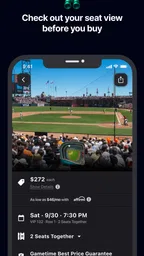
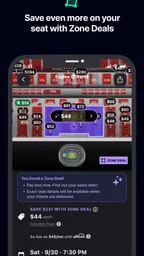
- Interactive seat maps help you choose where to sit.
- Mobile tickets make entry convenient at supported venues.
- Last-minute listings can offer access to sold-out events.
- The app covers sports games concerts and live shows.
What could be better
- Fees can make the final price higher than the listing price.
- Ticket availability may change quickly for popular events.
- Coverage and inventory vary by city and venue.
- Some purchases may be final with limited refund options.
- Seat views and ticket details can vary in accuracy.





