
SeatGeek – Tickets to Events review
 Analysis by Appsdrops
Buying an event ticket often starts with a quick question: what is happening nearby, and can I get a seat that feels worth the price? SeatGeek is built around that decision, bringing event discovery and ticket buying into one mobile app. I find it most useful when I have a date or a type of event in mind but have not settled on a venue or a specific seat. Its biggest practical caveat is that the experience depends on having a working connection at the moments that matter, especially while browsing and completing a purchase.
Where a connection makes the biggest difference
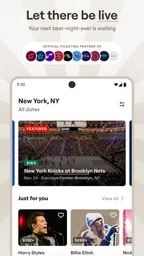
SeatGeek is an events app from SeatGeek for finding and buying tickets to sports, concerts, theater, festivals, and comedy. That range makes it more flexible than an app I would open only for one team or one venue. I can begin with a broad idea—such as a live show this weekend—and narrow my attention as I compare what is available.
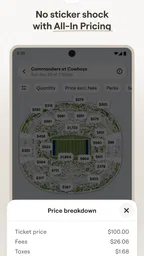
In everyday use, that comparison is the point. A ticket’s headline price is only one part of the decision: the location of the seat, the event, and the total cost all affect whether it is a sensible choice. I recommend checking the final purchase details before committing rather than treating the first appealing listing as the whole story. Ticket availability and prices can change, so a listing you were considering may not be there when you return.
A useful habit is to decide your limits before browsing: which event types are acceptable, how far you are willing to travel, and what price would make you pass. That stops a steady stream of tempting listings from turning into an impulsive purchase. It also helps when you are comparing several events, because you can judge them against the same priorities instead of starting over each time.
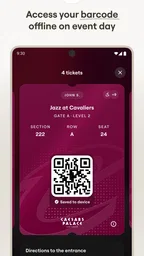
The connection matters most during active searches and checkout. If service is weak, loading listings or moving between event details can become frustrating, and it is unwise to assume that a ticket screen will be available without internet when you reach a venue. I would open the app and check the ticket well before heading inside, while I still have time to address a login, loading, or account issue.
Searching while plans are still flexible
SeatGeek suits a common planning scenario: friends have an open evening but cannot agree on what to do. Instead of checking several separate event sources first, I can use one place to explore different kinds of live entertainment. Once a promising option appears, I would compare it with the group’s schedule and travel plans before buying. The app helps with discovery, but it cannot make those choices for the group.
For a last-minute decision, a reliable mobile connection becomes particularly valuable. I would avoid waiting until I am already outside a venue to settle the plan or inspect the purchase details. If the network is congested or my signal is poor, troubleshooting then is more stressful than checking everything at home or on a stable connection beforehand.
That same advice applies to people buying for someone else. Before paying, make sure the event, date, and ticket selection match what the recipient expects. A rushed purchase on a weak connection leaves less room to spot an error. I see the app as a convenient place to handle the decision, not a substitute for slowing down long enough to verify it.
Using the app across different mobile situations
SeatGeek can be useful at home, on public transport, or while coordinating plans with friends, but those settings do not offer the same connection quality. Browsing over an unstable public network may make the experience slower, while a busy venue can make it harder to rely on a quick refresh. My practical approach is to do the research and purchase before the most time-sensitive part of the day.
If you are comparing options while traveling, remember that the app is only one part of the outing. You still need to judge whether the venue is reachable, whether the event time works, and whether the seat choice is acceptable. I would not buy solely because an event appears convenient in a search result; location and timing can turn an attractive listing into a poor fit.
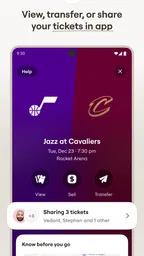
Another useful distinction is between browsing and relying on the app at the door. Browsing can be done casually, with time to retry if something takes a while. Entry is a deadline. Before leaving, I would open the relevant ticket information while connected and make sure I know how to return to it. That small check is more useful than hoping that an app screen will load at the exact moment the line is moving.
When something stalls, prepare before it becomes urgent
Network problems do not always mean a purchase has failed. A page that seems slow may simply need time, and repeatedly tapping a purchase control can create confusion about what has or has not gone through. If a checkout appears stuck, I would pause, check for a confirmation or account update, and avoid starting a duplicate transaction until I understand the status.
If the app stops responding while you are browsing, retrying on a steadier connection is a reasonable first step. For an important purchase, I would also keep track of the event and ticket details I intended to choose, so I can recognize whether a later listing is the same option or a different one. That is especially helpful when listings move quickly and the screen you saw earlier is no longer available.
Before event day, it is sensible to confirm that you can sign in and reach the relevant purchase information. If you share ticket plans with other people, agree in advance on who is responsible for presenting the ticket and who should be contacted if something goes wrong. Those are simple preparations, but they reduce dependence on hurried messages and unreliable service at the entrance.
Keeping mobile data use sensible
I would use SeatGeek’s connected browsing for the parts where current information matters: exploring events, checking options, and making a purchase. If you are trying to conserve mobile data, avoid repeatedly reopening the same searches while moving through areas with inconsistent coverage. It is more efficient to narrow down your choices when you have a dependable connection and then return only when you have a specific detail to verify.
That is not a reason to skip checking the final details. A ticket purchase is consequential, so saving a little data is not worth guessing about the event or seat. Instead, make your browsing deliberate: settle on the event, review the selection, and complete the transaction when you can pay attention. If you are on a limited connection, postponing casual exploration until Wi-Fi is available can be a better choice than loading listings repeatedly.
For people who travel to events, I would also treat the ticket as something to verify before departure, not something to retrieve for the first time after arrival. The app’s value is strongest when it has already helped you make the plan; the weaker the connection gets, the less appealing it is to leave essential checks until the last minute.
Who should choose it—and who may prefer another route
SeatGeek is a good fit if you regularly consider different kinds of live events and want one app for discovering and buying tickets. It is also useful when plans are flexible and you want to compare possibilities rather than begin with a single venue’s schedule. The app is free, rated for Everyone, and has a 4.5 average from around 46,000 ratings, with more than 5 million installs. Those figures suggest broad use, but they do not guarantee that every event or listing will suit your plans.
For someone who follows one team closely, a team- or venue-focused app may be a more direct option for schedules and event-specific information. If you already know exactly which event you want, going straight to the relevant official ticketing channel may also feel simpler than browsing a broad marketplace. SeatGeek’s advantage is variety; that variety can be unnecessary when your choice is already made.
I would also hesitate to make it the centre of a plan if I expect to be without reliable connectivity during the purchase or at entry. That does not mean the app is unsuitable for travel or busy venues, but it does mean I would prepare earlier. People who prefer to make arrangements entirely in person, or who do not want to compare digital listings, may find their usual ticket-buying method more comfortable.
A practical verdict on staying connected
SeatGeek is most convincing as a connected planning and buying tool: it brings several kinds of live events together and gives me a place to explore before deciding. The trade-off is that browsing, checkout, and retrieving important information are less reassuring when the network is unreliable. I would use it to find an option, make the purchase carefully, and check the ticket details before setting out.
SeatGeek was released in 2013, and its current version is 2026.43.0 for devices running Android 10 or later. For me, the right way to use it is straightforward: take advantage of the broad event selection when you have time and a stable connection, then prepare for event day instead of relying on a last-second refresh. That makes it a helpful companion for flexible plans, rather than a tool I would want to depend on without a connectivity backup.
What we like
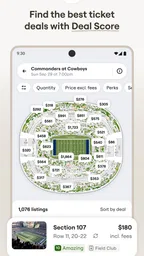
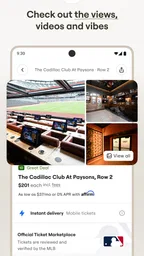
- Interactive seat maps help compare views before choosing.
- Price filters make it easier to find tickets within budget.
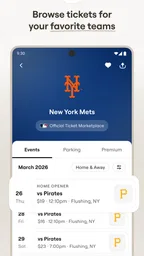
- Event recommendations can help uncover nearby shows and games.
- Mobile tickets keep entry passes accessible on your phone.
- The app covers sports games concerts and theater events.
What could be better
- Some events may have limited ticket options in the app.
- Ticket prices can change quickly as demand shifts.
- Service fees may increase the final checkout total.
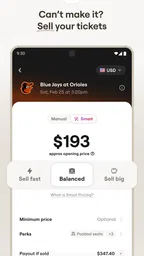
- Refunds and exchanges depend on the event and seller terms.
- A reliable internet connection is needed to access mobile tickets.




