


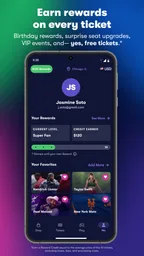
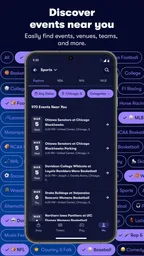

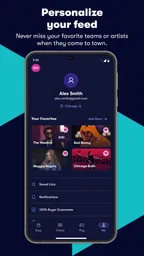


Vivid Seats | Event Tickets review
 Analysis by Appsdrops
When I’m trying to find tickets for a specific concert or game, the hard part isn’t just browsing listings; it’s comparing options without losing track of what matters. Vivid Seats gives that search a clear home, covering live events across music, sports, and theater. I find it most useful when I have an event in mind but still need to weigh different ticket choices. It is less compelling if I only want a venue’s own inventory or prefer to avoid resale marketplaces.
Finding tickets without turning the search into a chore
The app is an Events app from Vivid Seats, built around buying and selling tickets rather than serving as a general-purpose calendar. That focus is a practical advantage: I can approach it with a particular artist, team, or show in mind and use it to explore ticket availability. The trade-off is that it won’t replace a local events guide if I’m still deciding what to do.
In everyday use, perceived speed matters most when I’m moving between an event and its available choices. I want to get oriented quickly, compare options, and avoid restarting my search if I briefly switch tasks. I found the app’s purpose straightforward, but a smooth experience still depends on the event and the amount of information I’m reviewing. I wouldn’t assume every search or busy moment will feel equally quick.
A useful way to start is with the event rather than a broad, open-ended browse. If I’m planning to see a particular team, for example, I can look for the relevant matchup first and then decide whether the available ticket choices suit my budget and plans. That keeps the app focused on a real decision instead of encouraging endless scrolling through events I may not attend.
Concerts, sports, and theater each come with different planning concerns. A concertgoer may care most about location and the date, while a sports fan might be comparing more than one game. Theater plans can be tied to a particular evening, making the available choice for that date especially important. I like that all three kinds of outings fit within the same app, but I still treat each event as its own purchase decision rather than assuming the listings are interchangeable.
How I compare choices before committing
For an event with several possible tickets, I’d narrow my decision in stages: first confirm the date and venue, then compare the options that remain, and only then move toward checkout. This sounds basic, but it helps prevent a familiar mistake: choosing something that looks appealing before checking whether it fits the actual plan. If I’m coordinating with friends, I’d also agree on the event and practical limits with them before browsing, so the app doesn’t become a substitute for deciding together.
One non-obvious trade-off is that a wider selection can make choosing harder, not easier. A listing that looks attractive in isolation may not be the best match once I consider where I want to sit, how much I intend to spend, and whether the event time works. I recommend treating the first promising option as a candidate, not an automatic purchase. That small pause is useful anywhere ticket choices are being compared.
When I’m buying for more than one person, I’d settle the key details before placing an order: who is attending, which event and date everyone means, and what compromises are acceptable. This is especially helpful for a group with different preferences. It reduces the risk of confusing “the event we want” with “the particular option we’re willing to buy.” The app can support the search, but it can’t resolve a disagreement about plans.
Busy searches and recovery from interruptions
Ticket browsing often happens under mild pressure. A friend sends a message, I check another option, or I need to confirm a date before deciding. My practical advice is to keep the event details handy and recheck them whenever I return to the app. That is a planning habit, not a claim about a special saved-search or recovery feature: I wouldn’t rely on an interrupted session to preserve every step of a decision.
At a high-demand moment, I would avoid rushing simply because I’m worried an option might disappear. Read the event and ticket details carefully, confirm that the choice suits the group, and proceed only when the purchase makes sense. I can’t infer from the app’s general purpose that every listing behaves the same way or that availability will remain unchanged while I think. Careful checking is more valuable than trying to shave a moment off the process.
If something feels slow, I’d first separate an app problem from a broader connection issue by checking whether other apps are responding normally. I’d then return to the event and verify the details before continuing. This is a sensible troubleshooting routine rather than a promise that a particular error will resolve in a particular way. For a time-sensitive purchase, I’d also keep the event name and date clear so I can resume the search without relying on memory.
Reliability, confidence, and the limits of a marketplace
Vivid Seats has a 4.7 average from around 39,000 ratings, alongside roughly 9,800 written reviews. I see that as reassuring context for an app many people use, not proof that every transaction or ticket choice will be perfect. The app is free to download, but that should not be confused with the cost of tickets; the important decision is whether the actual option shown suits your plans and spending limit.
Because the app brings buyers and sellers together around event tickets, I would read the details of a specific choice rather than relying on a general impression of the platform. Before buying, I’d double-check the event, date, and the ticket information presented for that option. This is one place where slowing down is sensible: a quick tap is not worth the trouble of discovering later that I misunderstood what I selected.
When comparing it with buying directly from a venue or event organizer, the choice depends on what I need. A direct source may be preferable if I want to start with that organizer’s own ticket options. Vivid Seats is more useful when I want to browse event tickets through a dedicated marketplace and compare what is available there. I would not treat either route as automatically best; I’d compare the particular options and terms before deciding.
One practical workflow is to use the app for discovery and comparison, then pause before completing a purchase. I can confirm the plan with everyone attending, check that the selected event is the right one, and review the ticket details one last time. That short gap is particularly useful when I’m looking at several dates or arranging an outing around work, travel, or family commitments.
Device fit and day-to-day expectations
The current version is 2026.145.0, and the stated minimum operating-system requirement is version 8.0. That makes the compatibility threshold relatively clear, but it does not guarantee identical speed on every device. In my view, the more relevant question is whether your phone can run current apps comfortably and maintain a dependable connection while you search. I wouldn’t judge performance solely by the minimum requirement.
I can’t make a confident claim about battery use, storage demands, or memory consumption from the app’s basic details alone. For a realistic assessment, I’d watch how it behaves on your own phone during a typical search rather than assume it is either lightweight or demanding. If your device is older or already struggles with other apps, keep your browsing focused and allow time to review your choice instead of leaving the decision to the last minute.
The app is rated for Everyone and has passed the five-million-install mark. Those details make it approachable in a broad audience sense, but they don’t remove the need for an adult to supervise purchases when appropriate or for every user to review ticket details carefully. A wide age rating is not a substitute for understanding the financial decision involved.
Who will get the most from it
I’d recommend Vivid Seats to someone who regularly attends concerts, sports, or theater and wants one place to look for tickets across those interests. It can also suit an occasional event-goer who already knows what they want and needs a convenient way to compare choices. The developer, Vivid Seats, has kept the app’s identity closely tied to event tickets, which makes its purpose easy to understand from the outset.
I’d be more cautious if I’m only willing to buy through an event’s direct seller, or if I need extensive planning tools rather than ticket shopping. It may also be the wrong choice for someone who finds comparing multiple options stressful and would rather accept a straightforward choice from a single source. In those situations, checking the venue or organizer directly, or deciding on a simpler purchase route, could be a better fit.
My bottom line is that Vivid Seats is a focused ticket-search app with a useful range of live-event categories and a clear role in planning an outing. I’d use it when I have an event in mind, compare choices at a measured pace, and verify the details before buying. Its strongest value is helping me explore ticket options in one place; its main limitation is that marketplace choice still asks me to do careful comparison. If that matches how you like to plan, it is worth trying.
What we like
- Browse tickets for concerts sports games and theater shows in one app.
- Interactive seat maps help you compare locations before purchasing.
- Ticket listings show seat details and view information when available.
- Mobile ticket access makes entry easier at supported venues.
- Order tracking keeps purchase details easy to find.
What could be better
- Ticket prices may include fees that raise the checkout total.
- Some events may have limited ticket availability in the app.
- Refunds and exchanges can depend on event terms and seller policies.
- Mobile entry may require a reliable internet connection.
- Seat details and view descriptions may vary between listings.





