



Яндекс Афиша — билеты review
 Analysis by Appsdrops
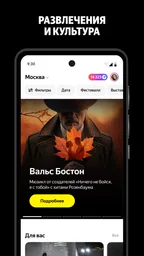
When I want to make a plan that involves more than dinner, I prefer starting with the event rather than searching venue by venue. Яндекс Афиша — билеты is built for that kind of browsing: it is an events app for finding and buying tickets to cultural outings, including cinema, theatre, concerts, plays, films, and excursions. Its appeal is practical rather than flashy. It brings different kinds of things to do into one place, which can make choosing an evening out feel less like a research project.
Finding something worth going out for
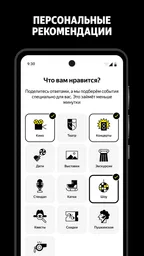
The app’s strongest idea is that a free evening does not have to begin with a fixed choice of venue. You can start with a mood or a broad plan—perhaps a film, a live performance, or an outing—and browse from there. That makes it useful when a group knows it wants to do something but has not settled on what. A dedicated cinema app may be quicker if the film is already chosen; this app is more valuable when the decision itself is still open.
That range also changes how I would use it. I would not treat it only as a checkout tool after finding an event elsewhere. I would open it earlier, while comparing the kinds of experiences available, then narrow the search to something that fits the day and the people coming along. Bringing films, theatre, concerts, and excursions together gives the app a broader role than a single-venue ticket service.
In everyday use, that can save a few rounds of switching between separate apps and event pages. It is especially handy for visitors or residents who are not attached to one venue and want to discover what is happening nearby. The trade-off is that a broad catalogue can take more effort to browse than a specialist service with a tightly focused selection. If I already know the exact cinema or performer I want, going straight to that provider may be the more direct route.
A useful starting point for a real evening out
Imagine it is Friday afternoon, a friend is visiting, and neither of you has decided what to do. I would use the app to compare several kinds of outing before settling on one, rather than immediately committing to a film or searching for concerts separately. Once an event catches my eye, I would check the practical details on its page before making a decision: the venue, the time, and whether the available option suits the people in the group. That simple habit matters because an appealing event is not necessarily a workable plan.
For a group, I would decide on the basic constraints before browsing: which part of town is convenient, how late everyone can stay, and whether the plan should be seated or involve more moving around. This is not a special feature claim; it is a way to get more value from a catalogue spanning different event types. Without a few boundaries, browsing can become an endless scroll through possibilities that do not fit the evening.
For a more spontaneous plan, I would begin with the category rather than a specific title. For a planned celebration, I would work in the opposite direction: shortlist the event first, then compare the timing and ticket choices before asking friends to commit. Separating discovery from the final decision is a small workflow improvement, but it helps avoid buying tickets simply because something looked appealing at first glance.
How it compares with specialist ticket apps
Most people have a familiar alternative: search the web for an event, then follow a venue or ticket seller to its own booking page. That approach can be excellent when you know what you want, and a venue’s own service may offer the clearest details for its performances. Яндекс Афиша has a different advantage: it is a place to begin when the event type, venue, or even the plan is still undecided.
I see it as a discovery-and-booking companion, not a reason to stop checking the event’s practical information. An aggregator can make comparison easier, but the final choice still depends on details such as location, session time, and ticket conditions shown for the particular event. If those details are important to your plans, take a moment to review them before purchase rather than relying on the event title alone.
That distinction is useful when choosing between this app and a specialist alternative. Pick Яндекс Афиша when you want to explore several kinds of culture in one sitting. Go directly to a cinema, theatre, or organiser when you already know the exact event and want to focus on that provider’s own information. Neither route is automatically better; the right one depends on whether you are browsing broadly or completing a known plan.
What its current version tells me—and what it does not
The app is currently at version 3.77.0. That identifies the version available now, but a version number by itself is not a changelog. I would not infer that a particular search tool, booking step, or interface element has recently changed just from seeing a newer version number. For existing users, the sensible expectation is to use the current build and judge it by the event-finding and ticket tasks they need to complete.
The release date shown for the app is September 12, 2024. Together, that release information and the current version give a limited but useful picture: this is an established product with a versioned app, rather than a service whose existence is only implied by a brief description. They do not, on their own, reveal which improvements arrived along the way. I would look for actual update notes in the app store before attributing a specific change to a particular release.
For someone already using it, the most practical way to assess an update is to repeat a familiar task: look for a nearby event, compare options, and see whether the path to the right ticket feels clear. If you are new, there is no need to reconstruct the app’s history before trying it. The more relevant question is whether its current mix of event types matches the way you choose outings.
Яндекс Афиша is free to download, and its age rating is Everyone. It is published by Direct Cursus Computer Systems Trading LLC. The app has a 4.7 average from around 12 thousand ratings, with over 1 million installs. Those figures offer a sense of how widely it is used, but they do not guarantee that every listing will suit every user or that every booking will fit a particular plan. I would treat the app’s value as something to judge by the events available for the place and dates I care about.
Where it can save time, and where it can add friction
The clearest benefit is reducing the number of separate places I need to consult while deciding what kind of outing to choose. That is most noticeable when the group is open to several options. One person might be thinking about a film, another about a concert, and a third about a more unusual excursion; a broad events app gives the conversation a common starting point.
The same breadth can be a limitation. If I open the app with no idea what I want, I may have to make several decisions before I find a suitable event. A focused app can feel cleaner when I only care about one venue or event type. My advice is to use a broad search for inspiration, then narrow the plan quickly by practical constraints instead of browsing indefinitely.
Another useful trade-off is between convenience and checking the details carefully. A single place to explore is helpful, but choosing an event involves more than its name or category. I would verify the venue and timing before buying, especially when organising for a group or travelling across town. That does not diminish the app’s convenience; it keeps the convenience from turning into a rushed decision.
If I were planning for someone with a strict schedule, I would settle the time window first and browse only options that can realistically fit. For a visitor unfamiliar with the area, I would compare the location against the rest of the day’s plans before choosing. These small checks matter more for an excursion or evening performance than for a casual film, because the event may shape the whole outing rather than just one part of it.
Who I would recommend it to
I would recommend it to people who regularly ask, “What should we do?” and are open to more than one answer. It can also be useful for someone who wants a single starting point for different cultural plans, rather than maintaining separate discovery habits for films, performances, concerts, and excursions. The app’s broad scope is its reason to install it, not merely a long list of categories.
I would be less likely to recommend it as someone’s only ticket app if they always book through one specific venue, or if they already know exactly which event they want. In those cases, a direct venue or organiser service may be simpler and may be the natural place to check event-specific details. Likewise, people who dislike browsing should decide on a category and a few practical limits before opening a broad catalogue; otherwise, choice can feel like work rather than help.
There is also a difference between using the app to discover an outing and using it to organise the whole day. Its central job is event discovery and ticket access. I would still make my own plan around transport, meeting time, and how long the group wants to stay out. Keeping that boundary clear makes the app more useful: it can help answer what to attend without pretending to answer every logistical question around the outing.
What I would watch as I keep using it
For regular users, the useful thing to watch is not the version number alone but whether the experience continues to make comparison straightforward. When a new version appears, I would check its update notes for specific changes, then pay attention to the tasks that matter in practice: finding a suitable event, understanding the ticket choice, and confirming the details before purchase. That is a more grounded way to judge product evolution than assuming every update changes the parts a particular person cares about.
I would also keep expectations focused. A broad events app is strongest when it helps surface options and brings a booking decision within reach. It is not automatically the best substitute for a specialist source when you want the fullest venue-specific context, and no catalogue can choose the right event for a group with conflicting schedules. The user still needs to compare the options and make the call.
Overall, I find Яндекс Афиша most appealing as a practical way to turn an empty evening into a shortlist of real possibilities. Its mix of films, theatre, concerts, plays, and excursions makes it more flexible than a single-purpose ticket app, while the need to narrow choices and check event details is a fair price for that breadth. If you enjoy discovering cultural plans before you know exactly what you want, this is a useful app to keep at hand. If you already have a venue and event in mind, a direct specialist service may get you there faster.
What we like
- The app brings event tickets together in one convenient place.
- Filters help narrow down events by category and date.
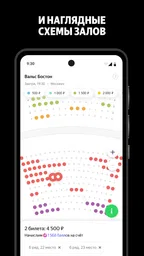
- Event pages provide useful details before you book.
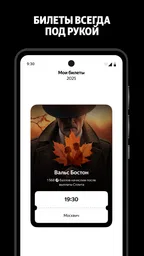
- Saved events make it easier to keep track of plans.
- The app supports ticket purchases for many Russian cities.
What could be better
- Event availability can vary greatly by city.
- Some listings may redirect you to an external ticket seller.
- Popular events can sell out quickly.
- The app is less useful outside its supported regions.
- Ticket refunds depend on the event organizer's rules.





