



XA Downloader - Video Saver review
 Analysis by Appsdrops
I would treat XA Downloader as a practical utility to assess carefully, rather than as an app that automatically deserves access to every video I encounter. Its purpose is straightforward: help save videos at different resolutions and play them back. That can be useful when I want a clip available offline, but downloading media also raises sensible questions about where files come from, what I am allowed to save, and what the app asks me to do along the way. My recommendation is to judge it by the controls and choices actually visible while using it, and to keep downloads limited to material I have permission to store.
What the app is useful for
XA Downloader - Video Saver is a free video app from RedFoxUnitedInc, listed in the video players and editors category. Its combination of downloading and playback is the main appeal: instead of saving a clip with one tool and opening it in another, I can use one app for both parts of that basic workflow. The app is rated 4.4 on average, with roughly 176,000 ratings, and has passed 10 million installs. Those figures suggest it has attracted a substantial audience, though popularity alone does not tell me whether a particular download source or workflow will suit me.
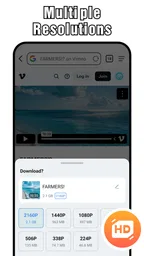
The clearest reason to try it is convenience. If I often need to keep permitted videos on my device for a commute, a trip, or a place with unreliable reception, a downloader can save repeated searching and buffering. Resolution choices matter here: a smaller copy may be sensible when storage is tight or the clip is mainly for a phone screen, while a higher-resolution option may be preferable when detail matters. I would make that choice deliberately rather than assume the largest file is always the best one.
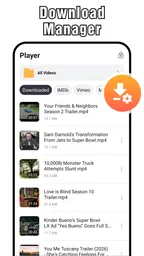
As a player, it also has a useful role after a file is saved. A download is only helpful if I can find it and play it when needed, so I would test the complete path with one nonessential video before relying on it for travel: choose an appropriate resolution, save the file, locate it inside the app, and confirm it plays. That small trial catches practical problems early, such as an unsuitable file size or a source that does not behave as expected, without turning a planned offline library into guesswork.
Trust starts with what I can actually check
Video-saving apps deserve a more careful first look than an ordinary player because the action involves material from outside the app. I would not infer a privacy promise, a particular permission set, or a specific account system from the app’s purpose or its popularity. Instead, I would check the permission prompts shown on my own device and ask whether each one makes sense for the task I am trying to perform. If a request seems unrelated, I would pause rather than grant it automatically.
The available app details identify the developer as RedFoxUnitedInc and the current release as version 2.0.0. The app was released on April 11, 2025, and its stated minimum operating-system requirement is Android 8.0. Those facts help me identify the product and judge basic device compatibility; they do not, on their own, establish how data is handled. For trust-sensitive decisions, I look for clear explanations and meaningful choices in the app and its store page instead of treating a version number or a large install base as proof of privacy.
I would also keep the source of each download in view. Saving a video for offline personal use is different from redistributing it, removing attribution, or capturing material that its owner has not made available for that purpose. The cautious habit is simple: download only when the source and the relevant rights allow it, and avoid using a downloader to bypass restrictions. This is not a special technical trick; it is the line that keeps a convenient tool from becoming a way to misuse someone else’s work.
Resolution choices are a storage decision, too
A resolution menu can look like a pure quality setting, but in everyday use it is also a storage and reliability decision. Before a long journey, I would avoid queueing several large files without checking the remaining space on my device. If I only need to listen to or glance at a short clip on a phone, a lower resolution may be enough. If the video contains text, fine detail, or demonstrations I need to inspect later, choosing a clearer version can be worth the extra space.
My practical tip is to test one representative clip rather than build a whole offline collection immediately. Note how much space it occupies, play it from beginning to end, and check whether the quality is adequate on the screen where you will watch it. That gives you a personal benchmark for future downloads without relying on a generic rule about what counts as a “small” or “high-quality” file. It also makes it easier to notice when a source offers no choice that fits your needs.
There is a trade-off: a resolution option is useful only when the source provides a compatible video and the download completes correctly. I would not treat the presence of multiple choices as a guarantee that every clip is available in every quality. When a particular video matters, keep the original source accessible until you have confirmed the saved copy works. That is a more dependable workflow than assuming a download has succeeded just because it appeared to start.
A realistic offline workflow
Imagine I am preparing for a train ride where mobile reception may drop. I would first identify a few videos that are appropriate to save and that I am allowed to keep offline. I would then pick a resolution based on how much detail I need and how much storage I can spare, download one clip as a test, and play it before leaving. If it works, I can repeat the process for the rest. If it does not, I have time to use the source’s own offline option or another permitted method instead of discovering the problem on the journey.
This kind of small, deliberate workflow is where a downloader can be more useful than a general-purpose player. A typical player is usually the simpler choice when all I need is to open files already on my device. A browser or the original video service may be better when I only want to stream, especially if it offers its own authorized offline viewing. XA Downloader is most compelling when the combination of saving and playing is genuinely useful and the source allows that use; it is not a reason to download everything I can access.
I would keep downloads organized with the same care as other media. After testing a file, remove copies I no longer need rather than letting a collection grow unnoticed. If the app presents a clear way to review or delete saved items, that is the point at which I would use it; I would not assume a particular folder structure or cleanup feature without seeing it on my device. This simple habit helps preserve storage and reduces the chance of confusing a temporary offline copy with a permanent archive.
Controls, costs, and sensible boundaries
The app is free to install, with optional in-app purchases listed from $0.99 to $8.99 per item. I would check the purchase screen before confirming anything and decide whether the free experience already covers my needs. Those optional prices are worth keeping in mind if I prefer not to make in-app purchases, but they do not by themselves tell me what any individual purchase includes. I would base a decision on the details shown at the point of purchase, not on assumptions about upgrades or limitations.
For user control, I focus on choices I can verify in the moment: whether I can select a resolution, whether the source is clear, whether I can cancel a download, and whether I can remove a saved file when finished. I would not claim the app has a particular account dashboard, privacy toggle, or history control unless I could see it. On a device used by other people, I would be especially careful about where saved videos appear and would avoid storing private material in a shared environment unless I understood who could access it.
The app has a Teen content rating. That is useful context for households, but it is not a substitute for checking the actual sources being viewed or saved. If a younger person uses the device, I would talk through the difference between playing a video and downloading it, and set expectations about permission and responsible sharing. A content label cannot determine whether a particular clip is suitable or whether its owner permits an offline copy.
Who should choose it, and who should look elsewhere
I can see XA Downloader working well for someone who regularly saves permissible videos, wants to choose among available resolutions, and values having playback in the same app. It is also a reasonable candidate for users who want to prepare a small set of clips before travel and are comfortable checking file size, playback, and source permissions themselves. The core benefit is not complicated editing or an elaborate media library; it is a focused save-and-watch routine.
I would skip it if I mainly stream from services with reliable built-in offline viewing, if I only need a player for files I already own, or if I do not want to manage downloaded copies. A service’s own app is usually the better option when it provides an authorized download function, because the terms and playback experience are tied directly to that source. A dedicated media player is a better fit when organizing and playing local files matters more than fetching new ones. And anyone unwilling to inspect permission prompts or make careful choices about source rights may be more comfortable avoiding downloader tools altogether.
On an older or storage-constrained phone, I would be selective rather than assume every available resolution is practical. The minimum operating-system requirement is Android 8.0, but compatibility on paper does not guarantee that every device will have ample free space or behave identically. Start with one small, low-stakes test, keep an eye on storage, and do not depend on an untested download for an important trip or presentation.
My cautious verdict
XA Downloader - Video Saver makes sense as a straightforward option when I have a legitimate reason to keep a video offline and want a player alongside the download workflow. Its rating and install reach show that many users have tried it, while its free entry point makes a cautious test easy; optional purchases are something to review individually rather than accept by default. The Teen rating and Android 8.0 minimum also give useful context when deciding whether it fits a device and household.
My recommendation is measured: try it with one permitted clip, inspect the prompts, choose resolution with storage in mind, and confirm playback before relying on it. If the app gives you the control and clarity you need, it can be a convenient companion for planned offline viewing. If you need strong assurances about privacy or account controls that you cannot verify through visible choices, or if the source already offers a better authorized offline option, choose that route instead. The app’s value depends less on downloading as much as possible and more on using its save-and-play convenience deliberately.
What we like
- Simple controls make saving videos easy for first-time users.
- Built-in downloads help keep saved clips available offline.
- A lightweight design can be convenient on older devices.
- The app may support multiple video resolutions.
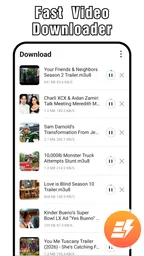
- A download queue helps organize several saves at once.
What could be better
- Some websites may block downloads or change their video formats.
- Downloaded videos can use significant storage space.
- Background downloads may be limited by device settings.
- Ad-supported screens can interrupt the saving process.
- Availability of features may vary by region or app version.





