





HD Video Player All Formats review
 Analysis by Appsdrops
I often end up watching videos on a phone that is also used by someone else in the household. In that situation, a player is more than a way to press play: it needs to make local files easy to find without turning a shared device into a cluttered, confusing media shelf. HD Video Player All Formats is aimed at that everyday job, with video playback, audio playback, subtitle tools, and file browsing gathered in one app. I find that combination useful when people pass a phone or tablet around, though it works best when everyone understands that it is a general-purpose player, not a family-management tool.
One player on a shared device
The app sits in the video player and editing category, but its practical appeal is playback rather than editing. ASD Dev Video Player for All Format develops it, and the app’s focus is straightforward: open media already on the device, watch it, and browse files without necessarily switching between a video app, an audio app, and a separate file manager.
That matters in a realistic household moment: I might save a film for a trip, while another person uses the same device to listen to music or check a downloaded clip. A combined player can reduce the little handoff hassles—finding the right app, backing out of one media library, and opening another. The trade-off is that one shared app can also put different people’s files in the same browsing space. I would treat it as a convenient common tool, not as a way to keep one person’s media separate from another’s.
The app has a 4.3 average from around 372,000 ratings, and it has passed 100 million installs. Those figures suggest it has broad appeal, but they are not a guarantee that every file or device will behave identically. My practical advice is to test it with the kinds of videos your household actually watches before making it the default player for everyone.
What the all-in-one approach changes
Compared with a phone’s built-in gallery player, a dedicated player can be more useful when your media is scattered among folders rather than neatly organized in one photo library. The included file manager gives the app a browsing role as well as a playback role. That can save time when someone hands you a downloaded file and says, “Can you open this?” Instead of hunting through several apps, you can start by looking through the device’s files from the player.
There is a cost to that convenience: a file-oriented interface can feel less curated than a streaming service or a gallery organized around recent pictures. If you mainly watch films through subscription apps, this player is unlikely to replace them; its value is in local media. I would choose a streaming service for its catalog and a gallery for casual phone recordings, but reach for this app when I have a particular file to play.
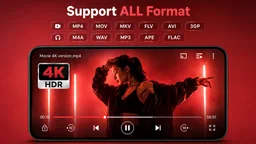
The listing describes support for 4K video and common formats such as MP4, along with MP3 playback and subtitle downloading. That breadth is appealing, but a format label alone cannot promise smooth playback on every handset. High-resolution video can be demanding, and the phone’s hardware, the file itself, and available storage all affect the experience. If a large clip stutters, I would first try a lower-resolution copy or another device before deciding the player is at fault.
Set it up with sensible boundaries
On a shared phone, the first useful step is agreeing how the app will be used. Each person can be responsible for their own downloads and for leaving the device in a state the next person can understand. Because this is also a file-browsing app, it is worth remembering that media stored on the device may be visible to someone who can use the device and browse its files. I would not assume that the player creates private profiles or locks one person’s library away from another’s.
That boundary is especially helpful on a tablet left in a common room. Keep personal or sensitive media somewhere appropriate for the device’s existing privacy settings, and do not rely on a playback app to enforce household rules. If the phone is passed to a child, hand it over with the understanding that the app can open local media; the app itself should not be treated as a substitute for supervision or device-level restrictions.
Another practical habit is to keep a simple folder structure. For example, separating trip videos from music and school clips makes the file manager easier for everyone to navigate. This is not a special feature or automatic organization system; it is a small housekeeping choice that makes a general-purpose player more comfortable on a communal device. If one person routinely downloads large videos, checking storage before a journey can also prevent the unpleasant surprise of running short on space.
Coordinate playback and subtitles
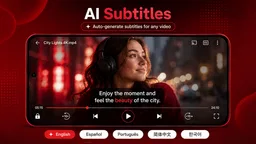
Subtitle support is one of the app’s more useful details for shared viewing. If someone is watching quietly while another person is reading or working nearby, subtitles can make a clip easier to follow without turning up the volume. The subtitle downloader can also help when a video and its text track need to be brought together, although I would check the result before settling in: the wrong language or a poor timing match can make subtitles more distracting than helpful.
A good household workflow is to test the subtitle on a short section before a long film. Confirm that the text is readable from the usual viewing distance and that it stays in step with the dialogue. This small check can prevent several people from interrupting the viewing later to adjust things. It is also a reason not to assume that “subtitle support” means every file will arrive perfectly prepared; the source video and subtitle still need to match.
The app also handles audio, so it can cover a quick music-listening session without requiring a second local-media player. That is convenient for an adult using the phone on the way out or for someone checking an audio file. But a dedicated music library may be a better fit if the household needs carefully maintained playlists, shared listening queues, or a richer music-discovery experience. I see the audio capability as a useful extra, not a reason to replace every music app.
For coordinating who watches what, the simplest approach is still a spoken agreement or a shared routine—such as returning the device to the home screen after use. The app brings playback and browsing together, but it does not remove the need to communicate when several people depend on one phone. That distinction matters: convenience is not the same thing as multi-user coordination.
Age context and everyday trust
The app is rated for Everyone, which makes its intended audience broad, but that rating does not say that every file someone can open is suitable for every age. The content comes from media stored on the device, so adults should think about the files available on a shared phone or tablet rather than relying on the player to curate them. For a child’s device, I would use the device’s own supervision and access settings where needed and keep the media library appropriate.
The basic decision is not complicated: if a young person needs a straightforward way to play family videos, this may be useful; if an adult needs strong separation between personal files and a child’s browsing, I would choose a setup that provides that separation at the device or account level. The player’s convenience should not be mistaken for a privacy boundary. On a device used by several people, who can unlock it and what files are stored there matter more than the name of the playback app.
There is also a small trust issue around shared downloads. Someone may add a file for a specific occasion, then forget it is still on the device. A periodic tidy-up helps keep browsing manageable and avoids leaving old clips in a shared library longer than intended. I find this especially sensible on a tablet that travels between rooms or is lent to relatives, where it is easy to lose track of what has been saved.
Where it fits beside other players
Against a built-in video player, this app’s strongest case is the combination of file browsing, audio playback, and subtitle tools. Against a streaming app, its advantage is that it is designed for files already on the device rather than a catalog delivered through a service. Those are different jobs, so I would not judge it by whether it offers the discovery and recommendations found in streaming platforms.
It may be the wrong choice if you want a polished shared media library with separate household profiles, a carefully managed watch history, or one central place for films across several services. A dedicated gallery can feel simpler for short recordings, while a specialist music app can be more comfortable for regular listening. If your priority is opening a range of local video and audio files from one place, however, the broader toolset is a sensible fit.
It is free to install, with in-app purchases listed from $0.49 to $35.99 per item. I would start with the free experience and only consider a purchase if the app’s actual use on your device gives you a clear reason. The current version is v12.1.473, and it supports Android 7.0 and later, which makes it an option for some older Android devices as well as newer ones. It is not an iOS app, so iPhone and iPad users should look for a player in their own app store.
My household verdict
I would recommend HD Video Player All Formats to someone who regularly opens local videos, wants audio playback close at hand, and appreciates being able to browse files from the same app. It is particularly practical on a shared Android tablet used for downloaded travel videos, family clips, and occasional music. The most useful approach is to keep the device’s folders tidy, test subtitles before a group viewing, and set privacy expectations outside the player itself.
I would skip it as the centerpiece of a family media system if you need separate accounts, strong content boundaries, or a managed shared watchlist. It is also unnecessary if all your viewing happens in streaming apps and your built-in player already handles your occasional clips. For everyone else, it offers a practical middle ground: more tools for local media than a basic player, without pretending to solve the separate problems of household privacy and coordination.
What we like
- Supports common video formats without extra codecs.
- Offers subtitle support for watching foreign-language content.
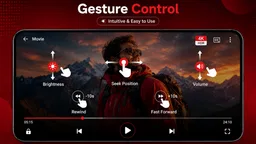
- Includes playback controls that are easy to access.
- Can play videos stored locally on the device.
- Lets users adjust playback speed.
What could be better
- Ad-supported screens may interrupt the viewing experience.
- Some advanced features may require in-app purchases.
- High-resolution playback can drain battery quickly.
- Large video files may use substantial device storage.
- Performance can vary across devices and Android versions.





