

Video Player All Format review
 Analysis by Appsdrops
I like Video Player All Format most as a practical, no-fuss way to watch a mixed collection of video files on an Android device. It is less about turning playback into a home-cinema project and more about opening a clip without first wondering whether the format will work. That makes it useful for everyday viewing, especially when videos come from different sources. Still, its broad feature set is not a reason to replace every media app you already use: the best choice depends on whether you want straightforward playback or a more carefully organized library.
Reliable playback is the main appeal
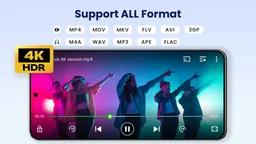
Video Player All Format is a video player for Android from InShot Inc., and the appeal is easy to understand: it aims to handle a wide range of formats, including high-resolution video, while bringing several media tasks together. In ordinary use, that means it can serve as the app you try first when a downloaded clip or an older file refuses to open in a basic player. Its store summary highlights 4K and HD playback, but the real value for most people is simpler: less fuss moving between files and fewer reasons to keep several small playback apps installed.
The app has a 4.8 average from around 1.9 million ratings, and it has passed 100 million installs. Those figures suggest it has found a broad audience, though they do not guarantee that it will suit every device or file. I would treat format support as a helpful starting point, not a promise that every unusual encode will play perfectly. Video containers and codecs are not the same thing, and a file can still be a problem even when its extension looks familiar.
That distinction matters in practice. If one video fails, I would first check whether another player can open it and whether the file itself is complete, rather than assuming the app is broken. Conversely, if the same awkward file repeatedly plays here while a device’s default player rejects it, this app has earned its place. For a person who watches clips shared by friends, saved from different sources, or transferred from another device, that compatibility-first approach is more useful than a polished library screen alone.
Useful beyond a single play button
The extra tools make Video Player All Format more flexible than a barebones player. It includes video downloading, an MP3 player, and Chromecast support, so it can cover different moments in a day: watching a saved video, listening to audio, or sending playback to a compatible screen. I appreciate that these jobs sit in one app, but I would not assume they all deserve equal attention. If all you need is to watch a couple of local clips, the player is the central reason to install it; the other options are convenient extras rather than a requirement.
A sensible workflow is to use the app as a first stop for files that have already been saved on your device, then decide whether its other tools fit your habits. For instance, I would keep a video I need to replay easily in the device’s normal file organization rather than relying on a player to become my entire media archive. This makes it easier to find the original later, and it avoids confusing playback convenience with long-term file management.
Chromecast support is particularly useful when the small screen is the wrong screen. If I have a personal clip I want to show in a room, casting can be more comfortable than passing a phone around. But casting depends on having a compatible setup, and it is not the best option when I need precise control over a file or want to watch privately while away from home. The feature is a practical bridge between phone playback and a larger display, not a substitute for checking that the receiving device is available before settling in.
Where the all-in-one approach can feel less simple
Putting a downloader, audio player, and video playback in one place can save app switching, but it also creates a wider surface area than some people need. If your only goal is to open videos, extra sections may feel like clutter rather than a benefit. I would recommend taking a moment to learn which part of the app you actually use instead of treating every tool as essential. A focused player may feel calmer if you prefer a minimal interface and have no interest in downloading or listening to audio there.
There is also a practical trade-off around high-resolution playback. A 4K label sounds reassuring, but a smooth experience depends on the video file and the phone or tablet handling it. Large, demanding videos can be less comfortable to watch on an older or less capable device, and the screen itself may not show the detail that a high-resolution source contains. I would not choose a player solely for a resolution claim if most of my viewing is on a small screen or if my files are already modest in size.
Downloading is another feature to approach thoughtfully. It can be convenient when the content and source permit saving, but a downloader does not automatically make every video available for offline use. I would use it for material I am allowed to save and would avoid assuming that it bypasses restrictions or works identically with every source. That distinction helps set realistic expectations and keeps the app’s useful feature from becoming the basis for a frustrating search for content it cannot provide.
Everyday use and a better playback routine
Imagine getting home with a video from a family gathering that was sent in a format your default player does not handle. Rather than converting the file immediately or hunting through several apps, you can try opening it in Video Player All Format. If it plays, you can watch it there; if you want to share it with everyone in the room, Chromecast may be the next step. If it does not play, that is a useful signal to check the file or try a dedicated alternative, not to repeatedly tap the same option and hope the result changes.
For a more reliable routine, I would keep original files intact and test playback with a short clip before committing to a long viewing session. This is especially sensible for large videos or files received from unfamiliar sources. A quick test catches audio or playback problems early and saves the annoyance of discovering them halfway through. It also gives you a fair sense of whether your device handles the particular file comfortably, rather than judging the app from a single, unusually demanding video.
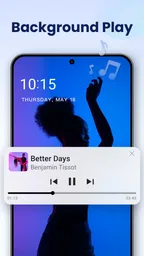
If audio is the main thing you want, the built-in MP3 player can reduce the need to switch apps for a simple listening session. But people who depend on curated playlists, extensive music-library management, or specialized audio controls may be happier with a dedicated music player. Likewise, someone who edits footage will need an editor rather than a playback tool: despite the broader media category, this app’s core purpose is watching and listening, not shaping a finished video.
Who should install it—and who may prefer another player
I would suggest Video Player All Format to people who regularly encounter varied video files and want one familiar place to try them. It is also a reasonable option for someone who sometimes casts a clip to a television or wants basic audio playback alongside video. The app is free to download, has an Everyone content rating, and offers in-app purchases ranging from $0.99 to $39.99 per item. That means it is accessible to try, while anyone who wants to avoid optional spending should pay attention to any purchase prompt and decide whether an added item is worth it to them.
The current version is 2.9.2, and the stated minimum operating system is Android 7.0. Before installing, I would check that the device meets that requirement and has enough room for the files I plan to watch. This is not a complicated decision, but it can prevent a needless download attempt on an older device. The app’s release date is February 10, 2017, which places it among established Android players rather than a brand-new experiment; I still judge it by how it handles my own files and viewing habits.
Someone who mainly streams films through subscription services may not gain much from another local media player. Those services already organize their own catalogues and viewing, while Video Player All Format is more relevant when the file is on your device or you want the app’s extra playback tools. On the other hand, users who need detailed subtitle controls, library tagging, network-share browsing, or specialist playback settings should compare it with players built around those needs before switching. I would not assume that a broad format focus automatically means the deepest control over every part of playback.
My verdict on Video Player All Format
Video Player All Format earns its place by making the common job of opening and watching different kinds of video feel approachable, then adding useful options such as MP3 playback and Chromecast. Its strongest case is convenience: one app can handle several everyday media tasks without forcing you to build a complicated setup. Its weakest case is the same breadth. If you want only a lean player, or you need advanced library and playback controls, the extra tools may not outweigh a more specialized alternative.
For a friend who often receives or saves videos and occasionally wants to cast them, I would recommend giving it a try. I would not recommend it as a video editor, a full music-management system, or a guaranteed solution for every unusual file. Start with a short test, keep expectations grounded in your device’s capabilities, and use the features that genuinely fit your routine. On those terms, it is a useful, approachable media player rather than an app that needs to replace everything else.
What we like
- Plays common video formats without requiring separate codec downloads.
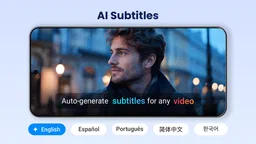
- Supports subtitles for a more accessible viewing experience.
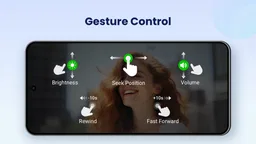
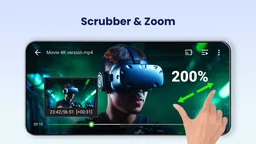
- Offers playback controls that make it easy to adjust viewing.
- Handles both local videos and streamed content.
- A simple layout helps new users find playback features quickly.
What could be better
- Some features may require in-app purchases.
- Ads may interrupt browsing or playback.
- Streaming performance depends on your network connection.
- Large video libraries can take time to scan.
- Playback quality can vary with your device's hardware.





