
Alight Motion review
 Analysis by Appsdrops
I think Alight Motion makes the most sense when a video needs more than a quick trim and a filter. It is a mobile editor built around animated graphics, layered compositions, and visual effects, so it can turn a phone into a compact motion-design workspace. That extra creative control is useful, but it also asks more of you than a straightforward social-video editor does. If I only wanted to crop a clip and add a caption, I would choose something simpler; if I wanted the caption to move, blend with footage, and feel deliberately designed, this is the more interesting tool.
From a rough idea to a workable project
Alight Motion is a free video and photo editing app from Alight Motion, in the video players and editors category. It is rated for Everyone and has been available since August 5, 2018. The current version is 5.0.273.1028425, and it runs on Android 7.0 or later. It has more than 100 million installs, an average rating of 3.1 from around 1.3 million ratings, and about 14,000 written reviews. Those figures suggest a widely used tool with a mixed reception, which fits my own view: it can be rewarding when you want hands-on control, but it is not the easiest route to a quick result.
The useful question at the start is not “Can I edit a video here?” but “Do I want to build a composition?” Alight Motion suits projects where motion itself is part of the message: an animated title card, a short intro, a poster with movement, or a photo edit that combines several visual elements. It is also a sensible option for creators who want to develop a repeatable style rather than rely on a preset look. You can work toward a particular rhythm and visual language instead of simply accepting whatever a template produces.
For a realistic everyday example, imagine making a short announcement for a club or small business. You have a phone video, a logo, and a few lines of information. In a basic editor, you might place text over the video and call it done. In Alight Motion, the appeal is being able to treat the text and graphic elements as animated parts of the composition, shaping how the announcement appears and how it relates to the footage. That can make a small piece feel more intentional without requiring a desktop editing setup.
I would still sketch the idea before opening the project. Decide what the viewer needs to notice first, what should move, and what can stay still. Motion is easy to add and harder to justify; too many animated elements can compete for attention. A simple plan helps keep the app’s creative freedom from turning into a busy edit. For a one-off clip that needs only a clean cut, a quick subtitle, or an automatic montage, a simpler mobile editor will usually save time.
Building the composition without losing the idea
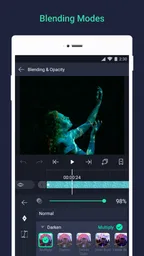
The central strength of Alight Motion is its layered way of thinking. Instead of treating a video as one flat strip with a few decorations, you can approach the image as a composition made from separate visual pieces. That matters when you want text, a graphic, a photo, and footage to have different roles or movement. I find that this way of working encourages more deliberate choices: if an element feels wrong, you can focus on that element rather than rebuilding the whole idea from scratch.
A practical workflow is to establish the visual base first, then add the parts that carry meaning. For the announcement, I would place the footage, settle the framing, and only then introduce the logo and headline. I would keep secondary information visually quieter. This order prevents a common beginner mistake: polishing animated details before deciding whether the underlying composition is readable. It also makes changes easier to judge, because each new layer has a clear purpose.
One useful, less obvious habit is to test the opening and closing moments early. A title may look attractive while paused, yet arrive too abruptly or remain on screen after the viewer has finished reading. Checking those transitions before decorating the middle of the clip can save a lot of unnecessary adjustment. I would also preview the design at the size people are likely to see it on a phone. Small lettering and delicate visual details can look clear while editing but lose impact on a compact screen.
Another trade-off is that control brings decisions. A preset-based editor may get you to a polished social post faster because it has already made many design choices. Alight Motion is more appealing when you want to make those choices yourself, and less appealing when you are not interested in learning how timing and visual hierarchy affect the result. I would not mistake a large number of options for an automatic improvement in quality; the strongest edits are often the ones that use only a few effects with a clear reason.
Iteration: make changes with a purpose
Motion projects often need more than one pass. The first pass is for structure: what appears, in what order, and what the viewer should understand. The next is for timing and visual polish. Keeping those stages separate is a useful way to work in Alight Motion, because it reduces the temptation to adjust every small detail while the overall sequence is still unsettled. If the headline is competing with the footage, changing its animation may not solve the real problem; it may need a different position or less visual emphasis.
I recommend changing one kind of thing at a time. First check whether the message is legible, then whether the movement supports it, and then whether the effects help the look rather than distract from it. This sounds basic, but it is especially valuable in a layered editor, where a small change can affect how several elements feel together. A quick before-and-after preview is more informative than repeatedly tweaking details without a clear comparison.
There is also a useful decision point between making a reusable style and treating every project as a fresh experiment. If you often produce similar announcements, intros, or short promotional pieces, keep your visual rules consistent: the same general title treatment, a restrained set of colors, and a familiar order of information. That does not mean every post should look identical. It means you can spend more attention on the new content instead of reinventing the whole visual approach each time.
The app is not automatically the best place for every stage of a project. If you need fast, conventional edits—joining clips, trimming pauses, and adding simple captions—an editor designed around quick assembly may feel more direct. If your work depends on a tightly controlled animated composition, Alight Motion’s more hands-on approach is the reason to choose it. The distinction is about the job, not which app is universally better.
Preparing the handoff and managing the cost
Before finishing, I would review the whole piece from beginning to end rather than judging it only inside the editing view. Watch for moments where text appears too briefly, movement feels out of step with the message, or effects draw attention away from the main subject. Then make sure the final composition still reads at phone size. This last viewing pass is especially important for work intended for social feeds, where people may encounter the video while scrolling and may not give it much time.
For handoff, think about the person who will receive or publish the finished work. A useful deliverable should communicate its message without requiring an explanation from you. If another person needs to revise it later, keep the project’s structure understandable while you work: use a clear visual order, avoid unnecessary layers, and do not leave a collection of experiments mixed into the finished composition. Those habits make later revisions less confusing, whether you are returning to the project yourself or passing the result to a collaborator.
Alight Motion is free to download, with in-app purchases ranging from $0.49 to $79.99 per item. I would try the basic workflow on a small, low-stakes project before paying for anything. That gives you a fair test of whether you actually enjoy building edits this way, rather than assuming a purchase will make the learning curve disappear. The price range is broad enough that I would check the exact purchase details in the app store before committing, especially if you are choosing a tool for regular work.
A useful first test is a short title animation over a piece of footage you already have. Keep the idea modest: one clear message, a small number of visual elements, and a deliberate beginning and end. If you enjoy adjusting the composition and timing, the app may suit larger projects. If the process feels like work for a result you could have made in a simpler editor, that is a good sign to choose a faster alternative instead.
Who I would recommend it to
I would recommend Alight Motion to people who want to learn mobile motion design by making real pieces, not just applying a ready-made treatment. It is a good fit for creators who care about how text and graphics move, for hobbyists experimenting with visual effects, and for anyone who wants more authorship over short video and photo edits. The ability to shape a composition layer by layer is the key reason to consider it. That control is most valuable when the final result needs a distinct look or when you expect to revisit and refine the work.
I would steer away from it if your priority is speed above all else, or if you mainly need a simple editor for everyday clips. People who dislike hands-on adjustment may find the process slower than template-led tools, while anyone working on a project that demands a carefully managed, familiar desktop workflow may prefer a computer-based editor. I would also be cautious about starting with a complicated, effects-heavy concept. A small project gives you a much clearer sense of whether the app’s way of working suits you.
The 3.1 average rating is a reminder that popularity does not guarantee a smooth experience for every person. With a large audience and many ratings, the app plainly reaches a wide range of users, from casual editors to people looking for more creative control. My advice is to judge it by your own first project rather than by install totals or ratings alone. Its learning curve is part of the trade: you get room to make more deliberate visual work, but you need to bring patience and a clear idea.
Overall, I see Alight Motion as a capable creative workspace for people who want to make motion a meaningful part of an edit. It is not the mobile editor I would pick for every quick clip, and its freedom can lead to overcomplicated results if you animate without a plan. But for a creator willing to build, preview, and refine a composition, it offers a practical way to turn an initial idea into a finished visual piece. Choose it when control over motion matters more than getting to the export in the fewest taps.
What we like
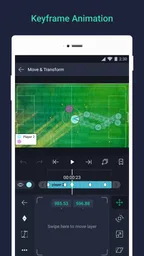
- Keyframe controls allow precise animation timing.
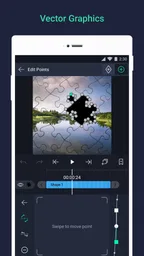
- Vector graphics stay sharp when scaled.
- Layer grouping helps organize complex projects.
- Custom easing curves give motion more personality.
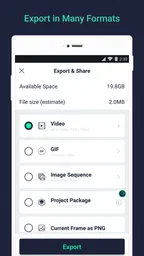
- Projects can be exported in multiple formats.
What could be better
- Advanced tools may take time to learn.
- Free exports include a watermark.
- Large projects can strain older phones.
- Some features require a paid subscription.
- Rendering can be slow for complex animations.





