


PLAYit-All in One Video Player review
 Analysis by Appsdrops
I like a media player best when it gets out of the way: I tap a file, it plays, and I can find the controls I need without hunting through menus. PLAYit-All in One Video Player aims to do that for videos and music, while also giving regular viewers some useful ways to shape playback. Its appeal is practical rather than flashy. If you keep different kinds of media on your phone and want one app to handle them, it is worth considering; if you only stream video, a dedicated streaming app may suit you better.
Starting with a simple playback routine
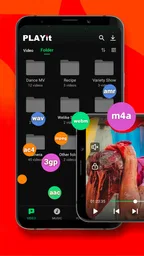
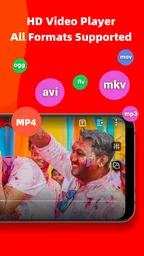
PLAYit is a free Android video and music player from PLAYIT TECHNOLOGY PTE. LTD. It is in the video-player and editing category, though its central job is playing media rather than editing it. The app supports a range of media formats, which makes it useful when a file does not open conveniently in the player that came with your phone. I would treat it as a flexible local-media option, not as a replacement for every video service or a full desktop media library.
A straightforward routine is to open the app, locate a saved video or audio file, and use the playback screen for the session. That sounds basic, but it is where a player earns its place: a useful format range can save the hassle of switching between separate apps for a downloaded clip and a music file. For an occasional viewer, that alone may be enough. For someone who watches regularly, the better approach is to settle on a few familiar controls and use them consistently rather than exploring every option each time.
In an everyday situation, imagine saving a few clips for a commute or a trip where connectivity is unreliable. A player for files already on the device can be more dependable than planning around a streaming service. I would first check that the files are stored locally and playable, then test one clip before leaving. That small habit matters more than a long setup session: it catches a problem while you still have time to choose another copy or player.
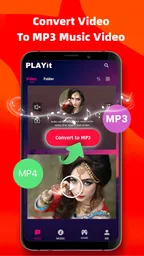
The same idea applies to music. If I have an audio file alongside videos, using one player can reduce app-switching. The trade-off is that a dedicated music app may offer a more focused library experience for people who organize large collections, rely on specialized listening tools, or want their music workflow entirely separate. PLAYit makes the most sense when convenience across media types matters more than having the deepest tools for one type.
What to check before settling in
Start by opening a file you use often, not just a short test clip. Confirm that the picture and sound behave as expected, and spend a moment learning where the playback controls are. Then try a second file in a different format if your collection is mixed. This is a more useful compatibility check than assuming that one successful video means every file will work equally well.
It is also worth checking the app’s available settings at your own pace. I would look for the options that affect the way I actually watch or listen, then leave unfamiliar choices alone until there is a reason to change them. Players can expose controls that are useful in one situation but distracting in another. A simple default setup is often better than a collection of adjustments whose effects you no longer remember.
Keep an eye on the difference between a playback preference and a file problem. If one clip behaves oddly while other media works, try another copy or another player before changing several settings at once. Changing one thing at a time makes it easier to see whether the adjustment helped. That is a small but worthwhile troubleshooting habit, especially when the file matters and you do not want to make the rest of your setup less comfortable.
PLAYit is free to download, with optional in-app purchases priced from $0.99 to $25.99 per item. I would decide whether the free experience covers my routine before considering any purchase, and check what an offered item actually does in the app before paying. The existence of purchases does not mean every viewer needs them. If playback is already doing what you want, there is no reason to spend just because an option appears.
Build faster habits around the controls
Experienced use is less about memorizing every menu and more about reducing repeated decisions. I would keep the same playback routine: choose the file, check that it is the intended one, start playback, and make only the adjustments I need for that session. If I frequently return to a particular clip, I would use whatever clear, available route the app provides to find it again rather than relying on a vague memory of where it sits among other files.
For a long video, a useful habit is to pause before leaving the app and note where you stopped, rather than assuming every player or file will resume exactly as you expect. For a short clip, it is quicker to replay from the beginning than to spend time refining controls. These are ordinary workflow choices, but they make a difference: a player should reduce friction, not turn a casual watch into a project.
When using the app for both music and video, I would keep those sessions mentally separate. Start audio when the goal is listening, and switch to a video only when you actually want to watch. That sounds obvious, yet it helps avoid the common annoyance of opening a file for one purpose and ending up in a different kind of playback. A combined player is convenient precisely because it can handle both; a little intentionality keeps that flexibility from feeling cluttered.
Another practical tip is to test the app on the kind of media you plan to use before depending on it away from home. A file that plays well in a quiet room may be less convenient when you need to operate the phone quickly, or when you have only a few minutes to spare. Learning the basic screen while you are relaxed means less fumbling later. I would not assume an advanced shortcut exists unless I can see and verify it in the app; reliable habits are better than imagined features.
Where an all-in-one player has limits
A broad format range is helpful, but it cannot guarantee a perfect result with every file. Media can differ in ways that affect playback, and an app cannot make a damaged or incompatible file healthy simply by opening it. If a particular file fails, I would compare it with a known-good file and, if necessary, try another player. That is a sensible boundary: PLAYit can be a convenient first choice without being the answer to every media issue.
There is also a difference between playing local files and managing an entire media collection. If your priority is a carefully organized music library, a player focused on collection management may be a better fit. If you mostly watch subscription content, the streaming service’s own app is the more direct choice. PLAYit is most compelling when the media is already on your device and you want a single place to play different kinds of files.
People who prefer a minimal interface may also want to spend a little time deciding whether the available controls and settings feel comfortable. More flexibility can mean more things to learn, even when the basic task is simple. I would avoid changing multiple settings just to see what happens; that makes it harder to return to a familiar setup. If you find yourself repeatedly navigating around the app instead of watching, a simpler player may better match your habits.
The app is rated for Teen audiences. That is useful context for households choosing what to install, but it does not replace a parent’s judgment about the media being played. A player handles files; the suitability of those files is a separate question. For shared devices, I would think about who can access the media on the phone rather than assuming the player itself determines what is appropriate to watch.
A well-used tool, with a clear audience
PLAYit has a 4.5 average from around seven million ratings, and it has been installed over 500 million times. Those figures suggest that many people have found a reason to keep it around, but popularity does not tell me whether it fits a particular phone or routine. I would judge it by a simple test: does it open the media I actually use, and can I operate it without repeated friction?
The app’s current version is 2.7.54.6, and it supports Android 5.1 and later. It was released on November 8, 2019. Those details make it easier to check whether a device meets the stated minimum before installing. In practice, I would still test playback on the actual device, because meeting a minimum operating-system requirement is not the same thing as confirming that every file or control will behave ideally for you.
My recommendation is to try PLAYit if you regularly play saved videos and audio and want one free app to handle both. Start with a familiar file, learn the controls you use, and leave the rest of the settings alone until a real need comes up. That approach makes the app easier to assess and avoids spending time on adjustments that do not improve your routine.
I would skip it if your phone is used almost entirely for streaming, or if you want a dedicated music library with tools tailored to serious collection management. I would also keep another player in mind for a stubborn file rather than expecting one app to solve every compatibility problem. For everyday local playback, though, PLAYit is a practical choice: flexible enough to cover mixed media, simple enough to use routinely, and best when treated as a dependable player rather than a complete media-management system.
What we like
- Supports many common video formats without requiring extra codecs.
- Includes background playback for listening with the screen off.
- Offers playback speed controls for watching at a preferred pace.
- Can detect video files stored on the device for quick access.
- Provides subtitle support for a more accessible viewing experience.
What could be better
- Contains ads that may interrupt browsing or playback.
- Some features may require permissions users prefer not to grant.
- The interface can feel crowded with its many tools and options.
- Advanced features may require payment or in-app purchases.
- Playback quality can vary depending on the device and video format.





