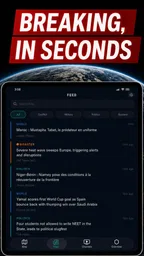
World Monitor: GlobeAlert review
 Analysis by Appsdrops
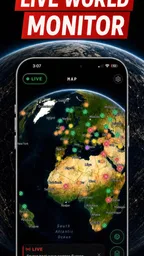
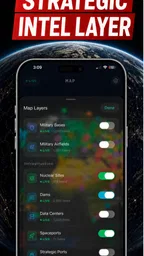
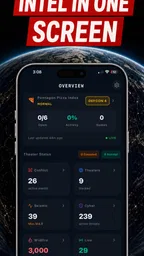
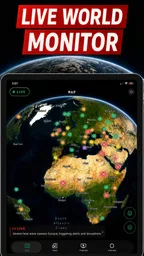
I’m drawn to news tools that help me get my bearings quickly rather than asking me to scroll through a long stream of headlines. World Monitor: GlobeAlert takes a map-first approach to world news, with breaking-news alerts as part of the experience. That changes the basic question from “What’s the latest story?” to “Where is something happening, and is it relevant to me?” For a curious reader, that perspective can be genuinely useful. It can also lose its appeal if the map becomes a novelty rather than a regular part of how you follow the news.
What makes the first week interesting
In its first few sessions, the strongest draw is the shift in perspective. A conventional news app usually organizes information by topic, publication, or time. A live map makes geography the starting point, which can help me notice how separate events relate to different parts of the world. I find that especially useful when a major story is unfolding somewhere I don’t follow closely: the map gives me a quick orientation before I decide whether to read more.
The app belongs to the News & Magazines category, but it feels most distinctive when I treat it as a visual companion to ordinary news reading, not a complete replacement for it. A map can show that activity is concentrated in a particular region; it cannot, by itself, explain the background, competing accounts, or human consequences of a developing story. My practical first-week routine would be to open it for a brief scan, identify a location or alert worth investigating, then turn to detailed reporting for context.
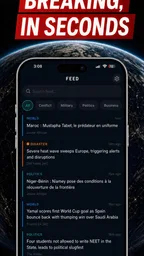
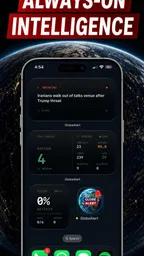
Alerts are potentially the part that makes the app more than an occasional curiosity. I would use breaking-news notifications selectively: the goal is to learn about a significant event while it is developing, not to make every update interrupt whatever I am doing. If you are deciding whether to enable alerts, start with the least intrusive setup available in the app and pay attention to whether the notices actually change what you know. A notification that merely prompts you to open a map without helping you understand the event can become noise quickly.
The public response is encouraging, though it is still a modest base for judging long-term staying power: World Monitor: GlobeAlert has a 4.7 average from around 7,300 ratings, with 92 written reviews. That suggests plenty of users have found value in it, but an average score cannot tell me whether the app suits my own news habits. I would pay more attention to whether its geographic view answers a recurring question for me than to the rating alone.
When a map adds more than a headline list
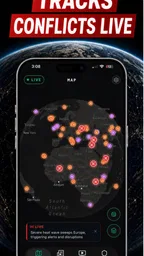
A useful, less obvious way to approach a world-news map is to use it for orientation, not certainty. If several alerts appear in an area, I would treat that as a prompt to investigate rather than proof that the area is experiencing one connected event. Maps make proximity visually persuasive, but nearby markers may concern different developments. Checking each item’s wording and then comparing it with fuller coverage is a better habit than assuming the map itself supplies the complete story.
That distinction matters for travelers, people with family in other countries, and readers following international developments for work. Someone preparing for a conversation or checking the broad picture before a trip may value the ability to scan locations quickly. Someone who needs verified operational advice, detailed local guidance, or a definitive account of a fast-moving crisis should rely on appropriate specialist and primary sources as well. I see GlobeAlert as a way to decide where to focus attention, not as a substitute for careful verification.
Whether it earns a place in a monthly routine
The test after the first week is simple: do I still have a reason to open it when no dramatic event is dominating the headlines? Its strongest recurring value is the possibility of a quick geographic check when I want a broad sense of what is happening around the world. That is a specific habit, and it will suit some readers much better than others. If my normal routine is to follow a small number of topics through trusted publications, a map may add little once the initial novelty has passed.
For a realistic everyday use, imagine checking the app during a short break after seeing a headline about a developing international story. I can use the map to orient myself, notice whether there are other nearby items that deserve attention, and then open a more detailed source to understand the report. The value is not that this replaces reading; it helps me choose what to read next. That workflow also limits aimless browsing, which is important when a live display encourages one more tap.
Compared with a standard news feed, the map-led format is better at showing location at a glance and less naturally suited to sustained reading, topic-by-topic analysis, or comparing an outlet’s coverage over time. A general news app is likely the better everyday home if I want editorial sections, long reads, or a familiar chronological stream. GlobeAlert makes more sense as a complementary tool for readers whose first question is often where an event is happening.
It is free to install, which lowers the barrier to trying that routine, but the app also offers in-app purchases ranging from $5.99 to $49.99 per item. I would spend time with the free experience before considering any purchase, and I would check exactly what an item offers in the app before deciding whether it supports a habit I already have. A paid option is worthwhile only if it improves a repeated task for you; curiosity during the first few days is not enough reason on its own.
The developer is Appricott Dijital Teknoliji ve Yazilim A.S. The app has over 50,000 installs and is rated Everyone, so its audience is broad, but the format still has a clear preference: it rewards people who like to think spatially about news. If you prefer a calm, tightly curated selection of stories, or you avoid breaking-news notifications because they increase stress, a conventional publication app may fit better. The best choice depends on whether a map makes your understanding clearer rather than simply busier.
Keeping the experience useful without turning it into a chore
Maintenance here is less about managing a complicated setup and more about managing attention. I would decide in advance what I want the app to do: perhaps give me a short world scan, or help me follow a handful of developing situations. Then I would keep alerts only if they serve that purpose. This small boundary helps prevent a news map from becoming another feed I check automatically without remembering what I was looking for.
Another practical habit is to pair a map check with a specific follow-up action. When an item catches my eye, I can note its location, read the accompanying information carefully, and seek fuller coverage before sharing or acting on it. When nothing stands out, I can close the app. That sounds basic, but it is a useful safeguard for any fast-moving news product: visual activity can feel urgent even when a particular item is not relevant to my day.
The current version is 1.0.4, and the minimum operating-system requirement is version 7.0. Those details make it easier to judge whether the app is a practical trial on a device, but the more important maintenance question is whether I keep returning for a clear reason. I would periodically reconsider alert settings and any purchase rather than letting an initial burst of interest set my routine indefinitely.
Where fatigue can set in
A live map can make news feel immediate, but immediacy has a cost. If I open it repeatedly without a question in mind, every marker can become a reason to keep scanning. That risks producing a sense of constant crisis rather than useful awareness. Readers who find breaking-news coverage overwhelming may be better served by scheduled summaries or a smaller number of trusted sources, especially if notifications pull them away from work or rest.
There is also a natural limit to what a visual overview can communicate. A marker’s position is easy to grasp; the context behind it is not. A location-first interface may encourage quick comparisons, but different events can have very different scale and significance. I would avoid judging importance from how close items appear or how striking the map looks. For careful research, the map should be the starting point for questions, not the final answer.
Finally, a map is not automatically a better way to consume every kind of news. If I want local service updates, commentary, in-depth investigations, or a carefully ordered briefing, I am likely to reach for a more specialized source. GlobeAlert is most compelling when the geographic dimension itself matters. If that rarely affects how you choose or understand stories, its central idea may not justify a permanent spot on your home screen.
My long-term verdict
World Monitor: GlobeAlert is worth trying if you regularly want a fast sense of where world events are unfolding and you are comfortable using a visual overview as the first step in a longer reading process. Its appeal is not simply that it puts news on a map; it gives location a more prominent role in how I decide what deserves attention. That can make international coverage easier to navigate for readers who otherwise feel lost in a stream of headlines.
I would not recommend making it your only news source, and I would not keep alerts enabled just because they are available. The app earns lasting space when I use it for a defined purpose—orienting myself, spotting a story to follow, or checking a broad geographic picture—and then move on when that purpose is met. If that short, repeatable routine fits your life, the map can remain useful after the first-week novelty fades. If you want deep reporting or a quieter, curated daily briefing, a traditional news app is probably the better primary choice.
What we like
- Provides quick access to global events on an interactive map.
- Helps users spot developing situations across different regions.
- Useful for keeping track of events beyond local news coverage.
- A map-based layout makes geographic context easy to understand.
- Can support situational awareness for travel and research.
What could be better
- The volume of alerts may feel overwhelming during major events.
- Information accuracy depends on the underlying data sources.
- Some regions may have less complete event coverage than others.
- Frequent updates may use mobile data and battery power.
- A global overview may lack the context offered by detailed reporting.





