
World Monitor App review
 Analysis by Appsdrops
I judge a news app not just by how much it shows, but by how quickly I can make sense of it when I’m tired, distracted, or checking my phone in a hurry. World Monitor is aimed at readers who want a broad view of events around the world. Its promise is useful, but that kind of overview also makes clarity and ease of use especially important: a screen full of urgent information can help orient me, or leave me unsure where to look first.
Finding a useful path through the news
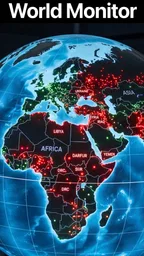
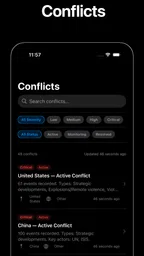
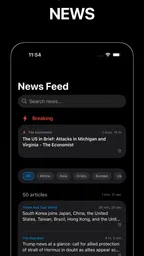
World Monitor is a free news and magazines app from Hypecent Limited. Its short store description is simply “World Monitor,” while the fuller summary points to real-time global intelligence. I take that positioning to mean the app is designed for awareness across events and regions, rather than as a replacement for a newspaper’s long-form reporting or a single outlet’s editorial voice.
That distinction matters when I decide how to use it. For a quick scan, a global monitor can help me notice a developing story beyond my usual interests. For context, though, I still want to open a trustworthy report and read the details. A monitor is a starting point for questions, not necessarily the place where every question gets answered.
Navigation is most useful when I have a clear task: check what is unfolding, look for a story connected to a place I care about, or get my bearings before reading more. I would approach it in short visits rather than expect it to guide me through a carefully sequenced daily briefing. That makes it a better companion to regular news reading than a complete substitute for it.
One practical habit is to decide what I am checking before I open the app. “What changed since this morning?” is more manageable than trying to absorb everything happening worldwide. This small boundary helps prevent a broad news feed from turning into an endless scan, and it makes the app’s overview-oriented purpose more useful in everyday life.
The audience response is encouraging: it has a 4.7 average from around 5,500 ratings, with 69 written reviews. Those figures suggest many users find value in it, but they cannot tell me whether its presentation suits my own reading habits. I would treat them as a reason to consider trying it, not as proof that it will work equally well for every reader.
Readability is about pacing as much as text
For me, readable news is not only a matter of font size. It also depends on whether the screen lets me identify what deserves attention, whether I can pause without losing my place, and whether a quick glance is enough to understand why an item matters. The global scope of World Monitor makes those questions particularly relevant: a wide field of events can be informative, but it can also demand more attention than a focused local feed.
If you prefer a calm, linear reading experience, a traditional newspaper app may feel easier. Its articles usually provide a clear beginning and a longer explanation in one place. A monitor-style app has a different strength: it can support scanning across subjects before you choose what to investigate. I would use the two approaches for different jobs rather than expect one format to excel at both.
When I am short on time, I find it helpful to separate noticing a headline from deciding what it means. A brief visit can tell me which issues deserve follow-up; later, I can read fuller coverage without trying to process everything on a small screen. This is a useful workflow for anyone who wants awareness but does not want news checking to take over a break or commute.
Motor and sensory needs deserve a realistic test
News checking often happens in awkward conditions: one hand occupied, the phone held at an angle, or attention divided between the screen and something else. I would test World Monitor in the way I actually expect to use it, rather than assume that a clean-looking screen automatically makes it comfortable. The key questions are practical: can I move through the information without repeated, precise actions, and can I stop and resume without frustration?
For readers with limited dexterity, any app that requires frequent small taps or extended scrolling can become tiring. I would keep sessions focused and use the phone’s own accessibility and display settings where helpful. Those operating-system tools can support a more comfortable experience, but they do not guarantee that every part of an app will respond equally well to every setting or input method.
Sensory comfort is personal, too. A fast-moving stream of news can feel engaging to one person and overwhelming to another, especially during a stressful event. If alerts or a busy display make it harder to concentrate, a sensible approach is to limit the time spent scanning and choose a quieter moment for a fuller check. I would not treat constant monitoring as a requirement for being informed.
A useful trade-off is to use a global overview for orientation, then switch to a slower source when a story affects you directly. That reduces the pressure to interpret every item while it is unfolding. It also gives readers who are sensitive to dense or urgent news a clear stopping point: identify what matters, leave the stream, and return when they are ready.
Where and when it fits into a day
Picture a routine morning: I have a few minutes before leaving home and want to know whether the day’s headlines include something beyond my usual local coverage. A quick look at a global monitoring app can help me decide what to read later. It is less suited to a moment when I need a complete explanation immediately, or when I am trying to avoid difficult news altogether.
On a commute, the app may be useful if I can safely spare attention for a brief check, but it is not a good reason to read while walking through traffic or driving. In noisy or bright surroundings, a glance-based format can be convenient only if the screen remains comfortable for me to read. If those conditions are poor, saving the check for a quieter setting is the more sensible choice.
For someone who follows international affairs for work or personal interest, the broad perspective is the main reason to try it. I would still pair it with direct reporting when accuracy, local nuance, or a detailed timeline matters. Readers who mainly want neighborhood updates, a single publication’s analysis, or a curated digest may be happier with a local news service, a newspaper app, or a newsletter that narrows the field.
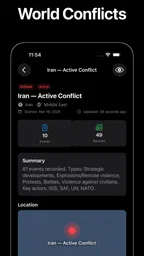
World Monitor is rated Everyone, which indicates its store age classification, not that every news item will feel suitable or comfortable for every reader. Global current affairs can include distressing subjects. If you are choosing an app for a child or someone who prefers to avoid upsetting news, I would check how the actual material feels in use and set boundaries around when and how it is opened.
Costs, version, and what to weigh before installing
The app is free to install, with in-app purchases listed from $4.99 to $99.99 per item. That range is worth noticing before buying anything: I would first see whether the free experience meets my needs and review the purchase details in the app store before committing. A free download does not mean every possible feature or use is necessarily free, so it is sensible to understand the specific offer shown to you.
The current release is version 1.3.0, and the stated minimum operating-system requirement is 7.0. It has passed 50,000 installs. Those details make it easier to judge basic compatibility and how widely it has been adopted, but they do not tell me how it will behave on a particular device. I would check the app store’s compatibility information for my phone before installing.
Hypecent Limited is the developer. I would pay attention to how the app feels over several short sessions rather than judging it by a single glance: does it help me find stories worth following, or does the breadth create more noise than insight? That is the most useful personal test for an app whose core appeal is a wide-angle view of the news.
The barriers that remain
The biggest potential difficulty is the same quality that makes the app distinctive: global breadth. A wide-ranging monitor may ask me to filter more than a focused publication does. If I want one clear lead story, local service updates, or a fully developed article, a narrower alternative is likely to save time and reduce cognitive load.
Another limitation is that quick awareness and deep understanding are different goals. Seeing that an event is developing does not automatically explain its background, consequences, or the reliability of every interpretation. I would use the app to decide what deserves attention, then compare detailed reporting when the subject matters. That extra step is not a flaw unique to this app; it is a sensible safeguard when following fast-moving news.
There is also no single ideal way to consume news. Some people need large text, fewer simultaneous items, or an audio-first experience; others want a compact scan. Before making World Monitor part of a daily routine, I would try it under the conditions that matter most to me and be ready to switch to a more accessible or less demanding alternative if the interaction feels tiring.
Who I would recommend it to
I would suggest World Monitor to readers who like to keep an eye on events beyond their usual beat and are comfortable treating a broad overview as the beginning of their reading. It is especially promising for people who want to use a short check to choose what to investigate, rather than spend that check consuming every detail. Its 50,000-plus installs show that it has reached a meaningful audience, though individual fit still depends on reading style.
I would be more cautious about recommending it to someone who wants a slow, carefully edited daily paper, a strongly localized service, or a low-stimulation news routine. In those cases, a publication with a defined editorial structure or a concise digest may be easier to follow. Readers who need a particular interaction style should test it first instead of assuming that a general news app will meet their specific accessibility needs.
My overall view is that World Monitor has a clear role: it can help me widen my awareness and choose which stories merit a closer look. Its best use is deliberate and brief, followed by fuller reporting when context matters. If that is how you want to approach global news, I think it is worth trying; if you want a complete, quiet, highly guided reading experience, another kind of news app may suit you better.
What we like
- Offers a clear global overview of major events and conditions.
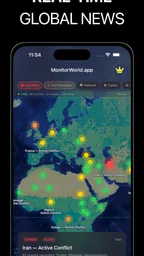
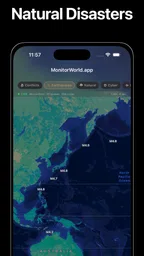
- Interactive maps make geographic patterns easy to explore.
- Useful for monitoring developments across multiple regions.
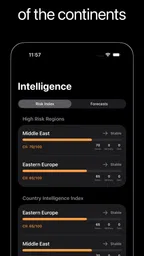
- Combines several types of global information in one interface.
- Can help users spot changes as events unfold.
What could be better
- Dense map layers may feel overwhelming to new users.
- Some data sources may update less frequently than others.
- Map details can be difficult to read on smaller screens.
- Information quality depends on the underlying data sources.
- A steady internet connection is needed for current information.





