


Woodsense: Wood Plans & Guides review
 Analysis by Appsdrops
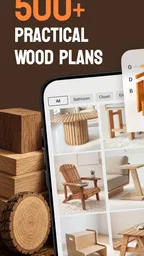
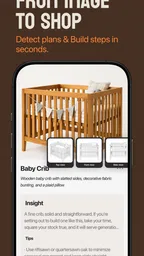
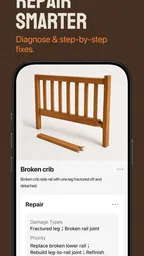
I see Woodsense as a practical companion for people who want to make something from wood but aren’t sure how to identify the material or turn an idea into a workable sequence of steps. It sits in the Books & Reference category, though its appeal is hands-on: it connects wood identification with video-guided projects for the home, backyard, and workshop. That makes it more useful as a starting point for planning than as a substitute for careful measuring, sound tool practice, or a reliable set of plans.
The app is free to install, with in-app purchases listed at $39.99 per item. It is developed by Next Vision Limited and is rated for Everyone. Its current version is 1.1.0, and it requires Android 9 or later. The app has a 4.5 average from around 2.9 thousand ratings, with more than 100 thousand installs. Those figures suggest that plenty of people have tried it, but they don’t tell me whether a particular project will match your tools, skill level, or available materials.
Where the first attempt can get stuck
The central challenge with any project guide is not simply finding an appealing build. It is working out whether the instructions fit the wood and workspace you actually have. A video can make a sequence look straightforward while leaving a beginner unsure about a board’s condition, a joint’s purpose, or how much room is needed to handle a long piece safely. Woodsense’s combination of wood identification and project videos is promising precisely because those questions belong together, but I would still treat the app as a guide rather than an automatic quality check.
If you open it with a specific task in mind, begin by narrowing the question. Are you trying to recognize a piece of wood, choose a project for a small space, or understand the order of operations? These are different jobs. Keeping one goal in view helps you judge whether the material you find is relevant instead of browsing videos and assuming that a good-looking result is also a suitable first build.
For a first-time woodworker, the most common point of friction is likely to be translating what appears on screen into a real bench. Pause before starting and note the actions that depend on accurate sizing, stable support, or a tool you may not own. A video is easy to watch in one sitting; a project may require preparation, extra cuts, or a trip to source appropriate stock. That gap is normal, not a sign that you have missed a hidden setting in the app.
Wood identification also deserves a little restraint. A visual guide can help you learn what to look for, but appearance alone may not settle every identification question, especially when the piece is coated, weathered, or cut in an unfamiliar way. If the wood’s identity affects a structural or safety decision, cross-check it with a knowledgeable supplier or another dependable reference rather than relying on a quick visual impression.
Make a small setup check before following a guide
Before you commit to a project, check that the app is current in your app store and that your device meets the Android 9 minimum. If it does not open or behaves unexpectedly, close it and reopen it, then check for an available update and restart the device. These are sensible first steps, not guarantees; they can clear a temporary snag without changing the project content or your saved work.
Also check the ordinary conditions around the task. Make sure you can hear or see the video clearly, have enough space to work, and can stop playback when you need to inspect a step. If a clip seems to move too quickly for your needs, replay the relevant moment and write down the sequence before touching tools. This simple habit is more dependable than trying to remember several cuts or assembly steps while working.
Because the app includes paid items, take a moment to review what an item covers before making a purchase. The listed price is $39.99 per item, so it is worth deciding whether a paid guide addresses a project you genuinely intend to do rather than buying on impulse after browsing. I would compare the scope of the item with the tools, time, and materials you can realistically provide.
Recover your workflow without guessing
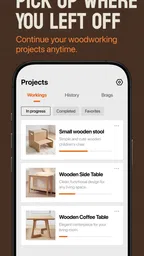
If a project session gets interrupted, return to the task by identifying the last step you completed, not by jumping ahead to the next attractive shot. Look back at the sequence and compare it with the physical work in front of you. If you cannot tell whether a cut or assembly step is finished, pause and verify it before proceeding. With woodwork, repeating a check is far less costly than forcing a later component into a mistake.
A useful habit is to keep a short project note outside the video: the material you are using, the step you reached, and any question that remains. This is especially helpful if you switch between identifying wood and watching a build guide. It prevents a broad reference session from turning into a jumble of unrelated possibilities, and it gives you a clear point to resume after a break.
For a backyard or home project, I would also separate planning from building. Watch the relevant guidance first, then make a materials and workspace check before starting. This avoids the familiar problem of discovering halfway through that a piece is too long to handle comfortably or that a step needs more room than the available surface provides. A video can show the intended sequence; your own checklist connects that sequence to your actual surroundings.
If playback or navigation seems unreliable, first determine whether the issue is confined to the app or to the device more broadly. Try another video or another app, and check that your connection is working if the content needs it. If other apps are also struggling, restarting the device or checking its connection is a more useful first move than repeatedly changing project choices. If only Woodsense is affected, update or relaunch it before deciding that the guide itself is unusable.
Know when the app is not the cause
Some difficulties come from the project rather than the software. Wood can differ in condition and dimensions, and a guide cannot make an unsuitable board fit a plan. If a piece is warped, damaged, or simply different from what the instructions assume, stop and reassess the material. Do not compensate for uncertainty by making an unplanned cut or assembly change that could weaken the result.
Likewise, trouble reproducing a step may come from a mismatch in experience or equipment. A video that makes a task look quick does not mean it is appropriate for a beginner working without the necessary setup. Choose a simpler project or seek direct instruction when a step involves a tool you do not know how to use safely. The app’s general-audience age rating is not a measure of woodworking skill, and it should not be read as an indication that every project is suitable for every viewer.
Woodsense is also not the best choice if what you need is a fully specified technical plan with every dimension and material decision settled for your exact situation. In that case, a dedicated plan, a specialist book, or help from an experienced woodworker may be a better fit. The app’s value is in making project learning and wood reference more approachable, not in removing the need for judgement.
How it compares with familiar alternatives
Compared with a general video search, Woodsense has a more focused purpose: wood recognition and guided making are brought under one app rather than left as separate searches. That focus can help when you are moving from “what might this wood be?” to “what can I make?” A general video platform may still be better when you want many competing demonstrations of one narrow technique or need a particular tool explained from several angles.
Compared with a printed woodworking book, video guidance can make the order and motion of a task easier to follow. A book may be easier to scan for a diagram or keep open on a bench without handling a device, while a video can show how a step unfolds. I would use Woodsense for orientation and visual learning, then keep a written note or a more detailed plan beside the work when precision matters. That mix is particularly useful for a small home project where you want approachable guidance but still need to make decisions about your own materials.
Who is likely to get the most from it?
I can see Woodsense suiting curious beginners, homeowners planning modest projects, and hobbyists who want a convenient reference while exploring different kinds of wood. It is also a reasonable fit for someone who prefers watching a process before trying it. The app’s reach—over 100 thousand installs—shows it has found an audience, though the right fit still depends on whether its guides match what you want to build.
Imagine finding an offcut while tidying a garage and wondering whether it could become a simple shelf or garden item. I would use the wood-identification side to form an initial idea, browse a relevant project, and then check the piece’s condition and dimensions independently before committing. If the guide assumes more stock or a different workspace than I have, I would choose another project rather than improvising around a mismatch. That is a practical way to use the app without mistaking inspiration for a complete plan.
On the other hand, experienced makers who already have trusted references may find the app less essential, especially when they need exact specifications or advanced instruction. Someone who wants only a searchable encyclopedia of timber, or only highly technical construction drawings, may be better served by a specialist reference for that single purpose. Woodsense’s appeal is the connection between identifying wood and learning through project videos, not exhaustive coverage of every woodworking need.
My practical verdict
My impression is that Woodsense is most useful when you approach it with a modest, concrete goal: learn about a piece of wood, explore a suitable home or backyard project, or watch a process before planning your own work. Its strongest practical idea is joining those two parts of the hobby, which can make it easier to move from curiosity to a sensible next step.
I would still keep expectations grounded. Treat the videos as guidance, verify materials and measurements yourself, and stop when a tool or step is outside your experience. Check the scope of any paid item before purchasing, since the app is free to install but offers items at $39.99 each. With those habits, Woodsense can be a helpful reference for learning and planning; if you need exact, situation-specific plans or expert supervision, another resource should take the lead.
What we like
- Clear diagrams make woodworking plans easier to follow.
- A range of project ideas can suit different skill levels.
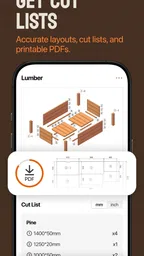
- Material lists help users prepare before starting a build.
- Plans can inspire practical projects for home and workshop.
- Step-by-step guidance can help beginners build confidence.
What could be better
- Some plans may require tools that beginners do not own.
- Project measurements may need adjustment for available materials.
- Small screens can make detailed diagrams harder to inspect.
- Advanced builds may be challenging without prior woodworking experience.
- The usefulness of the plans depends on their level of detail.





