




Wispr Flow: AI Voice-to-Text review
 Analysis by Appsdrops
I would reach for Wispr Flow when my hands are busy but I still need to write something that sounds like me: a quick message, a note for later, or a longer reply that would be tedious to type on a phone. It is a productivity app from Wispr AI, Inc., built around speaking instead of tapping. The idea is especially appealing in a household where people share a tablet or take turns using a device, though voice input also makes personal boundaries worth thinking about.
When one device serves several people
Picture a familiar evening: someone is cooking, another person needs to send a school message, and the household tablet is the nearest device. A voice-to-text tool can make drafting less awkward than pecking at a keyboard with one hand. I can see Flow being useful for dictating a shopping note, drafting a reminder, or getting the first version of a message down while attention is split between chores.
The important distinction is that a shared device is not the same as a shared account. I would treat the person currently using the device as responsible for checking the destination and wording before sending anything. Voice capture can make it easy to move quickly, but it does not remove the need to confirm which app is open, whose conversation is on screen, and whether the dictated text belongs there.
That makes the app most useful for short, low-stakes writing in a shared setting. For a sensitive message, private journal entry, or anything involving personal details, I would wait until I had my own device or a clearly private moment. The convenience of speaking aloud is also a drawback: people nearby may hear the draft, and the speaker may not want others to hear what they are dictating.
Set up with clear personal boundaries
Flow’s purpose is to turn speech into text for use in apps, so I would think about setup in terms of who is using the device and where the resulting words will go. Before dictating, check the active app and text field. Before handing the device to someone else, close or leave any conversation where a new user could accidentally continue writing. Those small habits matter more on a household device than on a phone that rarely leaves one person’s hands.
I would also avoid treating a shared device as a communal writing space by default. A child using it for a school note, for example, may need help reviewing the wording, while an adult drafting a work message may prefer not to dictate with others in earshot. The app can reduce typing effort, but it cannot decide who should see a draft or whether a message is appropriate to send.
One useful workflow is to dictate a rough draft, pause, and reread it before sending. That extra check is particularly valuable when switching between people or tasks. Speech can capture the main thought quickly, but spoken phrasing does not always make a polished written message. I would use dictation to get unstuck, then make a deliberate pass for names, tone, and any details that should not be shared.
Coordinate without turning dictation into a group chat
For household coordination, I would use Flow as a way for one person to compose a message, not as a substitute for deciding together what the message should say. A grocery reminder or a note about a change of plans is a sensible use. If the message affects several people, it is still worth agreeing on the details first; voice input makes composition faster, not coordination magically clearer.
A practical habit is to dictate the message in a quiet moment, then review it on screen before choosing the recipient. This avoids speaking a private detail in front of the household and reduces the chance of sending a draft to the wrong conversation. If the device is being passed around, I would make a clean handoff rather than leaving an unfinished text field open for the next person.
Compared with a standard phone keyboard, Flow’s appeal is reduced typing, particularly for a paragraph or a note written while doing something else. Compared with built-in speech input, its stated focus is on producing usable text across apps. I would still keep ordinary typing and the device’s existing voice input available: typing is better for passwords, addresses, precise edits, or places where speaking would be disruptive. A dedicated voice workflow is helpful when it fits the moment, not a reason to force every message into speech.
Age, trust, and the limits of convenience
The app is rated for Everyone, which makes its general audience broad, but that label is not a household rulebook. Parents and guardians still need to decide whether a child should use voice input, what kinds of messages are suitable, and whether the device is being used with appropriate supervision. I would not assume that an age rating means an app provides family supervision or shared-account safeguards.
Trust also depends on the setting. Speaking a message aloud can reveal its contents to people nearby, and a voice-to-text workflow is not ideal when the topic is confidential. If someone is dictating health, financial, work, or family information, I would choose a private place and review the text carefully before it is used. For discreet communication, typing may simply be the better option.
There is another everyday trade-off: speech is quick for ideas but can be less controlled than typing. A noisy room, interruptions, or a speaker who is thinking aloud can make a draft harder to use without editing. I would not rely on dictation alone for a carefully worded apology, a formal application, or anything where one misplaced name or phrase could cause trouble. The best pattern is to let speech produce the rough material and let a person make the final decision.
What the app costs and how established it is
Flow is free to install, with in-app purchases listed from $15.00 to $143.99 per item. That range makes it sensible to try the free experience before committing to a purchase, especially if the intended use is occasional household notes rather than frequent dictation. I would check the purchase details in the app store before paying and decide whether the way I actually write justifies the expense.
It has a 4.6 average from around 17,000 ratings, with roughly 1,500 written reviews, and has passed one million installs. Those figures suggest that it has found a substantial audience, though popularity cannot tell me whether it suits a particular person’s voice, environment, or privacy preferences. It is a free productivity app rated for Everyone, and its current version is 2.8.7. The release date is February 13, 2026, so I would also keep in mind that this is a relatively new entry in a category where familiar built-in tools may already be good enough for many people.
Who should choose it—and who should pass
I would recommend Wispr Flow to someone who often writes longer messages on a phone, prefers speaking to typing, or needs to capture thoughts while their hands are occupied. It is also a reasonable option for a household that shares a device, provided each user takes care to check the active app, review drafts, and avoid dictating private content in front of others. The strongest case is not that everyone should speak instead of type; it is that a reliable voice-first option can remove friction from the kinds of writing that otherwise get postponed.
I would skip it if I mostly send short messages, work in noisy or public places, or need quiet and discreet input. I would also stick with built-in speech input if it already handles my routine tasks well and I do not want another app or purchase decision. People who need strict separation between family members’ activity should focus on the device and account arrangements they already control rather than expecting a dictation app to provide those boundaries.
My household verdict is that Flow can make shared-device writing more convenient, but it works best with simple habits around handoffs and review. Dictate only when the setting is suitable, confirm the recipient, and read the result before sending. Used that way, it can be a genuinely handy alternative to typing; used carelessly, it can make private words easier to say aloud and mistakes easier to send. I would try it for everyday drafts first, then decide whether its voice-led approach earns a regular place in my routine.
What we like
- Dictation can be faster than typing for longer messages.
- Voice input is useful when your hands are busy.
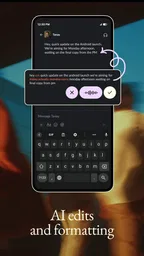
- AI editing can make spoken text easier to read.
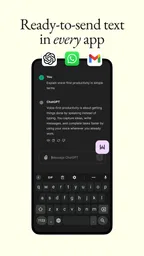
- Works across supported apps for flexible dictation.
- A natural speaking style can feel less restrictive than formal dictation.
What could be better
- Speech recognition can mishear names and uncommon terms.
- Background noise may reduce transcription accuracy.
- Dictation requires a working microphone and permission access.
- AI edits may change the meaning of a sentence.
- Voice input may be unsuitable for private conversations.





