
Google Calendar review
 Analysis by Appsdrops
I find a calendar most useful when it helps people coordinate without turning every small plan into a conversation. Google Calendar is a productivity app from Google LLC, and its real strength is making a personal schedule easy to check and share across everyday routines. In a household, that can mean fewer missed appointments and less guesswork about who is free. It is less compelling if everyone wants a separate, tightly controlled family-planning system rather than a calendar connected to individual accounts.
One household, several schedules
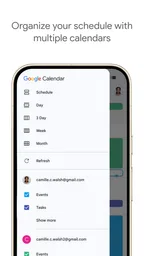
A realistic use is a parent keeping work meetings in one calendar, a partner tracking appointments in another, and both checking shared plans before arranging a school pickup or weekend outing. The useful distinction is between seeing someone’s availability and putting every detail of their day in front of everyone. I’d start by deciding which events actually need to be shared, instead of treating one calendar as a household-wide diary.
That boundary matters because calendars can reveal more than a person’s availability: event names and details may be personal. For a shared dinner or a repair visit, a clear title and time are enough. A medical appointment or private work commitment may be better kept on an individual calendar, with only the relevant blocked-out time shared if the account’s sharing options suit the situation. I would not assume that using one device means everyone should use one account.
Keep accounts and devices distinct
On a shared tablet or phone, separate account boundaries are a practical first step. Each person should use the account they are meant to use, and the device should be locked or signed out when appropriate. Otherwise, the next person may see another user’s schedule or accidentally create an event in the wrong place. That is not a special family feature; it is a basic consequence of sharing a screen and a signed-in account.
Before inviting anyone to a calendar, I’d check what the invitation lets them see and do. Sharing a schedule is not the same as handing over control of an account, and it is sensible to keep those decisions separate. If a relative only needs to know when a household event starts, sharing just that event may be a better fit than exposing a broader calendar. The right arrangement depends on how much coordination is needed and how private the underlying schedule should remain.
There is a small but useful habit that prevents many mix-ups: give calendars and events names that make their purpose obvious. “Dentist” tells a household more than “appointment,” while “Family dinner” makes it clear that the event is shared rather than a private reminder. I also recommend checking the selected calendar before saving a new event, especially when more than one account or calendar is visible. A quick glance can prevent a personal commitment from landing in the shared schedule.
Make coordination useful, not noisy
For recurring routines, a shared calendar can reduce repeated messages. Put the regular event in once, then use the calendar view to see how it sits alongside other plans. This is particularly helpful for arrangements that change week to week: a work shift, a recurring class, or a regular pickup that occasionally needs an exception. The calendar is strongest as a common reference point, not as a replacement for talking through a change that affects everyone.
My practical rule is to use calendar entries for settled plans and a message for uncertainty. If a pickup time is confirmed, record it so everyone can check it later. If the plan is still being negotiated, a calendar entry can look more definite than it is. That distinction helps avoid the familiar household problem of one person treating a tentative block as a promise while another thought it was only a possibility.
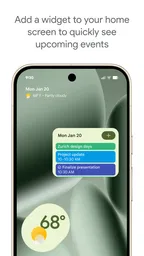
Notifications also deserve a little thought. Alerts can be helpful for time-sensitive appointments, but turning them on for every routine event can make them easy to ignore. I’d keep reminders for events where arriving on time matters, then review whether recurring entries need the same alert each time. A calendar that people trust is more useful than one that constantly interrupts them.
One overlooked trade-off is that a shared calendar only works when people maintain it. If one person enters every event while everyone else relies on it, the organizer becomes a human scheduling service. I’d agree on a simple household habit: the person who confirms a plan adds it, and anyone who changes it updates the entry or tells the others. The app can display information, but it cannot make a group communicate clearly.
Age, trust, and who should use it
The app is rated for Everyone, which makes it broadly suitable as a calendar tool, but that does not automatically make a shared account a good idea for every age or situation. Younger users may need an adult to help them understand which events are private, which are shared, and how to avoid changing someone else’s schedule. I’d treat that as a conversation about trust and device use, not as a reason to expose a child’s entire routine by default.
For an older child managing lessons, activities, and family plans, a calendar can be a helpful way to build independence. The adult can still coordinate the events that genuinely involve the household, while leaving personal reminders personal where possible. For a child who only needs to know the time of one activity, a direct reminder from a parent may be simpler than adding them to a broader schedule. The best setup is the least complicated one that gives the person enough information to act.
I would also avoid relying on a calendar as the sole channel for urgent changes. A new event or revised time is useful for planning, but someone may not be looking at the app at the moment it changes. For a same-day change to a pickup or appointment, contact the other person directly and use the calendar to keep the lasting schedule accurate afterward. That combination is more dependable than assuming every participant will notice an update immediately.
Where it fits among calendar options
Compared with a paper calendar on the kitchen wall, Google Calendar is easier to check when people are away from home and better suited to schedules that change. Paper can still win for a household that wants one glanceable, low-tech view and does not want everyone managing accounts or screens. Compared with a basic calendar built into a phone, Google’s option makes more sense when people already use Google accounts and want their plans available across their devices.
That convenience comes with a dependency: people need to be comfortable using accounts and keeping them separate. If your household prefers a dedicated family organizer with a single shared task-and-calendar workflow, another app may be more natural. Google Calendar is primarily a calendar, so I would not choose it on the assumption that it will manage chores, household responsibilities, or every conversation around a plan. It records when things happen; the household still decides who does what.
As a free app, it is easy to try without making a purchase decision first. It has a 4.6 average from around five million ratings, and it has been installed over ten billion times. Those figures suggest it is familiar to many people, but they do not tell me whether its account-based approach will suit a particular home. I’d judge it by whether everyone can reliably find the right schedule and understand what is shared.
My household verdict
Google Calendar works well for households that already use Google accounts and want a practical way to keep appointments and shared plans visible. I’d recommend it when the main problem is coordination: knowing when something starts, avoiding clashes, and checking a confirmed plan without searching through messages. The key is to share selectively, keep accounts distinct, and agree who is responsible for updating changes.
I would skip it as the household’s central organizer if the group wants one simple public board, avoids account-based tools, or needs a dedicated system for chores and responsibilities. It can also be the wrong choice when people are not comfortable with others seeing schedule details. In those cases, a paper planner, a basic personal calendar, or a more purpose-built family organizer may fit better.
For a home willing to set sensible boundaries, this is a straightforward way to make everyday plans easier to check. Google Calendar is free, is rated for Everyone, and has been available since October 17, 2012. I’d begin with one small shared calendar for plans that truly involve everyone, leave private commitments on individual schedules, and see whether the routine sticks. That keeps the benefit—less scheduling confusion—without making the whole household’s private life visible by default.
What we like
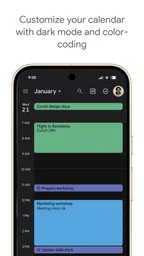
- Color-coded calendars make different commitments easy to scan.
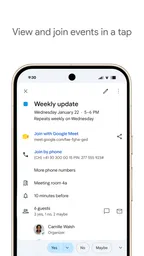
- Event invitations help coordinate plans with other people.
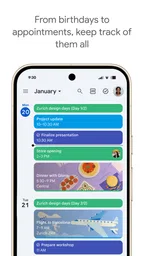
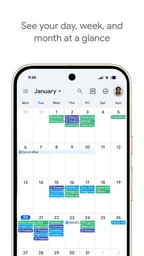
- Multiple calendar views suit quick checks and detailed planning.
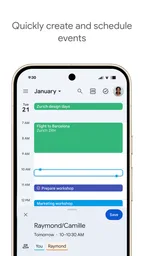
- Recurring events save time when scheduling regular activities.
- Tasks can be managed alongside calendar events.
What could be better
- Some advanced scheduling features require a Google account.
- Calendar sharing permissions can take time to configure.
- The interface can feel crowded when many calendars are enabled.
- Offline changes may take time to sync across devices.
- Notifications can become overwhelming without careful customization.





