

Wells Fargo Mobile® review
 Analysis by Appsdrops
I see Wells Fargo Mobile as a practical banking companion rather than a full replacement for every reason someone might visit a bank or use a specialist finance app. Its main strength is straightforward access to Wells Fargo bank and investment accounts in one place. That makes it most useful when you already have a relationship with the bank and want everyday account checks and financial tasks close at hand. If you are choosing a primary banking app, the key question is less whether it can do everything and more whether its account access fits the way you handle money.
Account access is the central strength
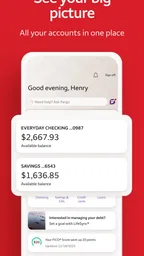
Developed by Wells Fargo Mobile, this free finance app is built around the bank’s own customers. I would start by thinking of it as a convenient front door to your existing accounts: useful for checking where things stand, then deciding whether you need to take action. It is not a general-purpose budgeting service, and its usefulness depends on having Wells Fargo accounts to manage.
The app has a 4.8 average from around 3 million ratings, alongside over 10 million installs. Those figures suggest that it has reached a large audience, but they do not tell you whether its workflow suits your particular needs. I would treat them as a sign of broad adoption, not as a substitute for checking that the app supports the account tasks you actually perform.
The most valuable day-to-day use is often a small one: checking an account before making a purchase, confirming that a payment or deposit appears, or reviewing an investment account without switching to a separate desktop session. That kind of quick check can make the app worthwhile even if you do more involved financial planning elsewhere.
A useful role in a financial routine
For a realistic example, imagine you are about to pay for a large household expense and want to make sure the money is in the account you expect. Opening the app gives you a direct route to your Wells Fargo banking information. If you also hold investments there, having those accounts within the same app can reduce the need to keep separate access points in your routine.
One practical habit I recommend is using mobile access for awareness and reserving more involved decisions for a moment when you can review your finances carefully. A quick balance check is helpful, but it is not the same as comparing recurring expenses, planning a budget, or evaluating an investment strategy. Keeping those jobs distinct helps prevent a convenient snapshot from being mistaken for a complete financial picture.
Another useful approach is to make account checks purposeful. Decide what question you are trying to answer before opening the app: whether a transaction has appeared, whether funds are available for an upcoming expense, or whether you need to review an investment account. That small discipline makes a banking app feel less like a stream of numbers and more like a tool for a specific decision.
The distinction between banking access and financial planning matters. Someone who wants a detailed household budget, shared expense tracking, or a cross-bank overview may prefer a dedicated finance tool. Wells Fargo Mobile is better suited to accessing Wells Fargo accounts than to serving as a neutral dashboard for every financial relationship you have.
What to expect from the experience
The app’s purpose is clear, and that focus can be a strength. Rather than asking it to organize every aspect of your finances, I would use it to reach the accounts connected to Wells Fargo and handle routine checks in context. The app is free, has an Everyone content rating, and is listed for devices running Android 11 or later. It was released on May 26, 2010, and its current version is 26.10.00.10-1.
Those platform details are worth checking before you rely on it. If your phone runs an older Android version, compatibility may be a deciding issue; if you use a supported device, the app is positioned for regular mobile access. The app’s age also means it has been part of mobile banking for a long time, though I would judge it by the current experience and your account needs rather than by longevity alone.
Because this app is tied to one financial institution, the most important setup question is whether your accounts are eligible for access through it and whether your usual tasks are available after you sign in. I would confirm that early, before making it the only way you keep track of bills or account activity. For essential payments, keeping a second way to check due dates and account information is sensible regardless of which bank app you use.
Where the trade-offs show
The main limitation is also the most obvious: this is not a bank-agnostic finance hub. If your money is spread across several institutions, you may have to move between apps to see the whole picture. A third-party personal finance app can be a better fit for someone who prioritizes consolidated spending analysis or a single overview across multiple banks, while Wells Fargo Mobile makes more sense for direct access to Wells Fargo accounts.
That distinction is especially important for households. If one person manages accounts at Wells Fargo while another uses a different bank, this app alone will not create a shared view of the family’s finances. You may still find it useful for your own accounts, but collaboration and cross-provider planning are different needs from institution-specific account access.
There is also a trade-off between convenience and attention. Mobile access makes it easy to check an account at any time, but frequent checking can create noise without improving a decision. I find it more useful to connect each visit to a concrete task than to open a finance app out of habit. The app can show account information; you still need your own routine for deciding what deserves action.
As with any financial app, I would avoid treating a phone as the only place where important account details exist. Keep track of payment deadlines and essential records in a way that remains useful if you change devices or cannot access the app temporarily. That is not a criticism unique to Wells Fargo; it is a sensible boundary for mobile banking in general.
Who will get the most from it
I would recommend Wells Fargo Mobile first to people who already bank or invest with Wells Fargo and want convenient access while away from a computer. It is particularly appealing if your routine involves occasional account checks and you prefer the bank’s own app over a separate service. The clearest benefit is having bank and investment account access in the same institutional setting.
It is less compelling for someone who has no Wells Fargo accounts, wants to compare products across banks, or expects one app to deliver detailed budgeting and financial coaching. In those situations, a different bank’s own app or an independent finance manager may better match the job. Choosing a tool by the task it does well is more useful than trying to make one app cover every part of your financial life.
New customers should also think about their existing habits. If you already rely on a desktop banking routine, mobile access is most valuable when it solves a real inconvenience, such as checking an account while traveling or confirming a transaction away from home. If you rarely need that flexibility, installing another app may add little to your day.
For existing customers, I would test a simple routine before depending on the app for everything: sign in, locate the accounts you use most, and see whether the information is easy to interpret on your phone. Then consider which tasks you still prefer to handle through another channel. That quick trial helps reveal whether mobile access genuinely saves time rather than merely duplicating a process you already like.
My verdict
My overall view is positive but deliberately specific: this is a sensible choice for convenient access to Wells Fargo banking and investment accounts, not a universal answer to money management. Its focused purpose is a genuine advantage if you are already a customer, while its institution-specific nature is a real limitation if you want a unified view of finances held elsewhere.
I would install it when direct mobile access to Wells Fargo accounts would make everyday checks easier, and I would keep a separate planning tool if budgeting or cross-bank tracking is central to my routine. That division of labor is the most realistic way to get value from it. Use it as an account-access tool, not as a substitute for a complete financial plan.
For the right person, Wells Fargo Mobile can make routine banking feel more immediate without needing to turn every financial task into a mobile one. If you are already a Wells Fargo customer and value access on your phone, it is an easy app to consider. If you need a bank-neutral dashboard or deeper planning features, I would look elsewhere for those jobs and use this app only for the accounts it is designed to serve.
What we like
- Biometric sign-in can make account access quicker.
- Card controls let you lock a misplaced card.
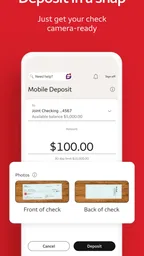
- Mobile deposit saves a trip to a branch.
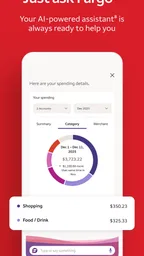
- Spending tools help track account activity.
- Alerts can notify you about important transactions.
What could be better
- Some features may require an eligible Wells Fargo account.
- Mobile deposits may have limits and processing delays.
- App access depends on a stable internet connection.
- Features may vary by account type and location.
- Older devices may not support the latest app version.





