

Cash App review
 Analysis by Appsdrops
I judge a money app partly by how quickly I can understand what it is asking me to do. Cash App puts several different financial activities in one place, so clarity matters more here than in an app devoted to a single task. My impression is that it can be convenient for everyday money movement, but it asks users to be comfortable navigating payments alongside investing and Bitcoin. That combination is useful for some people and potentially distracting for others.
Finding your way through a crowded money app
Cash App is a free finance app from Block, Inc. Its core appeal is that it brings person-to-person payments together with banking-related tools and ways to invest. The app has been available since October 15, 2013, and its current version is 5.74.0. Its audience is substantial: it has more than 100 million installs, around 4.5 million ratings, and a 4.7 average. Those figures suggest broad familiarity, though they cannot tell you whether its layout will suit your own needs.
In ordinary use, the main challenge is not learning one complicated feature; it is keeping the different jobs straight. Sending money to someone, checking money held in the app, and exploring investment options are distinct activities, even if they sit within the same product. I recommend approaching Cash App with a specific task in mind at first. Complete a simple payment workflow before exploring the other areas, and pause to check the recipient and amount before confirming. That small habit is especially useful when an app combines quick transactions with more consequential financial choices.
The interface is designed around direct actions rather than long explanations. That can make a familiar payment feel straightforward, but compact screens and multiple financial topics can require attention. If you are helping a family member learn the app, I would show them one task at a time instead of giving a tour of every feature. A short, repeatable route—open the app, find the relevant action, review the details, then confirm—is easier to remember than a broad explanation of everything it can do.
For readability, the most practical test is whether you can distinguish the action you intend from nearby options. Finance interfaces deserve slower reading than social apps: a misunderstood control can affect real money. I would not treat speed as the measure of success. Before sending, make a deliberate final check of the person and the amount; before using an investment feature, take time to understand the particular action on screen rather than assuming it works like a payment.
Different abilities call for different routines
Motor needs can change how comfortable a payment flow feels. A person using a small screen, one hand, or a less precise touch may find repeated navigation and small targets more demanding than someone using the app casually at a desk. I cannot assume every control will be equally easy for every user, so I would test the exact tasks that matter: locating a contact, entering an amount, reviewing it, and completing the action. If any step feels fiddly, slowing down and using a stable grip or a larger device may help.
Sensory context matters too. A bright, noisy commute is a poor place to make a financial decision that needs careful reading. If you have difficulty concentrating amid movement, glare, or interruptions, wait until you can focus before confirming a transfer or exploring an investment. Likewise, if reading dense financial language is tiring, avoid trying to learn a new feature while you are rushed. The app’s range is a benefit only when you have enough attention to tell one kind of transaction from another.
For someone with low vision or who relies on a screen reader, I would test the app on the device and with the settings they already use before depending on it for urgent payments. The important question is not whether a product makes a general claim about accessibility; it is whether the labels, order, and confirmation steps make sense in that person’s real setup. A trusted person can help test a low-risk task, but should not take over account access or make financial decisions on the user’s behalf.
There is also a useful distinction between access to an app and confidence using it. Someone may be able to open Cash App but still find the mix of payments, banking, investing, and Bitcoin hard to interpret. I would encourage new users to treat those as separate tools, not as one interchangeable pool of money. Knowing which screen belongs to which task can reduce accidental taps and make it easier to explain what happened later.
Where it fits into an ordinary day
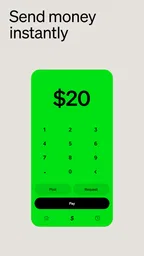
Imagine splitting the cost of groceries with a roommate after shopping. A focused payment app can be convenient because the task is brief: identify the person, enter the amount, review, and send. Cash App is most appealing in this kind of moment when both people already know how they want to use it. I would still confirm the recipient carefully, especially if names or account details look similar. Convenience should not replace verification.
A different scenario is receiving money and then deciding what to do with it. The app’s broader mix may save a switch between services, but it also creates a decision point: a payment balance, banking-related activity, and investment choices are not the same thing. My practical tip is to handle the immediate need first. If the money is meant for rent or groceries, keep that purpose clear before browsing investing or Bitcoin options. Separation in your own habits can matter even when several activities are accessible from one app.
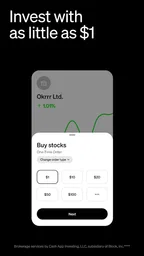
Cash App can also suit people who want to explore investing without opening a separate app for every financial task. That does not make it the right choice for someone who wants detailed research tools, a highly specialized investing workflow, or a dedicated banking experience. I would compare the actual screens and terms with the service you already use before moving important routines. A broad app may be convenient, but convenience is not the same as depth.
Compared with a traditional bank app, Cash App is more centered on quick money interactions and a broader collection of consumer finance activities. A bank’s own app may be a better fit if your priority is managing an established account relationship and keeping all your routine banking there. Compared with a payment-only alternative, Cash App offers a wider scope, but users who only want to send and receive money may prefer a simpler interface with fewer financial decisions around it. The best comparison is based on the task you actually do most often, not the longest feature list.
What to consider before relying on it
Cash App is not automatically the right choice for every person or situation. If you dislike having payments and investing in the same environment, the range may feel like clutter rather than convenience. If you need a tool that is easy to explain to someone who has little experience with digital finance, a narrower app—or in-person help from a trusted institution—may be easier to manage. And if you frequently make transactions while distracted, I would avoid treating any quick-send flow as something to complete on autopilot.
It is also worth asking whether the people you need to pay already use the service. A payment tool is only useful for a shared routine when the other person can participate comfortably. Before making it your default, try it for a modest, familiar task and see whether both sides understand the steps. That test reveals more than browsing feature descriptions: it shows whether the process fits your habits and your social circle.
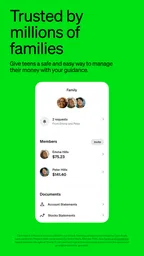
For readers who wonder whether they must use the investment side to benefit from the app, the answer is no in practical terms: you can judge it by the money tasks you actually want to perform. You do not need to explore every area just because it is present. Similarly, if you are unsure whether it is suitable for a younger family member, its Everyone content rating is a store classification, not a substitute for adult guidance around money, privacy, and financial decisions.
Another sensible question is whether the app can replace a bank or a specialist investment service. I would not assume that from its range alone. People have different account needs, and a payment-focused convenience does not necessarily replace the features or support they rely on elsewhere. Keep an existing service until you have checked that Cash App handles the specific responsibilities you need, and avoid moving everything at once simply because the app offers several kinds of financial activity.
The app is free to download, which makes it easy to try, but that should not be confused with every possible financial activity being cost-free. I would read the terms shown for a particular transaction or feature before proceeding. That is a general but important habit in any finance app, especially when the same interface includes both sending money and investment choices.
A measured verdict on inclusion and everyday use
My overall view is that Cash App can make common money tasks feel accessible when a user has a clear purpose, enough time to review the screen, and a device setup that works for them. Its broad reach and long presence make it familiar to many people, while the combination of payments, banking-related tools, and investing gives it more range than a simple transfer app. The same breadth, however, asks users to pay attention to what kind of action they are taking.
On inclusion, I would call it a practical option to try rather than a guaranteed fit for every ability or context. Test the specific route you need, use the accessibility settings available on your device, and make sure the confirmation steps are understandable before relying on it for an urgent transfer. If you find that navigating or reading the app takes too much effort, choose a service that better matches your needs instead of blaming yourself for the mismatch.
I would recommend Cash App to someone who wants a familiar way to handle everyday payments and appreciates having additional financial tools nearby, provided they are willing to review each action carefully. I would steer a person toward a simpler payment-only option if they want fewer choices, and toward a bank or specialist service if their main need is a more focused account or investing experience. Used deliberately, Cash App can be convenient; used hurriedly, its range can make an already important decision harder to follow.
What we like
- No monthly fee is required for a standard account.
- A customizable debit card is available to eligible users.
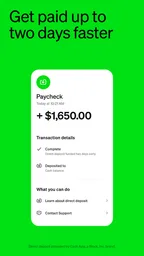
- Direct deposit can provide early access to some paychecks.
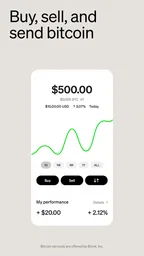
- Cash App supports stock and Bitcoin purchases in supported regions.
- Optional account security features include PIN and biometric locks.
What could be better
- Some transactions may incur fees depending on the payment method.
- Bitcoin and stock features are not available everywhere.
- Investing involves risk and does not guarantee returns.
- Customer support options may be limited compared with traditional banks.
- A Cash App balance is not a bank account in every respect.





