


PayPal - Pay, Send, Save review
 Analysis by Appsdrops
I would not keep a money app on my phone just because its first few transactions feel convenient. It has to keep earning its place through ordinary routines: paying someone back, receiving money, or checking where a payment went. PayPal is strongest when people around you already use it and you want one familiar place for those exchanges. It is less compelling if you only need a basic way to pay a single bill or prefer to keep all financial activity inside your bank’s own app.
Quick to try, most useful when a payment comes up
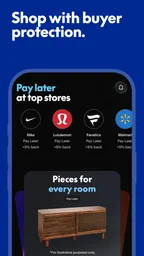
PayPal is a finance app from PayPal Mobile, and it is free to install. Its appeal is easy to understand during the first week: rather than treating every payment as a separate errand, you can use the app to send or receive money, shop, and access the pay-in-four option. I find that combination most useful when a payment is already part of the day, not as a reason to open the app without a purpose.
A realistic example is splitting the cost of a shared takeaway. If a friend has paid for everyone, a PayPal transfer can settle your share without needing to exchange cash. The practical advantage depends on the other person being comfortable using PayPal too; if they would rather use a bank transfer or another payment service, the extra setup can cancel out the convenience. Before sending, I would check the recipient and amount carefully, especially when choosing between contacts with similar names.
Shopping is another reason it may find a place in your routine. When a checkout offers PayPal, using an account you already maintain can feel simpler than entering payment details again. That does not mean it is always the better choice: if you prefer to keep purchases in one bank or card app, adding another account may create more to monitor rather than less. I would treat it as an additional payment route, not a replacement for every way I pay.
Decide whether its everyday jobs match yours
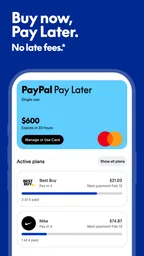
The app makes the most sense for someone who regularly sends money to people, receives payments, and encounters PayPal at checkout. It may also suit someone who wants to consider pay in four for an eligible purchase, while remembering that splitting a payment changes when money is due rather than making a purchase cheaper. I would only use that option when the repayment schedule fits my budget and I have checked the terms shown for the purchase.
If your financial life consists mainly of checking a balance and paying bills from one bank account, your bank’s app may already cover the essentials with fewer places to look. A dedicated transfer service may also be a better fit if your main need is a particular kind of payment that PayPal does not make easier for you. The useful question is not whether PayPal can handle several jobs, but whether you will actually use more than one of them.
The app has a 4.2 average from around 3.7 million ratings, with roughly 444,000 written reviews. Those figures suggest broad use and plenty of feedback, but they cannot tell me whether it suits a particular payment situation. I would judge it by whether the people I pay use it and whether its checkout option appears where I shop.
What keeps it useful after the first month
After the novelty fades, an app like this has to save effort repeatedly. PayPal’s recurring value comes from being available at the moment a person needs to settle up or a merchant offers it as a payment method. That is a modest but real kind of usefulness: it can remove a small obstacle from a familiar task. If neither circumstance happens often, the app may sit idle without improving your financial routine.
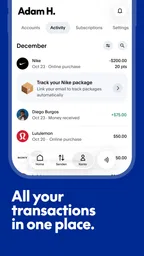
One helpful habit is to open the transaction details after a payment rather than relying on memory. When you send money, check that the recipient and amount match what you intended; when you receive it, make sure the transaction is the one you expected. Keeping the confirmation in the app can make it easier to distinguish a completed exchange from a plan to pay someone later. I would not treat a payment notification alone as a substitute for checking the transaction itself.
For shared expenses, I would settle each exchange close to the moment it happens instead of letting several informal promises accumulate. That makes it easier to remember what a transfer was for and reduces the chance of sending the same amount twice. PayPal is most useful here as a practical record of a payment, not as a budgeting system: you still need your own method for deciding what you can afford.
Pay in four deserves a separate check before it becomes a habit. The option can spread a purchase across payments, but it can also make several commitments feel smaller when viewed separately. I would write down or otherwise track the future amounts before agreeing, and avoid using it to justify buying something that would not fit my budget outright. If I want a simpler spending routine, paying in full through my usual method is often clearer.
Keeping the account tidy without making it a chore
The maintenance burden is not just the time spent opening an app. It is the attention needed to keep track of what you have sent, received, and agreed to pay later. I would check the activity after transactions and make a brief routine of reviewing any outstanding payment commitments. That small habit is more valuable than installing another finance app and then assuming it will manage decisions for me.
PayPal is available as a free app, but “free” does not make every transaction or payment choice automatically cost-free. Before completing a payment, read the amount and any terms displayed for that specific action. I would be especially careful when moving between a person-to-person transfer, an online checkout, and a pay-in-four purchase, since they are different kinds of transactions and should not be treated as interchangeable.
It is also worth deciding which app you want to regard as your main financial record. If you check your bank account for balances and use PayPal for occasional payments, that division can be perfectly workable. But switching back and forth without a clear routine can make it harder to understand your overall spending. I would use PayPal for the transaction it handles and keep my broader budget in the place I already review regularly.
The current version is 10.20.1, and the listed minimum operating system is 8.0. Those details matter most when an older phone is involved: check compatibility in the relevant app store before planning to rely on it. PayPal’s age rating is Everyone, but that rating is not a substitute for an adult deciding whether a financial account and its payment choices are appropriate for a young user.
Where convenience can turn into fatigue
The main source of fatigue is having another account to remember and another stream of transactions to review. If friends use different services, you may still need to ask which method they prefer. That conversation can be more inconvenient than a transfer itself, and it is a reason I would not assume PayPal is the universal answer for paying people back.
There is also a mental cost to having several ways to pay. A checkout option can make a purchase feel unusually easy, while a split-payment choice can make the total less immediate. I would pause long enough to compare the full amount with my budget and choose the payment method I can track most clearly. For a one-off purchase, my normal card or bank checkout may be the cleaner option.
PayPal is not a substitute for a bank’s broader money-management tools simply because it sits in the finance category. If your priority is monitoring accounts, organizing regular bills, or building a budget around your full financial picture, choose the service that actually supports those tasks in your routine. PayPal earns its space through payments and shopping, not by being the best home for every money decision.
Privacy and account security also deserve ordinary attention. I would use a strong, unique password, keep access to the account under my control, and review transaction details when something looks unfamiliar. Those are sensible practices for any app that handles payments; convenience should not mean approving a request without checking who it is for or what it will do.
Who should keep it, and who can skip it
With over 500 million installs, PayPal is clearly familiar to a very large audience, but popularity alone is not a reason to install it. I would recommend it to people whose friends or preferred merchants already accept it, especially if they regularly need to move between person-to-person payments and online shopping. The app is easier to justify when those uses recur rather than appearing once or twice a year.
I would skip it if your existing bank app handles your payments comfortably and you rarely encounter a reason to use PayPal. I would also think twice if you are trying to reduce the number of accounts you monitor or if pay-in-four options make it harder for you to keep spending in perspective. In those cases, the familiar alternative may be the more disciplined one, even if it takes an extra step at checkout.
Compared with a bank app, PayPal is more useful when the other person or merchant already works with PayPal; a bank app may be more natural for someone who wants routine money tasks in one place. Compared with a single-purpose transfer option, PayPal’s appeal is its combination of sending, receiving, shopping, and split payments. That breadth is a genuine convenience, but it is only an advantage if those functions fit your habits instead of encouraging you to maintain tools you seldom use.
A practical place in a lasting routine
My long-term verdict is that PayPal can earn a lasting spot, but it does not need to become the center of your financial life. I would keep it if it repeatedly helps me settle shared costs or pay at shops I use, and I would review the account when those transactions occur. If it stays unused, or if another method is clearer for the people I deal with, removing that extra step from my routine is reasonable.
The best way to decide is to notice what happens over the next few weeks: how often someone asks you to use PayPal, whether checkout is genuinely easier, and whether tracking its payments adds confusion. Keep the app if the answers show recurring value. If not, your bank app or another familiar payment method may serve you better. In my experience, the app is worthwhile when it solves a repeated, specific problem; convenience by itself is not enough.
What we like
- Supports quick payments at many online retailers.
- Lets users send money to friends and family.
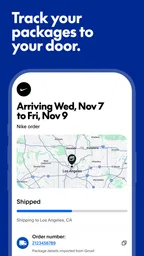
- Offers purchase tracking for eligible transactions.
- Can store multiple cards and bank accounts.
- Provides security alerts for account activity.
What could be better
- Some services charge fees depending on the transaction.
- Instant transfers may include an additional fee.
- Refund timing depends on the merchant and payment method.
- Account access can be limited during security checks.
- Some features are unavailable in certain countries.





