

Bank of America Mobile Banking review
 Analysis by Appsdrops
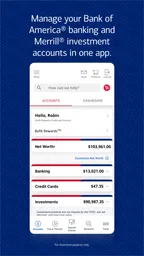
I find Bank of America Mobile Banking most useful when I need to handle my own money quickly while other people in the household are nearby or sharing a device. It can put everyday banking, budgeting, and investing tasks in one place, but it is still a personal financial tool, not a household account coordinator. That distinction matters: it can make my routine easier, yet it does not remove the need to agree on who is using the phone and which account they are accessing.
As a finance app from Bank of America, it makes the most sense for someone who already banks with the company and wants a mobile route to routine account tasks. I would not choose it simply because I want a general-purpose budgeting tool or a shared family finance dashboard. Its strongest fit is more direct: manage your own banking on your phone, with budgeting and investing also part of the app’s scope.
Using it around a shared household routine
A familiar situation is checking a balance while planning groceries, a bill payment, or a transfer between personal accounts. I can see the appeal of doing that on the phone already in my hand rather than switching to a desktop. In a busy household, that convenience can help me make a decision in the moment, such as checking whether a planned purchase fits the account balance before heading to the checkout.
The useful boundary is that “household” does not mean “shared access.” I would treat the app as belonging to the account holder, even if a partner or relative is helping with a household task. I would not assume that the app provides family profiles, a shared budget workspace, or a way to delegate particular actions. For a joint financial task, the people involved should understand which account is being viewed and who is responsible for approving or completing the transaction.
That makes the app practical for coordination by conversation rather than by an assumed family-control feature. For example, I might check an account, tell my partner what I found, and agree on a bill or purchase before acting. That is less seamless than a dedicated shared household planner, but it keeps the account holder’s role clear. If your main goal is to let several people independently manage one household budget, a purpose-built shared budgeting service may suit you better.
For a parent or caregiver using a phone that another person sometimes borrows, I would keep the banking session separate from casual device use. I would avoid handing over an unlocked phone with the app open, and I would finish the banking task before passing the device along. These are sensible habits for any financial app, not evidence of a special household mode.
Set up with clear account boundaries
The first question I would ask before installing it is whether I actually bank with Bank of America. The app is developed by Bank of America, and its central purpose is to support that relationship. If your accounts are elsewhere, it is unlikely to replace the tools from your own bank; a standalone budgeting app may be more relevant if you want to organize finances across providers.
Once installed, I would use my own credentials and keep them private, especially on a device used by more than one person. I would also make a habit of checking the account identity before taking an action. That small pause is valuable when switching between banking tasks, and even more so if I am managing money while distracted by household interruptions.
The app’s broad scope can be convenient, but it also makes it worth deciding what I want to use it for. If I mainly need to review banking activity, I can focus on that routine rather than treating the presence of budgeting and investing as a reason to move every financial decision into one app. A clear personal workflow helps avoid confusing a quick account check with a full review of spending or investment choices.
It is free to download, which makes trying it straightforward for an eligible Bank of America customer. The current version is 26.11.0, and it requires iOS or Android 11 or later. I would check the device’s operating system before planning to rely on it; an older phone that cannot meet the minimum may be a reason to use another access method instead.
Coordinate tasks without confusing access
For everyday coordination, I find it helpful to separate “who needs the information?” from “who should perform the transaction?” A household member may need to know whether money is available for a shared expense, while the account holder remains the person who checks the account and carries out any banking action. The app can support the latter person’s mobile routine, but it should not be mistaken for a substitute for a household agreement.
One practical workflow is to review the relevant account before discussing a bill, then communicate the amount and timing in ordinary conversation. If a purchase is shared, agree on how it will be handled before making a transfer or payment. That reduces the chance of one person assuming that another has already acted. It also avoids leaving the app open as a makeshift noticeboard for household finances.
There is a trade-off here. Keeping access personal may feel less convenient than a shared screen where everyone can see the same plan, but it is a cleaner way to protect account boundaries. If a family’s needs center on assigning chores, tracking shared spending, or giving multiple adults a common view, I would pair personal banking access with a separate coordination tool rather than expect this app to do both jobs.
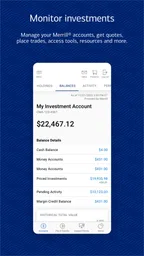
The budgeting and investing scope can still be useful to an individual who wants to consider more than a balance. I would approach those areas with a specific question in mind—such as understanding my own spending or reviewing an investment account—rather than assuming that a broad app automatically gives a complete household financial picture. People may have different accounts, priorities, and comfort levels; those differences are best discussed directly.
Age, trust, and the person holding the phone
The app has an Everyone content rating, but that should not be confused with a recommendation that children use an adult’s banking credentials. An age label describes the app’s content classification; it does not establish that a child should access an account or make financial decisions. I would keep account access with the account holder and explain household money decisions in an age-appropriate way without sharing login details.
Trust also means being deliberate about what is visible on a phone. A balance or account screen is private financial information, even if the device sits on a shared kitchen counter. I would close the banking session after use and avoid leaving sensitive details displayed when someone else is likely to pick up the device. That is a simple routine, but it matters more than a convenient setup if the phone changes hands often.
When another adult helps with a task, I would still keep the account holder in control rather than relying on informal credential sharing. If that arrangement does not work for your household, the better next step is to ask the bank about appropriate account access options, not to assume the mobile app contains permissions for family members. That distinction is especially important when several people need to see or manage the same finances.
For readers choosing between this and a general money app, trust comes down to what job they need done. This is a bank-specific app for people who want mobile access to Bank of America services. A cross-bank tracker may be more suitable for someone who wants to see accounts from several institutions together, while a shared budget app may be better for partners who need collaborative planning. Neither alternative necessarily replaces the convenience of using the bank’s own app for its customers.
What the public response suggests—and what it cannot decide for you
The app has an average rating of 4.6 from around 1.2 million ratings, with roughly 443,000 written reviews. It has also passed 50 million installs. Those figures suggest that many people have made it part of their mobile banking routine, but popularity is not proof that its setup or workflow will suit every person. I would weigh the app against my own bank relationship, phone, and household habits rather than treating a high rating as a personal guarantee.
Banking apps are judged on moments when people need clarity and confidence, not just on whether an icon opens quickly. My own standard would be whether I can complete the routine I actually need without losing track of the account or letting someone else use my session. If a task requires careful review, I would slow down and verify the details rather than rush simply because I am using a phone.
Compared with logging in through a bank’s browser experience, a dedicated app can be more convenient for regular mobile checks. Compared with a budgeting specialist, it is less appealing if the central need is collaborative planning across several banks. The right comparison is therefore not “which app has the most features?” but “which tool matches the financial relationship and the people who need to participate?”
My household verdict
I would recommend Bank of America Mobile Banking to a Bank of America customer who wants a phone-based way to handle personal banking and appreciates having budgeting and investing within the same app. It is particularly sensible for someone who already has a clear individual banking routine and wants to check or manage finances while away from a computer.
I would be more cautious if the main requirement is shared household management. The app should not be treated as a family dashboard, a way to hand account control to a relative, or a substitute for discussing who pays what. In that situation, use the bank app for the account holder’s tasks and choose a separate tool or conversation for shared planning. That division is a little less elegant, but it is more realistic and safer than expecting a personal banking app to solve household coordination.
Overall, its appeal is practical rather than magical: a mobile banking option from the bank itself, with a wide enough remit to cover more than a quick balance check. I like it best when one person is responsible for the account and the rest of the household coordinates around that person’s decisions. If you need a shared finance workspace first and a bank app second, I would look elsewhere for the planning layer while keeping the bank’s app for personal account access.
What we like
- Biometric sign-in offers quick access on supported devices.
- Card controls let you lock a misplaced debit card.
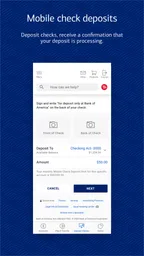
- Mobile check deposit saves a trip to a branch.
- Spending insights help track account activity.
- In-app support provides a convenient way to get help.
What could be better
- Some features require an eligible Bank of America account.
- Mobile check deposits may have limits and processing delays.
- Transfers to other banks may take several business days.
- Not all banking services are available in the app.
- App performance can vary with device and network conditions.





