

Trust: Crypto & Bitcoin Wallet review
 Analysis by Appsdrops
When I want to move crypto between a purchase, a swap, and a longer-term holding, the hard part is often keeping track of which app does what—and where I remain in control. Trust: Crypto & Bitcoin Wallet is built around bringing those activities into a self-custody wallet. I find that useful when I want one place to manage supported digital assets, but it also means I have to take responsibility for the choices and checks a custodial service might handle for me.
Starting with control, not convenience alone
This is a free finance app from DApps Platform, Inc., with an Everyone age rating. It has been available since October 25, 2017, and its current version is 26.45.8. Its scale is striking: more than 50 million installs, an average rating of 4.5 from around 2.6 million ratings, and about 22,000 written reviews. Those figures suggest broad use, but they do not tell me whether a particular network, token, or transaction will suit my needs. I still check the details before moving funds.
The defining choice is self-custody. Rather than treating the wallet as a bank account where a company manages access for me, I need to understand how I control and recover it. That distinction matters more than a polished screen or a quick swap button. If I am not prepared to protect recovery information and verify where a transfer is going, I would choose a simpler custodial service instead.
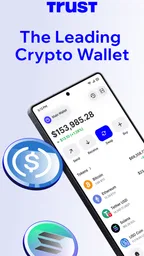
Trust’s multi-chain approach makes it a practical candidate for people whose assets are spread across different networks. I can use one wallet as a starting point for buying, selling, swapping, and earning, rather than immediately reaching for separate apps for every task. The trade-off is that “one place” does not mean every asset or route behaves identically. Network compatibility and transaction details still matter each time.
Set up before money moves
My first useful step is not buying crypto; it is understanding the wallet’s recovery process and deciding how I will keep that information safe. A self-custody wallet is only as convenient as my ability to access it again. I would not save recovery details casually in a notes app or send them in a message. I would also avoid setting up in a rush, especially while distracted or in a public place.
Before receiving anything, I would identify the exact asset and network I intend to use. A token name alone is not enough: similar assets can exist on different chains, and sending to an incompatible destination can turn a routine transfer into a costly mistake. I treat a small test transfer as sensible when the amount or destination is unfamiliar. That adds a step, but it is cheaper than assuming that every address or network choice is interchangeable.
For a first-time user, this is a meaningful difference from a conventional banking app. A bank transfer often has familiar account names and support processes; a blockchain transfer asks me to pay attention to addresses, networks, and transaction fees. Trust can organize wallet activity, but it cannot make those underlying distinctions disappear.
Following a practical purchase-to-hold flow
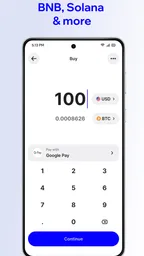
Imagine I want to set aside a modest amount of crypto after payday. I would begin by deciding what I am buying and why, then review the available purchase route in the app. The practical question is not only “Can I buy this?” but also “What asset and network will I receive, and what costs or conditions apply?” I would inspect the confirmation screen rather than treating the first displayed option as automatically best.
Once the asset arrives, I would confirm that it appears in the wallet before planning the next move. If I intend to hold it, I do not need to make a second transaction just because the app also offers swapping or earning. That restraint is part of using a multi-purpose wallet well: buttons create possibilities, not obligations. A quiet, deliberate holding workflow can be more suitable than constantly moving funds between features.
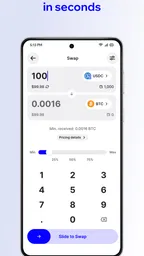
If I later want a different supported asset, I can consider a swap within the wallet instead of sending funds to an exchange and back. That can reduce app-hopping, but a swap is still a transaction with its own price, route, and network implications. I compare the amount I expect to receive and any displayed costs before confirming. For a large or unfamiliar swap, I would pause and check the asset details rather than rely on a convenient single-screen flow.
For everyday use, I might receive a small payment, verify the incoming asset, and keep it separate from money I need for rent or bills. Crypto prices can move, and self-custody does not make a volatile asset appropriate for short-term essentials. I use the wallet as a way to manage digital assets, not as a reason to blur the line between speculative funds and household cash.
Moving between services without losing the thread
The handoffs are where I pay closest attention. A purchase can begin in the wallet, while payment processing or asset availability may depend on the route shown at the time. A swap may involve a network transaction, and a transfer to another wallet means I must match the recipient address and chain. Each transition is a chance to check the asset name, network, destination, and final amount before I approve it.
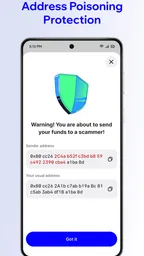
When sending to an exchange, I would first open the exchange’s deposit instructions and confirm that the selected network matches the one I am using in Trust. I would copy the address from the destination service, compare the beginning and end after pasting, and check whether a memo or other identifier is required. I would not assume an address saved from an earlier transfer is still right for a different asset. This careful routine is less slick than tapping a contact, but it is appropriate for irreversible transfers.
Fees deserve their own pause. The amount shown for an asset is not necessarily the amount I will receive after network costs or any service-specific charges. Network fees can also vary, so I avoid treating a past transaction as a reliable estimate for the next one. If the final confirmation looks different from what I expected, I would cancel and reconsider rather than approve it simply to finish the flow.
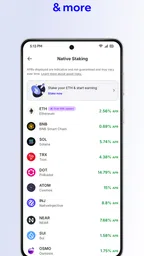
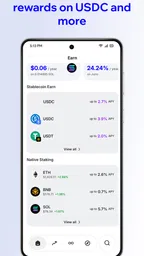
The earning side also calls for a handoff in my thinking: I am no longer merely holding an asset, but choosing to put it into an activity with different conditions and risks. I would read the terms presented for the specific asset before committing, and I would not assume that every asset has the same availability or withdrawal behavior. If I need immediate access to the full balance, keeping it uncommitted is the more straightforward choice.
What the workflow gives me—and what it costs
The result I value most is having several common crypto tasks available from a single self-custody starting point. For someone who already understands basic wallet habits, that can make moving between receiving, holding, and swapping feel more direct than maintaining a separate app for each step. Trust’s broad adoption is reassuring as a sign that it is not an obscure experiment, though popularity is not a substitute for checking each transaction myself.
Compared with a centralized exchange, a self-custody wallet puts more control in my hands but also more responsibility. An exchange can feel easier for buying and selling because it manages the account relationship and may present familiar balances. A wallet is the better fit when I specifically want to control access to my crypto and interact across supported chains. I would not choose between them based on slogans; I would choose based on whether I value managed convenience or direct custody more.
Compared with a single-chain wallet, the multi-chain focus can be useful if I regularly deal with assets on different networks. The cost is extra complexity: I must keep track of which chain an asset belongs to and which network a recipient accepts. If I only hold one asset and never plan to move it, a simpler wallet with a narrower scope may be easier to understand. More options are helpful only when I can use them accurately.
Trust is also a poor match for anyone who expects a wallet to reverse a mistaken transfer or recover access without preparation. Self-custody makes careful setup essential. I would steer a complete beginner toward learning with tiny amounts first, and I would tell someone managing money they cannot afford to lose to avoid treating crypto features as a substitute for a protected savings account.
Where the flow can break
The most serious friction is not an awkward screen; it is the gap between an easy-looking action and a technically consequential one. Choosing the wrong network, sending to the wrong address, or approving a transaction without checking its details can have consequences that ordinary app support may not be able to undo. I slow down at the final confirmation, especially when moving funds outside the wallet.
Another limitation is that a unified wallet cannot remove differences among networks, assets, and transaction routes. A purchase may be convenient while still requiring me to review its terms; a swap may save a handoff while presenting costs I should compare; an earning option may not suit funds I need to access quickly. I see these as reasons to make deliberate choices, not reasons to expect every feature to behave like a simple bank transfer.
I also would not use the app merely because it is free. The app itself costs nothing to install, but crypto activity can involve transaction or service costs, and market value can change. Before buying, swapping, or earning, I look at the specific confirmation details and consider whether the amount makes sense for my situation. Free access is not the same as cost-free activity or low risk.
Who I would recommend it to
I would recommend Trust: Crypto & Bitcoin Wallet to someone who wants self-custody and expects to handle more than one kind of crypto task, provided they are willing to learn the basics of networks, addresses, and recovery. Its 4.5 average rating and large community may make it easier to find general user discussion, but I would still verify instructions against the exact asset and route on screen. A high rating does not make a transaction safe by itself.
I would skip it if I wanted crypto to feel indistinguishable from a checking account, if I was unwilling to secure recovery information, or if I needed a service to manage every decision for me. I would also consider a conventional exchange for frequent trading if its account tools better match my needs, or a narrower wallet if I only need to hold one network’s assets. The right option depends on how much control I want and how much operational responsibility I am prepared to accept.
My practical recommendation is to begin by setting up carefully, then test the receiving and sending workflow with a small amount before relying on it for anything important. Keep purchase, swap, and earning decisions separate rather than treating them as one continuous prompt, and confirm the network at every handoff. Used that way, Trust can be a capable multi-chain wallet; used on autopilot, its convenience can hide exactly the details that matter most.
What we like
- Supports multiple blockchains from one wallet.
- Includes a built-in browser for decentralized apps.
- Lets users buy cryptocurrency with supported payment methods.
- Offers staking options for eligible cryptocurrencies.
- Provides tools to track token prices and portfolio value.
What could be better
- Some features vary by country and provider.
- Buying crypto may involve fees or minimum purchase limits.
- Users are responsible for safeguarding their recovery phrase.
- Not every token or blockchain is supported.
- Network fees can change and are outside the app's control.





