




Wedding Planner by WeddingWire review
 Analysis by Appsdrops
Planning a wedding can feel like trying to keep a dozen moving parts in the air at once. Wedding Planner by WeddingWire brings several of the most useful planning jobs together in one place, with venues, a checklist, a countdown, and budget tools. I find that combination appealing because it gives couples a straightforward place to begin organizing the big decisions without turning the process into a complicated project-management exercise.
A practical home for wedding planning
The app is focused on events, but its purpose is refreshingly specific: helping couples prepare for a wedding. Rather than being a general calendar or note-taking tool, it centers the experience on common planning needs. The idea is simple: keep track of what needs doing, consider where to celebrate, watch the date approach, and stay aware of spending.
That focus makes Wedding Planner by WeddingWire easy to understand before you even start. A wedding involves decisions that arrive at different times, and a dedicated planner can make them feel more manageable. I like that the app’s core tools speak to both the early stages, when you may be looking for a venue, and the ongoing work of keeping tasks and money organized.
It is free to download, has an Everyone content rating, and has been available since June 18, 2012. The current version is 8.30.2, and the app requires Android 9 or later. Its reach is substantial, with more than a million installs, while its 4.7 average comes from around 9,500 ratings. Those figures suggest that plenty of couples have found the app worth trying, though a rating alone cannot tell you whether its approach will suit your particular planning style.
What the main tools bring together
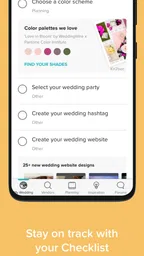
The wedding checklist is the feature that gives the app its strongest sense of structure. Wedding preparation can become a blur of calls, choices, and follow-ups, so having tasks collected in a dedicated place can help you see what still needs attention. I see the checklist as especially useful for couples who want a clear starting point rather than building a planning system from scratch.
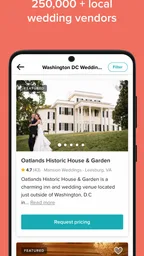
Venue discovery adds another important piece. The location affects the feel of the day and can influence many other choices, so it makes sense to put venues among the app’s central planning tools. The app also includes a countdown, a small but satisfying way to keep the wedding date in view. It can provide a reminder of the occasion ahead without requiring you to dig through a calendar.
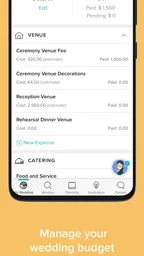
Budgeting rounds out the main set of tools. Wedding expenses can add up across many separate decisions, and a budget feature gives couples a place to keep financial planning in the same broader workflow as tasks and venue research. I would treat it as a planning aid: its value comes from helping you stay mindful of spending, while the accuracy and usefulness of any budget depend on the figures you choose to track.
How it fits into the current planning routine
In practical terms, the app makes the most sense as a companion you return to throughout the planning process. You might begin by looking at venues, use the checklist to organize the next steps, and keep the countdown and budget in mind as plans take shape. That combination can reduce the feeling that every detail is scattered across unrelated tools.
There is also a useful balance between concrete planning and motivation. A checklist is about action; a budget is about limits and priorities; venue browsing is about exploring possibilities; and the countdown keeps the event itself front and center. Together, they address different moods and stages of wedding planning rather than repeating the same function in several forms.
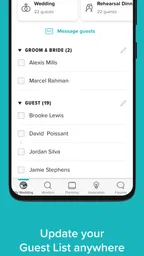
Still, a dedicated wedding app is most helpful when it matches how a couple already likes to work. Some people prefer to plan collaboratively, while others want one person to manage the details and share updates outside the app. The features described here make a solid planning foundation, but the best results will come from using the app consistently and agreeing on how both partners will keep plans current.
A long-running app, with a current version to consider
The product has a long history: it first appeared in 2012, and its current release is version 8.30.2. That span tells me the app has remained an active product over many years, while the version number identifies the release available now. It is reasonable to view that continued presence as a sign that the planner has evolved over time, but the version number by itself does not reveal which individual tools changed or when they were introduced.
For someone opening the app today, the practical question is less about its age and more about whether its current core matches the job at hand. The known focus remains clear: wedding venues, a checklist, a countdown, and budget planning. Those functions are easy to understand and cover several high-priority needs, which gives new users a sensible route into the planning process without requiring them to learn a complicated system first.
For existing users, a newer version can matter because an app that stays available may continue to fit into an ongoing wedding plan. But I would not assume that a particular update changes the way a checklist works or introduces a new planning feature just from the release number. The useful approach is to judge the current app by the tools it offers and by whether those tools support the routine you have already built.
What changes mean for couples already using it
If you have already started organizing your wedding with the app, its central set of tools can continue to serve as a shared mental map of the work ahead. A checklist helps keep tasks visible, a budget gives spending a dedicated place, and venue research supports a major early decision. The countdown can add a simple sense of momentum as the date gets closer.
For new users, the same set of tools offers a clear way to begin. Instead of opening with a blank page and deciding how to structure everything, you can start from the familiar categories of tasks, venues, timing, and money. That can be reassuring when wedding planning feels new or when you are not sure which decision deserves attention first.
The app’s value will naturally change over time. Early on, venues and broad budget planning may matter most; later, the checklist may become the tool you rely on more often. That shifting usefulness is a good fit for a process that unfolds in stages. I would not expect every feature to be equally relevant every week, and that is perfectly normal for a wedding planner.
Where expectations should stay grounded
The app presents a focused planning toolkit, not a guarantee that wedding organization will become effortless. A checklist can make tasks easier to see, but couples still have to decide what matters and follow through. A budget can help frame spending, but it cannot make financial choices for you. Venue discovery can support research, while the final decision still depends on your preferences and circumstances.
It is also worth keeping your own planning habits in mind. If you already have a system that works, adopting another app may create duplication unless you decide which tool is the main reference point. If you are starting from scratch, by contrast, the combination of checklist, venues, countdown, and budget may feel more cohesive than juggling separate notes and reminders.
I would also avoid judging a wedding planner only by how many features it appears to have. The important question is whether its core tools help you keep decisions visible and make steady progress. The app’s clear scope is a strength, but a focused scope means it should be evaluated on the planning tasks it actually covers, rather than on assumptions about functions beyond that scope.
What to keep an eye on as you plan
As the app continues through future releases, I would watch for changes that make the main planning flow clearer and easier to maintain. Improvements to the way couples move between venue research, tasks, the countdown, and budgeting would be especially relevant because those are the app’s defining areas. That is an expectation about what would be useful, not a claim that any particular change is already on the way.
For now, the best way to assess it is to try the features that matter most to your own wedding. Start with a few checklist items, see whether the venue tools fit your search, and decide whether keeping budget planning alongside the rest of your tasks feels convenient. A planning app should reduce mental clutter, not become another obligation competing for your attention.
My overall take
Wedding Planner by WeddingWire is a straightforward option for couples who want wedding venues, a checklist, a countdown, and budget planning gathered under one roof. Its clear purpose is its biggest advantage: you can quickly see how it relates to the work of preparing for a wedding. I also appreciate that the tools cover both practical organization and the excitement of watching the date approach.
It is not a substitute for making decisions together, checking details, or adapting plans when circumstances change. Instead, it offers a useful framework for keeping some of the main moving parts in view. With a 4.7 average and more than a million installs, it has attracted a sizeable audience, but your own experience will depend on whether its focused toolkit fits the way you and your partner like to plan.
If you want a free wedding planning app with a clear starting point, this one is worth considering. I would use it as a central organizer for tasks and budgeting while treating venue research as one part of the larger decision-making process. The strongest reason to give it a try is its practical mix of essential planning tools; the strongest reason to stay thoughtful is that a tool only helps when it fits your routine and you keep it up to date.
What we like
- Connects couples with a large directory of wedding vendors.
- Includes budget tools to help track wedding expenses.
- Offers customizable checklists for planning tasks.
- Lets users save ideas and inspiration in one place.
- Provides vendor reviews to support informed decisions.
What could be better
- Vendor availability and pricing can change after listings are viewed.
- Some vendors may not serve every location or wedding style.
- Planning features may feel overwhelming for smaller events.
- Saved plans and details may require an account to sync.
- The app may send notifications that need adjusting in settings.





