
Web Video Cast | Browser to TV review
 Analysis by Appsdrops
When I want to watch a video on a television instead of crowding around my phone, the main challenge is getting the content from its original source onto the bigger screen without turning the process into a project. Web Video Cast | Browser to TV is built around that handoff: it lets you cast movies, TV shows, and live streams to compatible devices, including Chromecast, Roku, DLNA devices, and Fire TV. I find its appeal easy to understand. Rather than treating the phone as the final viewing destination, it makes the phone a starting point for a more comfortable, shared watch.
From a phone screen to the living room
The app sits in the video players and editors category, but its everyday role is less about editing and more about moving online video to a television. That distinction matters if you are choosing an app for a specific job. I would look at it when I already have something I want to watch on my phone and want to send it to a TV device, not when I need a full video-editing suite or a replacement for every streaming service.
The basic workflow is straightforward in concept: open the app, find the video you want to watch, choose a supported receiver, and let the television take over as the viewing screen. The phone is useful at the beginning because it is already where the content and browsing happen; the TV is where the longer viewing session makes more sense. The useful idea is the handoff, not another library of shows.
That focus also makes the app easier to judge. Its purpose is to connect a source of video with a screen that is better suited to watching it. When that connection works smoothly, the phone becomes a controller and discovery tool rather than a tiny display that everyone has to share.
Getting from discovery to playback
I would begin by thinking about the source: a movie, a TV episode, or a live stream I have come across while using my phone. Web Video Cast is intended to help cast those kinds of video to supported television devices. The important first step is choosing the content I actually want, since the app’s value depends on having a playable video to send onward.
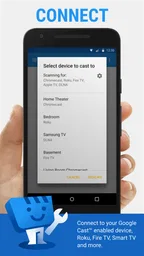
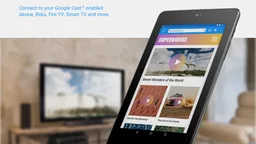
Next comes the receiver. The app supports several familiar casting routes, including Chromecast, Roku, DLNA, and Fire TV. That range gives it a practical role in homes where the television setup is not limited to one kind of device. Instead of assuming every viewer uses the same hardware, the app is aimed at a broader mix of TV-connected options.
Once I have selected a receiver, the experience becomes a question of whether the content and the destination cooperate. A good casting session should feel like a continuation of what I was already doing: identify a video, send it to the television, and settle in to watch. The less I need to interrupt that sequence to troubleshoot, the more useful the app feels.
This is where expectations should stay grounded. The app provides a route for casting; it does not make every video source or every home setup identical. Different receivers and video sources can behave differently, so the most satisfying experience is likely to come when the chosen content works well with the device I am sending it to.
The handoff between devices
The most important moment is not opening the app; it is the transition from phone to television. That is where a casting tool either earns its place or adds friction. When the handoff succeeds, I can stop holding the phone close to my face and let the larger screen handle the viewing. It is a small change in routine, but it makes a noticeable difference when watching with other people or settling in for a longer video.
Web Video Cast’s compatibility with Chromecast, Roku, DLNA, and Fire TV is central to that promise. For a household with one of those receiver types, the app can serve as a bridge from mobile browsing to TV playback. I especially like the flexibility of having multiple device families named as destinations, because it gives the app a broader use case than a tool tied to just one casting ecosystem.
Still, the bridge only helps when both ends of the journey are ready. The content needs to be suitable for casting, and the receiver needs to be the one I intend to use. If either side is unclear, the flow can stop feeling effortless. That is not unique to this app; it is part of the nature of sending online video between different devices and services.
For the smoothest routine, I would treat the phone as the place to choose and initiate playback, then give the TV the attention once the video is there. That keeps the process focused. It also avoids expecting the app to replace the TV’s own viewing experience or to supply content of its own.
What the finished experience feels like
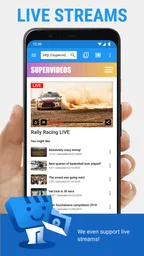
The payoff is simple: video that began on a phone can be watched on a television instead. For movies and TV shows, the larger screen makes the viewing session feel more like a proper sit-down activity. Live streams benefit from the same change in scale, especially when several people want to watch at once. The app’s central job is to make that shift possible without making the viewer rethink the whole setup.
That makes it useful in ordinary situations rather than only for a special technical project. I can imagine using it when I find a video while browsing, when I want to share a clip with people in the room, or when I would rather watch a stream from the sofa. The practical advantage is not complicated: content found on a mobile device has a path to a television screen.
There is also a sense of convenience in having one casting app aimed at several receiver types. If my home setup includes a compatible device, I do not need to think of the phone as the only place where mobile video can be enjoyed. That said, the app’s usefulness will naturally vary according to the devices and sources I use. A casting tool can simplify a working setup, but it cannot remove every compatibility wrinkle.
Web Video Cast is free to install, and it offers in-app purchases ranging from $1.49 to $6.99 per item. It has been available since March 7, 2014, and its current version is 6.1.0. Those details suggest an established app rather than a brand-new experiment, while the free entry point makes it possible to try the core idea before deciding whether any optional purchase is worthwhile.
Where the flow can lose momentum
The weak point in any cast-to-TV routine is the dependency on several pieces working together. A video source, the app, and the selected receiver all have to cooperate for the handoff to feel seamless. If playback does not move over as expected, the convenience can quickly turn into trial and error. I would not judge the whole idea by one difficult source, but I would keep in mind that casting is not always as simple as tapping once and forgetting about the setup.
Another possible frustration is expecting the app to behave like a universal streaming catalog. It is not presented as a library of films and shows; its purpose is to cast video to supported devices. That distinction helps set realistic expectations. The app can make the transition from phone to TV easier, but it does not change what content is available or guarantee that every online video will behave the same way.
Device choice can matter, too. The app names a range of destinations, but a household may have a particular receiver with its own quirks. I would start by selecting the device I actually plan to watch on and then see how the intended video behaves. That is a more reliable way to assess the experience than assuming all casting targets will offer an identical path.
There is a practical trade-off in using a phone to begin a TV session: the phone is convenient for finding content, but the quality of the overall experience depends on the transition away from it. If that changeover is smooth, the app feels like a natural extension of browsing. If it is not, the phone can remain an extra step rather than a helpful controller. The app’s strongest moments are therefore the ones where the content and receiver line up cleanly.
Who is likely to get the most from it?
I would recommend considering this app if you often discover videos on a phone and want to watch them on a television with Chromecast, Roku, DLNA, or Fire TV. It is also a sensible option for people who share a screen with family or friends and want an easier way to move from individual browsing to group viewing. The key benefit is not a complicated feature list; it is a more useful destination for video already found on mobile.
It may be less compelling if I rarely cast video, prefer watching everything directly through TV apps, or expect one tool to solve every compatibility issue. In those cases, the app’s role could be too occasional to become part of my routine. But if phone-to-TV viewing comes up regularly, the straightforward purpose is a point in its favor.
The app has a 4.6 average from around 2.4 million ratings, with about 27,000 written reviews and over 50 million installs. Those figures show that it has reached a large audience, though the right question for an individual viewer is still whether its casting workflow matches the devices and content they actually use.
A practical casting companion
My overall impression is that Web Video Cast | Browser to TV is best understood as a practical bridge. It starts with video on a phone and aims to end with playback on a larger screen, supporting Chromecast, Roku, DLNA, Fire TV, and more. When the chosen source and receiver cooperate, the result is a convenient way to turn mobile discovery into a TV viewing session.
The experience is strongest when I keep its purpose in mind: it helps cast movies, TV shows, and live streams, rather than supplying a catalog or guaranteeing that every source will behave identically. Some setup friction can come with moving video across devices, but the central idea remains useful. For viewers who want a simple path from phone to television, it is a worthwhile app to try, with an Everyone content rating and a free starting point.
What we like
- Supports Chromecast as well as Roku and many smart TV brands.
- Can cast videos from web pages without mirroring the whole screen.
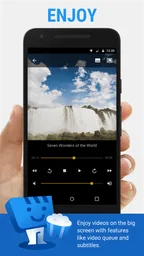
- Includes subtitle support for compatible video sources.
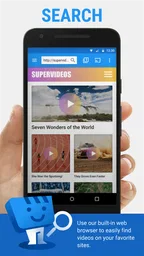
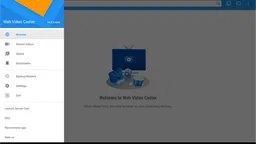
- Offers a built-in browser for finding and playing online videos.
- Lets you queue videos for playback on the connected device.
What could be better
- Some streaming sites block casting or require a compatible player.
- The receiver device and phone must be on the same Wi-Fi network.
- Casting may stop if the video source changes or expires.
- Some features require an in-app purchase.
- The interface can take time to learn for first-time users.





