






Washington Post: Live News review
 Analysis by Appsdrops
I judge a news app less by how many headlines it can put on a screen than by whether it helps me understand what matters without turning a quick check into an hour of scrolling. Washington Post: Live News is the Washington Post’s mobile news app, built around reporting on current events, politics, and other subjects covered by the publication. Its main appeal is having that newsroom’s journalism close at hand; whether it makes sense for you depends on how often you want to read it and whether you are comfortable with the distinction between free access and paid content.
What the free download does—and what paid access means
The app is free to download, and its in-app purchases range from $3.99 to $189.99 per item. That range is broad, so I would not treat the word “free” as a promise that every article or feature is available without payment. It is more useful to think of the download as a way to explore the app and its available reporting, then check the purchase options shown in the app store or in the app before committing.
The figures describe different things: the app has a 4.4 average rating from around 91,000 ratings, while it has more than 1 million installs. Those numbers suggest an established audience, but they cannot tell you whether the available access suits your reading habits. The practical question is whether you regularly want journalism from this particular publication, rather than whether the app has a large audience.
The developer is The Washington Post, and the app sits in the news and magazines category. It is rated Everyone 10+, which is worth keeping in mind if you are choosing news access for a younger reader. The publication’s name is familiar, but I would still check the purchase terms carefully: the listed range alone does not explain what each item includes or how long access lasts.
Where the app earns its place in a news routine
For me, the strongest reason to try Washington Post: Live News is the chance to follow a developing story through one publication’s reporting rather than stitching together fragments from search results and social feeds. That can be useful when a headline is changing quickly: I can return to the same outlet’s coverage, see how its reporting develops, and decide whether I want to spend time on a fuller article instead of relying on a short post.
A realistic use is a morning commute or a short break between tasks. I might check the day’s news, open one story that affects my work or community, and leave the rest for later. The app makes most sense when I use it as a doorway into selected reporting, not as a demand to read every alert or headline. If I already follow many outlets, choosing a few stories deliberately helps prevent the news habit from becoming an endless feed.
Politics is an especially natural use case given the publication behind the app. Readers who want sustained coverage of political developments may value a source they already know and can revisit. The same applies to major events where context matters more than a single breaking update. A brief headline can tell me that something happened; a reporter’s fuller account can help me understand what led to it and what is still uncertain.
One useful workflow is to separate urgent checks from deeper reading. I would use a quick visit to learn whether a major story has moved, then save my attention for a small number of articles when I have time to read carefully. That approach is more practical than treating a news app as a complete substitute for every source or every subject. It also makes it easier to notice when I need a different perspective or specialist reporting elsewhere.
How it compares with a general news feed
Compared with a broad news aggregator, this app is more closely tied to the Washington Post’s own editorial voice and reporting. An aggregator can be better when I want to compare headlines from several publishers in one place; this app is a more direct choice when I want to read this publication’s work. That distinction matters. A single newsroom can provide continuity and depth, while a multi-source feed can make it easier to spot how different outlets frame the same event.
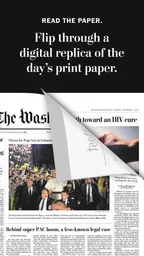
Compared with checking the publication through a mobile browser, an app can make a regular reading routine feel more direct, because it keeps that source in a dedicated place on the phone. But installing an app is not automatically better for occasional readers. If I only want one article now and then, a browser may be enough, and I can avoid adding another app to a crowded home screen. The right choice depends less on the format than on whether I return to this reporting often.
I also would not use a single publication as my only lens on a complicated issue. Reporting from one newsroom can be valuable, but comparing coverage with other reliable sources is sensible when a story is contentious, technically complex, or still developing. The app’s greatest strength—its focus on one publisher—is also a reason to supplement it when breadth is the priority.
Small decisions that make news reading more useful
First, I would be selective about what I open. Headlines are useful for orientation, but reading a few complete reports is usually more valuable than skimming a large number of snippets. When a story is important, I look for the reporting that explains background and consequences, not only the latest update. That habit helps me use the app for understanding rather than just checking whether something new has happened.
Second, I would treat a breaking-news check as provisional. Early accounts of a fast-moving event can change as more information becomes available. Returning to the same story later can be more useful than drawing a firm conclusion from its first appearance. This is a general reading practice, but it fits a publication-focused app particularly well: continuity helps me follow a story, while checking other sources can keep that continuity from becoming tunnel vision.
Third, I would decide on a reading budget before opening the app. A quick look during a busy day can easily expand into several stories, especially when headlines touch on multiple interests. Choosing one topic to follow and one article to read in depth gives the app a clearer job. For someone paying for access, this is also a practical way to judge personal value: notice whether the reporting is part of a real routine before spending on an option.
There is a tradeoff between convenience and attention. A dedicated news app can make it easier to stay informed, but frequent checking can make the day feel dominated by updates. I would avoid opening it reflexively whenever I have a spare minute. Setting a couple of intentional reading moments is a better fit for readers who want context without feeling that they must track every development in real time.
Who is likely to get value, and who may not
I would recommend trying it to readers who already seek out the Washington Post’s reporting, particularly those who follow politics and major national or international stories. It may also suit someone who wants one familiar publication as part of a wider news mix. The app is most compelling when its journalism is something you will return to, rather than an occasional curiosity prompted by a headline.
It is less likely to be the right choice for someone whose main goal is to compare many publishers at once. A news aggregator better serves that need. It may also be a poor fit if you rarely read long-form reporting, want a source focused on a narrow local subject, or do not want to consider in-app purchases. In those situations, a different publication, a general feed, or simply using a browser for occasional reading may suit you better.
If you are choosing for a family, the Everyone 10+ age rating is a useful starting point, not a substitute for deciding what news content is appropriate for the reader. News can include difficult topics, and the rating does not tell you how often particular subjects appear. I would look at the app together with the young person and establish how they should handle upsetting or confusing stories.
Readers who are unsure about paying should begin by exploring what is available at no cost and reviewing the exact purchase terms before selecting anything. The price range covers markedly different amounts, and the range by itself is not enough to compare value. I would base a decision on the access described for a specific item and on whether I expect to use the journalism regularly—not on the assumption that every paid option is necessary.
My verdict: a focused choice, not a universal newsstand
Washington Post: Live News is worth considering if you want a direct mobile route to reporting from The Washington Post and expect to read it often. Its appeal is focus: one publication’s journalism can give a developing story continuity and offer more context than a quick headline scan. That same focus means it is not the strongest standalone choice for anyone who wants a broad comparison of outlets or specialist coverage in every subject.
Because the download is free but in-app purchases range from $3.99 to $189.99 per item, I would separate trying the app from deciding to pay. Explore the reading experience first, then verify what a specific purchase provides before choosing it. The app has a 4.4 average and around 24,000 written reviews, but popularity cannot settle the personal question of whether its coverage earns a place in your day.
My recommendation is straightforward: try it if the Washington Post is a source you already value, and use it with deliberate reading habits and other outlets when you need a wider view. Skip it if you mainly want a multi-publisher feed, rarely read in-depth news, or are not interested in evaluating paid access. For the right reader, it can be a useful home for focused reporting; for everyone else, the free download is not by itself a reason to make it a regular habit.
What we like
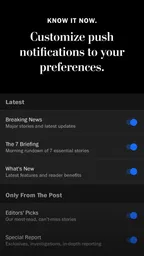
- The app offers customizable alerts for major breaking stories.
- Saved articles make it easy to return to stories later.
- Audio options provide a hands-free way to follow coverage.
- A clean layout keeps headlines and story sections easy to browse.
- Local coverage helps readers follow news from the Washington area.
What could be better
- Many articles require a paid subscription to read in full.
- Frequent alerts may feel distracting unless carefully customized.
- Some stories can take time to load on slower connections.
- The app may use significant storage as cached content grows.
- Personalization options may take time to configure.





