




VPN - Super Unlimited Proxy review
 Analysis by Appsdrops
I reach for VPN - Super Unlimited Proxy when public Wi-Fi turns a simple task into a small security worry: checking a message at a café, opening an account while waiting at an airport, or handling a quick work errand away from home. The appeal is practical. A VPN can add a layer of protection to a network connection, and this app is built to make that step feel less like a technical project. In my view, its best case is the person who wants an easy tool for occasional everyday use, not someone looking to tune every detail of a VPN connection.
A quicker answer to public Wi-Fi worries
The recurring problem is not that every café or hotel network is automatically dangerous; it is that a shared connection is outside your control. You may not know who else is using it or how it is managed. A VPN routes your traffic through an encrypted connection, which can make casual browsing on an unfamiliar network less exposed. It does not make you anonymous, protect you from every scam, or replace careful account and device habits. That distinction matters more than any broad promise of safety.
What I like about this app’s positioning is its focus on getting connected without asking the user to become a network specialist. VPN - Super Unlimited Proxy is a free Tools app from VPN Super Inc, and its straightforward purpose is apparent from the name. The service is intended for quick access to a VPN connection, with unlimited data promoted as part of the experience. For someone who has previously avoided VPNs because setup sounded fiddly, that simplicity can save time and remove hesitation.
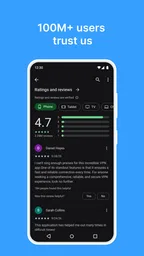
It is popular with a large audience: it has a 4.7 average from around 2.4 million ratings and over 100 million installs. That scale is useful context when deciding whether it is an established mainstream option, but popularity is not a substitute for checking whether a VPN meets your own privacy and performance needs. I would treat the rating as evidence that many people find it convenient, not as proof that every connection will suit every task.
Getting to a useful first connection
The first test I would make is a small one: install the app, open it before signing into anything sensitive on public Wi-Fi, and follow its connection flow. Then check that the VPN indicator on your device appears before opening a banking app, email account, or work service. This order is an easy habit to build, and it avoids the common mistake of assuming a VPN is active just because the app is open.
A VPN may ask the operating system to approve a VPN configuration before it can route traffic. That is a normal part of using this kind of tool, rather than a sign that the app has quietly taken over the whole phone. Read the system prompt, make sure you understand what you are approving, and disconnect when you no longer need the protected connection if you prefer to keep your network setup simple.
The app is free to download, with in-app purchases listed from $6.99 to $79.99 per item. I would check the current purchase screen carefully before choosing anything: those amounts are a broad range, not a promise about which option will appear for your account or how long it lasts. If your needs are occasional, begin with the free experience and decide based on how often you actually use it rather than paying pre-emptively.
Its current version is 2.36.0, and it supports devices running Android 8.0 or later. The content rating is Everyone. Those details help with basic compatibility and suitability, but they do not tell you how quickly a particular server will respond on your connection. My practical advice is to test the app in the place where you expect to use it: a VPN that feels fine on home Wi-Fi may behave differently on a crowded public network or a weak mobile signal.
Where it fits into an ordinary day
Picture a short stop between errands. You connect to a café’s Wi-Fi to check a travel confirmation and reply to a personal message. The useful workflow is simple: connect the VPN first, do the task, then disconnect if you do not want the VPN involved in the rest of your browsing. That small routine is more valuable than treating a VPN as a magic shield. It helps you make a deliberate choice about when your traffic goes through the service.
A second good use is travel, especially when you are moving between guest networks in hotels, stations, or shared accommodation. Rather than deciding from scratch each time whether to take the risk, you can make a consistent habit of turning on the VPN before using a network you do not manage. The trade-off is that VPN traffic can sometimes feel slower or less responsive, particularly when the underlying Wi-Fi is already poor. For a quick message that may be acceptable; for a large upload or a video call, I would compare the connection with and without it and choose based on what works.
The unlimited-data angle can be helpful if you dislike watching a small VPN allowance while doing ordinary browsing. Still, unlimited data does not mean unlimited speed, uninterrupted access, or a guaranteed route to every site. A VPN adds another step between your device and the destination, so latency and server load can affect the experience. If a page stalls, I would first check whether the original Wi-Fi is working, then try reconnecting or switching networks rather than repeatedly refreshing and assuming the app has failed.
The app also promotes private Wi-Fi hotspot access. That may be relevant when you are trying to use a hotspot connection, but I would not assume that the VPN automatically protects every device connected to your phone or changes how the hotspot itself is configured. Keep the distinction clear: the VPN app is for the connection on the device where it is running unless the device’s own hotspot and VPN behavior explicitly supports sharing that protection.
Less setup, with a few trade-offs
Compared with manually configuring a VPN, a consumer app like this can remove much of the setup work. You do not need to hunt for server details or enter connection settings by hand just to try a basic protected session. That is a meaningful advantage for casual users. The flip side is less room for people who want to choose every technical parameter, inspect a detailed configuration, or manage a self-hosted VPN. If those controls are central to your use, a more configurable service may be a better fit.
Another useful habit is to avoid treating the VPN as a reason to click links you would otherwise distrust. It cannot make a fraudulent sign-in page legitimate, and it does not stop someone from persuading you to reveal a password. I would still use unique passwords, enable account protections where available, and check the address and identity of a service before entering credentials. The VPN’s role is narrower: it can help protect the network path, not make your decisions safe for you.
Streaming and location-sensitive services are another area where expectations should stay realistic. A VPN can change the apparent route of a connection, but that does not guarantee a particular catalog, app, or service will behave as expected. Some platforms may restrict VPN traffic, and the added routing can make playback less smooth. If your main reason for installing a VPN is reliable access to a specific streaming library or a work system with strict rules, check that service’s requirements and test it before relying on this app for an important session.
When troubleshooting, I would use a short sequence instead of changing several things at once: confirm the phone has internet without the VPN, reconnect the VPN, and retry the task. If only one site fails, the issue may be that service rather than the whole connection. If everything becomes sluggish, switch back to the ordinary network for non-sensitive work or move to a stronger Wi-Fi signal. This simple comparison helps separate a VPN slowdown from a weak connection and avoids wasting time chasing the wrong cause.
Who I would recommend it to
I would suggest trying it if you want a low-effort VPN for occasional public Wi-Fi use and you value a simple starting point more than deep configuration. The combination of a free entry point and an unlimited-data pitch makes it approachable for people who want to see whether a VPN fits their routine before committing to a purchase. Its broad adoption and strong average rating also make it a familiar option, though I would still judge it by how it performs on your own phone and networks.
I would look elsewhere if your work depends on a VPN with specific company settings, if you need to audit technical details closely, or if a particular streaming or regional-access requirement is your main goal. In those cases, an employer-provided VPN, a service with the exact controls you need, or a direct connection may be more appropriate. A VPN can also be unnecessary for tasks on a trusted home network where you already understand the risks and do not need the extra routing step.
Overall, I see VPN - Super Unlimited Proxy as a convenience tool whose value is measured in reduced friction: it can make the decision to protect a public-network session easier and quicker. It is not a complete privacy plan, and the extra connection can bring occasional speed or compatibility trade-offs. If you approach it with those limits in mind, test it before relying on it, and use it for the situations it is suited to, it is a reasonable app to try. I would keep it for straightforward browsing away from home, while choosing a more specialized option when control, policy, or predictable service access matters more than convenience.
What we like
- Connects with one tap for quick access to a protected connection.
- No account is required to start using the service.
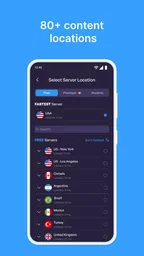
- Offers multiple server locations to choose from.
- Works with common public Wi-Fi networks.
- The free version provides a way to try the core VPN service.
What could be better
- The free version may show frequent advertisements.
- Connection speeds can vary between servers.
- The service may not reliably unblock streaming platforms.
- Some server locations may be unavailable at busy times.
- The privacy policy is worth checking before sharing sensitive traffic.





