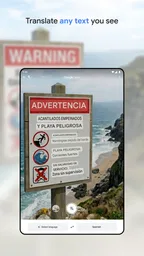
Google Translate review
 Analysis by Appsdrops
When I need to understand a menu, check the meaning of a message, or find a phrase before speaking, I want a translation tool that gets me moving without turning the task into a project. Google Translate is the one I reach for most often. It is a free translation app from Google LLC, and its broad language coverage makes it useful for quick, practical exchanges as well as for looking up unfamiliar text. My recommendation comes with a caveat: I treat its results as a helpful starting point, not as a guarantee of perfect wording.
What matters when choosing a translation app
The right choice depends less on a headline promise than on what you need translated. For a short sign, a common phrase, or the general meaning of a message, speed and convenience matter most. For a contract, medical instructions, a delicate apology, or anything where tone and precision carry real consequences, a machine translation should not be your final authority. Google Translate is strongest in the first group: it helps me bridge everyday gaps quickly, while leaving room to check important details.
It belongs to the tools category, but in practice it feels like a pocket reference I can consult in the middle of another task. The app’s reach is a major part of the appeal: it works across more than 100 languages, and the Play Store shows an average rating of 4.3 from around 9 million ratings. That scale makes it an easy first app to try, though popularity alone cannot tell you whether a particular sentence is accurate.
I find it most useful when I start with a clear goal. If I want to know what a restaurant dish generally contains, I need the gist. If I am trying to write a thoughtful note to someone, I need to inspect the wording and decide whether it sounds natural. Those are different jobs, and treating them as the same is one of the quickest ways to overtrust a translation.
Where Google Translate earns its place
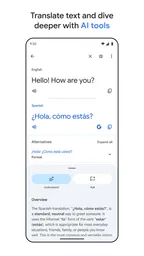
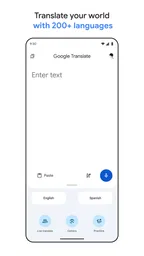
The main strength is the short route from uncertainty to an understandable answer. I can enter text and get a translation without first choosing a specialist workflow or learning a complicated interface. That simplicity matters when I am standing in a shop, comparing labels, or trying to follow a brief conversation. Its familiar, general-purpose approach also makes it a sensible first stop when I do not yet know which language tool would suit a task.
One practical habit I recommend is translating a whole sentence rather than isolated words whenever the surrounding meaning is available. A single word can have several senses, while a sentence gives the app more context. I also read the result back against the original and look for anything that seems oddly specific or too formal. This small check often tells me when I should rephrase my input or seek a human explanation.
For travel, a realistic use is dealing with a menu in a language I cannot read. I can translate a dish name or a short description, then ask the staff about ingredients if an allergy or dietary restriction is involved. The app can help me start the conversation, but I would not rely on an automated result alone for a safety-critical dietary decision. In that situation, showing the original text and asking a person to confirm it is the more responsible workflow.
Another useful approach is to keep my own source text plain. Slang, jokes, abbreviations, and references that depend on local knowledge are hard for any general translator to carry over cleanly. If the first result feels strange, I rewrite the sentence with a direct subject and a simple verb, then compare the new output. That is often more productive than repeatedly translating the same tangled phrase and hoping the wording will become clearer.
Google Translate is also a practical aid for reading messages from people who use another language. For a routine note, a rough translation can reveal the point quickly. When the message concerns an agreement, a complaint, or an emotionally sensitive subject, I slow down and avoid treating the translated tone as definitive. A blunt-sounding result may reflect a translation choice rather than the sender’s intent, so asking a clarifying question can be better than responding to an uncertain nuance.
Its broad adoption is easy to understand: it has more than 1 billion installs, and the app is rated for Everyone. Those figures tell me it is widely used and broadly accessible, not that every language pair or specialized subject will behave equally well. I would judge it by the actual task in front of me and check any important sentence rather than assuming that a popular tool is automatically dependable in every context.
Where another kind of tool may be better
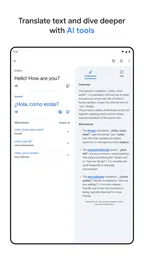
The usual alternatives fall into a few broad groups: bilingual dictionaries, specialist translation services, and help from a fluent speaker. A dictionary is often better when I need to understand one word’s possible meanings, usage, or grammatical role. Google Translate is more convenient when I need a whole sentence quickly, but a sentence-level result can hide why a word was chosen or which sense the source intended.
A specialist human translator is the better choice for polished, publication-ready writing or documents where a small wording mistake could have serious consequences. That does not make a general app useless; it makes its role different. I use it to understand a draft, prepare a question, or get an initial sense of a document. I would not treat that initial sense as a substitute for professional review when accuracy, legal meaning, or carefully controlled tone is essential.
A fluent friend or colleague can be more helpful than an app when local phrasing, humor, politeness, or cultural context matters. Even a grammatically plausible translation may sound unnatural in a particular situation. If I am trying to make a good impression in a personal message, I use an automated translation as a draft and ask a knowledgeable person to check the tone if the relationship or occasion is important.
There are also moments when the best alternative is to simplify the source rather than switch apps. Long, convoluted sentences are difficult to translate faithfully because the relationships between ideas can be unclear. Breaking one into two direct sentences gives the tool a cleaner job and makes it easier for me to spot a mismatch. This is especially useful for instructions: translate one action at a time and verify that the result still describes the action I intended.
I would skip a general translation app as my sole solution if I needed certified wording, a nuanced literary translation, or a dependable interpretation in a high-stakes conversation. I would also avoid judging someone’s competence or attitude from an awkward translated sentence. Those are situations where the limits of machine translation matter more than the convenience of instant access.
How to use it without overtrusting it
My most reliable workflow is simple: start with a complete, plain-language sentence; inspect the translation; then compare key names, quantities, dates, and negations with the original. Those small details can reverse the meaning of a message. If a result appears surprising, I try a clearer version of the source instead of assuming the first output is right. For anything consequential, I confirm the meaning with a person who understands the language.
I also separate “understand this” from “write this for me.” The first is a reasonable everyday use: I need enough meaning to decide what to do next. The second carries a higher bar, because I may be sending the words to another person and the tone matters. When I draft a message in English and translate it, I keep it short and direct, then review the output for unintended formality or a meaning that has drifted.
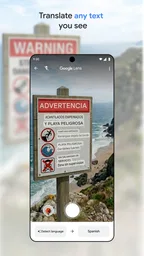
For reading a sign or label, I focus on the parts that affect my decision rather than assuming I have understood every nuance. If a label contains warnings or instructions, I treat the translation as a clue and seek confirmation if acting on it could put me at risk. The app is most useful when it helps me ask a better question, not when it encourages me to stop checking.
Because Google Translate is free, trying it does not require a financial commitment. The more meaningful cost is attention: I still need to decide when a quick answer is enough and when to verify it. Its scale and familiarity reduce the friction of getting started, but they do not remove the need for judgment. That distinction is worth keeping in mind before relying on any automatic translation.
Switching tools is easy; changing the workflow takes judgment
If you already use a bilingual dictionary or a preferred translation service, there is little reason to discard it just because this app is widely known. I would add Google Translate when I want a quick general-purpose option, then keep a dictionary or human source for situations that call for explanation or careful phrasing. The tools can complement each other: one gives a fast first impression, another helps resolve uncertainty.
There is no complicated commitment in trying a free app, but switching your habit entirely can create a different risk: you may start treating one convenient result as the final word. I prefer to choose the method based on the consequence of getting it wrong. For a casual sign, an instant translation may be enough. For a message that could affect a relationship, money, health, or legal obligations, I make room for a second opinion.
Google LLC’s app has an average rating of 4.3 and around 187,000 written reviews in the Play Store. I read that as a sign of a well-established tool with many users, not as a promise that it will handle every phrase as a fluent speaker would. If you are deciding whether to install it, the key question is whether you need quick access to broad language help or a specialist solution for a narrower, higher-stakes job.
My recommendation
Google Translate is worth keeping close for everyday understanding if you travel, encounter unfamiliar text, or need a fast way to begin a conversation across languages. I value its broad coverage and the fact that I can reach for it without making translation a separate, elaborate task. For ordinary phrases and general comprehension, it is an approachable first choice.
I would pair it with a dictionary, a fluent speaker, or a professional translator when word choice, cultural nuance, or consequences demand more care. I would not recommend relying on it alone for a legally binding document, a medical decision, or a message whose emotional tone must be exact. That is not a reason to dismiss the app; it is a reason to use it in the role it handles best.
Overall, I recommend installing it as a practical everyday tool, while keeping a habit of checking important results. Its value is not that it makes language effortless in every situation. It is that it can turn a confusing first encounter into a useful next step—and knowing when to take that step yourself is what makes the app genuinely helpful.
What we like
- Camera mode translates printed text in real time.
- Offline downloads support translation without an internet connection.
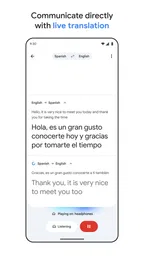
- Conversation mode helps two people communicate across languages.
- Handwriting input covers languages that are difficult to type.
- Phrasebook saves useful translations for quick reference.
What could be better
- Offline translation may be less accurate than online results.
- Some features require an internet connection.
- Camera translation can struggle with poor lighting.
- Spoken translations may not sound natural in every language.
- Privacy-conscious users may prefer not to send text to Google.





