



All Video Downloader & Player review
 Analysis by Appsdrops
I approach All Video Downloader & Player as a practical tool for handling video, not as a full entertainment service. Its appeal is straightforward: it brings video playback and downloading together, so I can use one app to watch a file and keep a copy for later when that is appropriate. In my experience, that kind of convenience matters most when I already know what I want to watch and would rather avoid juggling several apps.
A simple routine for watching and keeping videos
The app’s basic role is easy to understand. It is a free tools app from QR Code Scanner, and its focus is local video playback alongside downloading. The store summary highlights support for different formats and smooth playback, including 4K; I would treat that as a useful capability rather than a promise that every file will play perfectly on every phone. Device performance, the file itself, and available storage all affect the result.
My preferred baseline workflow is to decide first whether I need a download at all. If I am just watching a video once, streaming or opening it in the player is simpler. If I expect to revisit it somewhere with unreliable connectivity, saving it can make sense. That small decision keeps a downloads folder from becoming a pile of clips I no longer need.
For a realistic everyday example, imagine finding a useful cooking demonstration while planning dinner. I can watch it when I have a connection, then keep a copy for the kitchen if the download source and the creator’s terms allow it. Later, I can open the saved video directly rather than searching for it again or relying on the network. For tutorials, exercise routines, or travel clips, the same habit is useful—provided I have permission to save the material.
The strongest reason to choose this app is the convenience of keeping playback and downloads in one place. A separate video player may be a better fit if all I need is a polished library for files I already own. A browser’s built-in playback may be enough for occasional viewing. This app is most appealing when I regularly move between finding a video, saving it, and watching it again.
What to check before making downloads a habit
Before saving anything, I check that I am using a legitimate source and that downloading is allowed. A downloader is a tool, not permission to copy someone else’s work. I also look at how much free storage I have and whether I truly need the file offline. Keeping only the videos I expect to use is a more dependable routine than downloading everything that catches my eye.
Video quality is another practical trade-off. A high-resolution copy can look excellent on a large screen, but it can also take up more space and may be unnecessary for a quick reference clip viewed on a phone. When a choice of quality is available, I would match it to the purpose: prioritize clarity for demonstrations with small details, and avoid oversized files for casual viewing. The app’s emphasis on 4K playback does not mean every download needs to be 4K.
I would also test a newly saved file before depending on it. Open it while connected, confirm that playback works, and make sure it is the video you intended to keep. This catches a failed or incomplete download before a long trip or an offline work session. It is a modest check, but it is more useful than discovering a problem when there is no connection available.
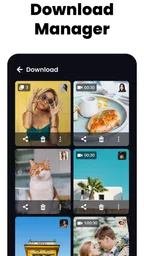
Because the app handles both downloading and playback, I would keep my own organization habits simple and consistent. Give saved videos recognizable names when the app or device allows it, and remove temporary clips after they have served their purpose. If the player exposes a file list, a quick review of that list can help distinguish useful references from accidental duplicates. I would not assume that a combined app automatically creates a well-organized media library.
Settings and habits that make it easier to use
I would start by checking the app’s available playback and download settings rather than accepting every default without thought. The useful choices depend on the phone and the way I use it: whether quality should favor space or detail, where saved files are kept, and whether playback controls suit one-handed use. These are sensible areas to inspect, not claims that a particular control or option is present in every version.
It is worth paying attention to storage behavior over time. Downloads can quietly consume space, especially when high-resolution files are involved. I make a habit of reviewing what I have saved after a project, journey, or series of tutorials ends. That is more effective than waiting for a low-storage warning and then trying to decide which clips matter under pressure.
For repeat use, I would create a small routine around the app: save only from sources that permit it, test the file, watch it, and clear it when it is no longer useful. This reduces the most common friction with download tools—the growing mix of forgotten files and uncertain copies. If I use videos for a recurring task, keeping a short, deliberate set of references is easier than building a large archive without a plan.
When playback appears choppy, I would troubleshoot in a measured order. First, try the same file again and see whether the issue follows that particular video. Then consider whether the file’s resolution or encoding is demanding for the device, and close other heavy tasks if the phone seems strained. If a lighter copy is available from a legitimate source, that may be the more practical choice. A player cannot remove every limitation imposed by hardware or a damaged file.
The same practical approach applies to sound and screen use. For a video where spoken instructions matter, I check the volume and audio before relying on it offline. For content with fine visual detail, I make sure the display is bright enough and choose a suitable quality if that option exists. These small checks are not glamorous, but they turn a download from a hopeful experiment into something I can actually use.
Where it fits among familiar alternatives
Compared with using a browser alone, a combined downloader and player can save a step when I want to return to a video. Compared with a dedicated media player, its download role is the distinguishing convenience, while a specialist player may offer a more focused experience for people with large personal collections. And compared with a streaming service, it is not a substitute for subscription libraries or a universal offline mode: the source and its rules still determine what can be saved.
That distinction is important for expectations. A downloader is most useful when I have a clear, permitted source and a specific reason to keep a copy. It is less useful when I mainly want recommendations, synchronized viewing history, or a curated catalogue. In those cases, the original platform or a dedicated media service is usually the better destination. I would use this app as a practical companion, not expect it to replace every video app on my phone.
There is also a difference between “supports many formats” and “will handle every file flawlessly.” A file can be unusually encoded, incomplete, or too demanding for a particular device. If one video fails, that does not automatically mean the whole app is poor; but if reliable playback of unusual files is central to my work, I would test representative files before making it my only player. A specialist player may be a safer choice for a demanding archive.
Who is likely to get the most from it
I can see this being useful for people who often revisit instructional videos, save permitted clips for weak-connectivity situations, or want a straightforward place to play files after downloading them. It is also a reasonable option for someone who prefers a focused utility over a broad media library, as long as the app’s actual controls and behavior fit their device.
I would skip it if I rarely download videos, if I need advanced library management, or if I want an app to organize and sync a large collection automatically. People who rely on a particular platform’s official offline viewing should use that platform’s own feature where available. And anyone saving other people’s content should check the relevant permissions instead of treating technical access as authorization.
The app has an average rating of 4.5 from around two million ratings, and it has passed over 100 million installs. Those figures suggest broad use, though they do not tell me whether it will suit a particular phone or workflow. It is rated for Everyone, and the current version is 1.9.9, with Android 7.0 as the minimum operating-system requirement. It was released on January 29, 2022; I would still check compatibility on the device I plan to use.
A practical verdict for experienced users
All Video Downloader & Player works best when I give it a defined job: save a permitted video I will genuinely need, check that it plays, and remove it when it has served its purpose. That routine makes its combined downloader-and-player approach feel useful rather than cluttered. The app is free, so it is easy to try, but I would judge it by how reliably it handles my own common files and sources rather than by broad claims about format support.
In my view, the experienced approach is not to hunt for hidden tricks. It is to use available settings deliberately, keep downloads under control, and have a fallback for files that do not play smoothly. If those habits match the way you use video, this is a sensible tool to try. If you want a rich streaming catalogue or a specialist player for a carefully managed archive, another option will serve you better.
What we like
- Downloads videos from multiple supported websites.
- Built-in player lets you watch saved videos in the app.
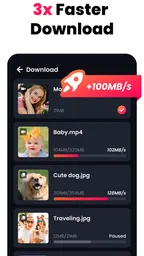
- Download progress is easy to monitor.
- Files can be organized for convenient offline access.
- Simple controls make the main features easy to find.
What could be better
- Some websites may block downloads or change their access rules.
- The app may show ads during use.
- Download speed depends on your connection and source site.
- Large video files can use substantial storage space.
- Not every video format or resolution may be available.





